





Most businesses pick one tool, and they stick with it. Either they choose HubSpot or MailChimp. But that’s the wrong choice. Businesses mistakenly think HubSpot and MailChimp are rivals, but that’s not true. They are actually quite complementary when you stop thinking about them that way.
HubSpot is where your customer relationships live. From contact management to marketing automation, HubSpot features cover the entire customer lifecycle in one place. Mailchimp is where your email marketing happens. Connecting the two means that your emails finally have the CRM intelligence behind them that they’ve been missing. That's what HubSpot Mailchimp integration is really about.
What Is HubSpot Mailchimp Integration?
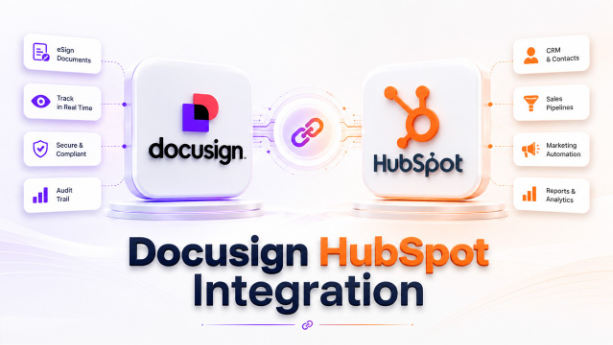
HubSpot manages your contacts and CRM while Mailchimp handles your email marketing. Independently, they both are solid tools. Together, they're significantly more useful. The HubSpot vs Mailchimp debate often misses the point. They serve different purposes and integrating them gets the best of both.
The HubSpot Mailchimp integration connects the two, so your contact data and email activity stop living in separate places. Contacts from HubSpot forms and pop-ups push automatically into your Mailchimp lists. Email opens, clicks, sends, and bounces from Mailchimp show up directly inside HubSpot contact records. Your CRM and your email marketing finally talk to each other.
One thing is worth noting that the native integration sync contacts one way, from HubSpot to MailChimp. For a two-way sync, you'll need HubSpot's Data Sync, which allows contact data and email communications to flow in both directions.
Why HubSpot Mailchimp Integration Matters for Your Business
Let's understand this with an example: Your CRM is full of contacts that are well-segmented and carefully tagged. But your email tool has no idea that it exists. So, you export lists, import them manually, and hope that nothing falls through the cracks. It’s tedious and it breaks down fast. That's the core problem this integration solves.
When HubSpot and Mailchimp are connected, your contact data stays consistent without any manual effort. When a lead comes in through HubSpot forms, it gets pushed to the Mailchimp lists automatically. Your team can now view email opens, clicks, and bounces right inside HubSpot contact records. This allows your marketing automation to actually react to what people are doing with your emails.
This is especially useful for small businesses because they don’t need large teams to run sophisticated email marketing. For growing companies, it means less friction between sales and marketing. Everyone can work from the same data. This is just one example of how HubSpot integrations help businesses connect their tools without rebuilding their entire workflow.
How to Integrate HubSpot with Mailchimp: Step-by-Step Setup Guide
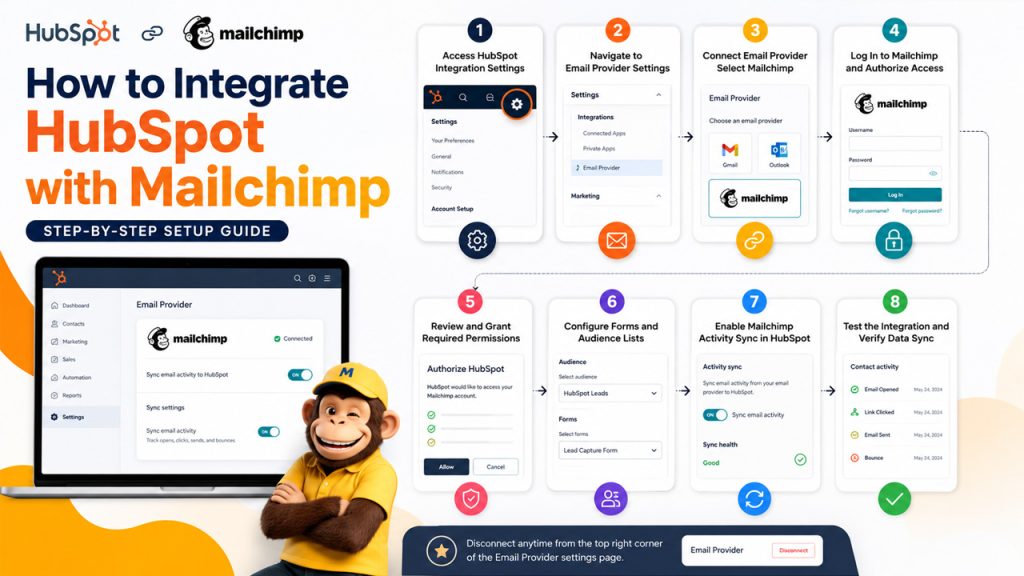
The setup isn’t complicated, but it does require the right permissions. You'll need super admin access in HubSpot to get started.
- Access HubSpot Integration Settings: Open your HubSpot account, click on the setting icon in the main navigation bar.
- Navigate to Email Provider Settings: From the left-hand menu, go to integrations, then select Email Provider.
- Connect Email Provider: Click “Connect Email Provider” and select Mailchimp from the options.
- Log In to Mailchimp and Authorize Access: You'll be redirected to Mailchimp's login screen. Enter your credentials and sign in.
- Review and Grant Required Permissions: Review the permissions required and click "Allow" to authorize the connection.
- Configure Forms and Audience Lists: Go to your pop-up or non-HubSpot forms and set up which Mailchimp lists new contacts should be pushed to.
- Enable Mailchimp Activity Sync in HubSpot: In the Email Provider settings, toggle on Mailchimp email activities so opens, clicks, sends, and bounces appear on HubSpot contact records.
- Test the Integration and Verify Data Sync: Submit a test form entry and confirm it shows up in the correct Mailchimp list.
If at any point, you want to disconnect, there’s a “Disconnect" option in the top right corner of the Email Provider settings page.
Key Features of HubSpot Mailchimp Integration
The HubSpot Mailchimp integration comes with several features designed to keep your contact data, email marketing, and automation workflows connected.
Automatic Contact Sync Between HubSpot and Mailchimp: Contacts that are captured through HubSpot forms and pop-ups are pushed right into Mailchimp lists automatically. This eliminates any manual exports or outdated lists that are sitting around. It keeps both platforms updated without anyone having to lift a finger.
Two-Way Contact Sync with HubSpot Data Sync: The native integration is one-directional, but HubSpot's Data Sync feature unlocks two-way contact syncing. This means you make changes in one platform; it reflects on both systems which keeps your data consistent across the board.
Mailchimp Email Activity Tracking in HubSpot: Your sales team can see exactly how a contact engages with your emails without having to switch platforms. Every opens, clicks, sends, and bounces from Mailchimp campaigns show up directly on HubSpot contact records.
Form-to-Mailchimp List Integration: You can map both pop-ups and non-HubSpot forms specific to Mailchimp lists. Whenever someone submits the form, they get added to the right list automatically, based on the rules that you set up once.
Workflow Automation Based on Email Engagement: Email actions from Mailchimp, like an open or a link click, can trigger automated workflows inside HubSpot. It's what turns passive email engagement into active follow-up without any manual intervention.
Sync Error Monitoring and Troubleshooting: When something breaks or a contact fails to sync, HubSpot flags it inside the integration settings. You no longer have to guess why a contact didn't show up where it was supposed to.
Key Benefits of HubSpot Mailchimp Integration
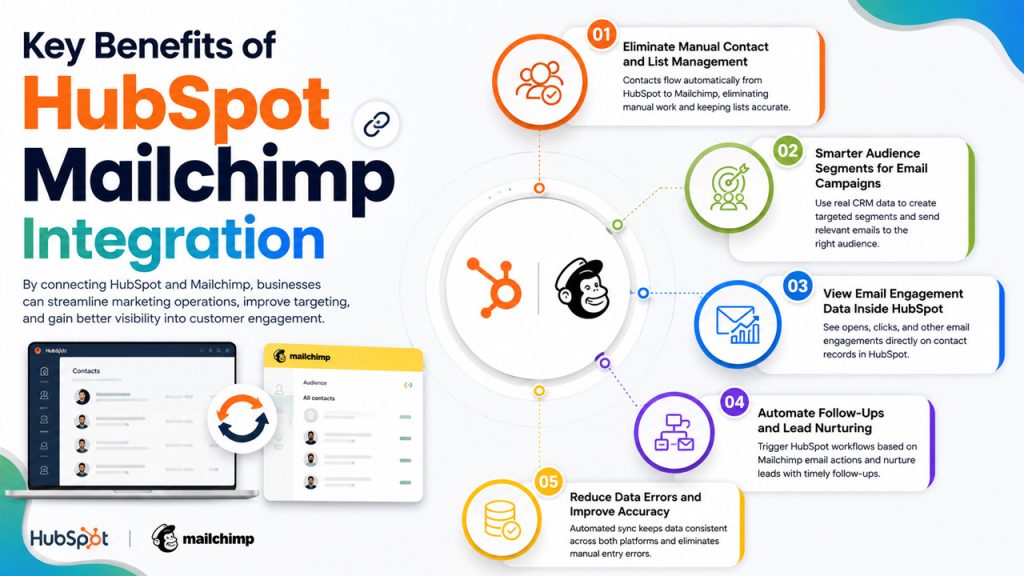
By connecting HubSpot and Mailchimp, businesses can streamline marketing operations, improve targeting, and gain better visibility into customer engagement.
Eliminate Manual Contact and List Management: Whenever a contact comes in, it flows from HubSpot into Mailchimp automatically. It eliminates the repetitive export-import cycle that wastes time and errors. Nobody has to maintain the lists manually; they stay accurate on their own.
Smarter Audience Segments for Email Campaigns: Because your email campaigns are backed by real CRM data, your targeting actually reflects what you know about each contact. You're not just creating a list blindly; you're reaching the right people with relevant messaging.
View Email Engagement Data Inside HubSpot: You no longer have to log into Mailchimp separately just to check whether someone opened the last campaign or not. Now, your sales reps can see a contact email engagement history directly inside HubSpot.
Automate Follow-Ups and Lead Nurturing: Mailchimp email actions can trigger HubSpot workflows automatically, so leads get timely follow-ups based on how they're actually engaging. No contact goes cold because someone forgot to check.
Reduce Data Errors and Improve Accuracy: When the sync is automated, it removes the human error that comes when you move data manually between two platforms. Data stays consistent in both HubSpot and Mailchimp.
Common HubSpot MailChimp Integration Challenges
While integration offers significant advantages, there are a few limitations and challenges you should understand before implementing it.
Native Integration Supports One-Way Sync Only: The native integration only pushes contacts from HubSpot to Mailchimp, not the other way around. If your team updates contacts inside Mailchimp, those changes won't reflect in HubSpot unless you set up Data Sync separately. It's a gap that catches teams off guard if they're not prepared for it. It's also worth checking HubSpot pricing tiers before setting up Data Sync, as two-way sync is only available on paid plans.
Existing Contacts Do Not Sync Retroactively: HubSpot won't go back and add existing contacts to a Mailchimp list. Only new form submissions made after the integration is set up will sync through. If you're expecting historical contacts to transfer automatically, they won't.
Limited Contact Field Mapping Capabilities: HubSpot only sends three fields to Mailchimp by default: first name, last name, and email address. If your Mailchimp lists have required merge tags beyond those, the sync will fail. You'd need to either remove those required fields or route contacts to a different list.
A/B Testing and Customer Journey Data Limitations: Activity from Mailchimp's A/B test campaigns and customer journey features won't appear in HubSpot. For teams that rely on those features regularly, it's a real blind spot in the reporting.
Best Practices for HubSpot Mailchimp Integration
Getting the integration running is one thing. Getting it to actually work well for your business is another. Here are a few good habits that make a big difference.
Clean Contact Data Before Syncing: Don't connect the two platforms with a messy HubSpot database. Duplicate contacts, missing email addresses, and outdated records will carry over into Mailchimp and create problems that are harder to fix after the fact. A quick cleanup before setup saves a lot of headaches later.
Map HubSpot Forms to Mailchimp Lists Strategically: Think about which HubSpot forms should push to which Mailchimp lists before you start configuring. Sending every contact to a single list might feel simpler, but it defeats the purpose of segmentation. Set it up thoughtfully from the start.
Enable Two-Way Data Sync When Needed: If anyone on your team updates contacts inside Mailchimp directly, the native one-way sync won't work. Set up HubSpot's Data Sync early, so changes made in either platform don't quietly get lost. If your business also uses an ERP, exploring HubSpot NetSuite integration alongside this setup can centralize even more of your data in one place.
Use Email Activity Tracking to Improve Sales Outreach: A lot of teams enable Mailchimp activity tracking in HubSpot and then never look at it. Build it into your sales process. When a rep can see that a contact opened three emails last week, that's a warm conversation that is waiting to happen.
Monitor Sync Errors Regularly: HubSpot flags sync issues inside the integration settings, but they won't fix themselves. Remember to keep checking periodically, especially after making changes to your Mailchimp lists or form configurations.
Final Thoughts
HubSpot and Mailchimp are meant for different jobs but that’s not their weakness. Actually, that’s what makes them work well together. HubSpot knows your contacts while Mailchimp knows how to reach them. The HubSpot Mailchimp integration connects these two strengths in a way that makes both tools more powerful and useful.
It’s not a perfect setup because of one-way sync limitations and restricted field mapping. But this integration works well for most small to mid-sized businesses. However, if you need more flexibility, HubSpot’s Data Sync fills the gaps.
The bottom line is this: if you're already using both platforms, connecting them is a straightforward decision. The only real question is how far you want to take it.
Note: If it doesn’t fit your needs at all, there are several HubSpot alternatives worth exploring that come with native email marketing built in.
Frequently Asked Questions : HubSpot Mailchimp Integration
The basic integration is available on HubSpot's free plan, but two-way Data Sync may require a paid tier.
By default, no. It syncs one way from HubSpot to Mailchimp. Two-way sync requires HubSpot's Data Sync feature.
Only the first name, last name, and email address are sent by default.
Email activities like opens, clicks, and bounces sync every 15 minutes once the feature is enabled.
Yes, simply click the "Disconnect" option in the Email Provider section of your HubSpot settings.