






Imagine two applications doing the same exact task. However, one is smooth and intuitive, and the other is so complex that it feels like a maze with no exit. The difference actually is not the logo, or the color palette, or even the price. The actual differentiator is the user experience, and rather than seeing it, they feel it when they use an app.
Often, a good user experience goes unnoticed. For example, if you have an e-commerce website, people will visit, get what they expect, and move on without paying too much attention to other things. However, on the other hand, a bad user experience makes itself visible clearly. You can also measure it in terms of metrics such as rage clicks, one-star reviews, and abandoned carts.
Being familiar with user experience basics is not only a nice-to-have skill for designers to have in their CV. It is a key survival skill for anyone marketing, building, or running a digital product in 2026. In this guide, let us break down what do we mean by UX, why it is important more than ever, and how you can get it right.
What Is User Experience (UX)? Understanding the Basics
User Experience is commonly called UX. It refers to the overall experience a person has when interacting with a product or service, particularly a digital one. It encompasses how a user feels before, during, and after that interaction.
The term was popularized by cognitive scientist Don Norman in the 1990s, but the idea is older and more human than any framework. At its core, UX asks one essential question: Does this work for the person using it?
UX is not just about aesthetics or ease of use in isolation. It's about the full journey; from the moment someone discovers your product, to how they navigate it, to whether they feel satisfied when they're done. It's shaped by psychology, behavior, design, content, and technology all working together. A well-designed UX builds trust. A poorly designed one breaks it quietly, and often permanently.
The Five Elements of User Experience Basics Explained
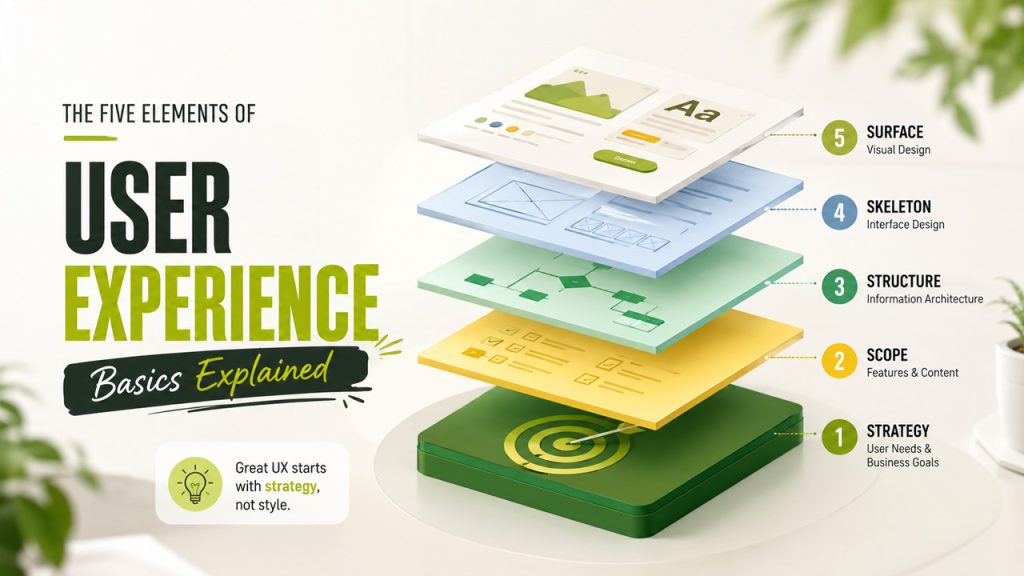
Jesse James Garrett, in his landmark work “The Elements of User Experience”, outlined five layers that form the foundation of any UX design effort. You can think of them as floors in a building where each one must be solid before you start building next.
- Strategy: This is the ground floor. It deals with users' needs and business goals. UX starts with purpose, not pixels.
- Scope: Once strategy is clear, scope defines what features and content the product will include. It translates goals into the requirements.
- Structure: This layer is the architecture of the experience. It manages how interactions are designed and how information is organized in a systematic way.
- Skeleton: This layer visualizes the structure through interface design, navigation, and layout. It acts like a blueprint before the design goes live.
- Surface: This constitutes the topmost layer. This is what users see when they interact with your product or service. It includes color, imagery, topography, and visual style.
Many products fail because they start at the surface and work backward. Great UX always starts with strategy.
UX vs UI: Key Differences in User Experience Basics
People often get confused between UX and UI and use them interchangeably. This mistake highlights a fundamental misunderstanding of both. Here's a clear breakdown of the two:
| Dimension | UX (User Experience) | UI (User Interface) |
| Focus | The overall journey & feeling | The visual & interactive elements |
| Concern | Does it work for the user? | Does it look and feel right? |
| Involves | Research, strategy, testing, flow | Typography, colors, icon, layout |
| Output | Wireframes, user flows, prototypes | Visuals designs, style guides |
| Analogy | The architecture of a building | The interior design & decor |
There can be products with beautiful UI but poor UX. You must have come across an app that is visually stunning but difficult to navigate. Similarly, a product can have functional UX but outdated and poorly designed UI, such as legacy tools that people still use despite looking like they were built in 2005. The best digital products are those that get both right. But when you are forced to use one, prioritize UX. Users might overlook imperfect visuals, but they won’t forgive a confusing experience.
Core UX Design Principles for Better User Experience
Great UX goes beyond just instincts. It is guided by a set of principles refined by decades of research, testing, and real-world feedback. With these practical guidelines, you can evaluate and improve any interface.
User-Centric Design: Every decision should be made keeping the user’s perspective in mind. Designer’s preference or stakeholder’s assumption is secondary.
Consistency: Once users interact with a product or service, they expect the same pattern throughout the product. Consistent patterns, language, and behavior build confidence, habits and reduce cognitive load.
Visual Hierarchy: Users are not interested in all information available. Good UX makes use of visuals and structural hierarchy to help them find what they need quickly and easily.
Feedback: Good UX lets users know the consequences of their actions through confirmation messages, loading indicators, or error displays. This doesn’t leave users hanging or confused.
Accessibility: Design the product which is easily usable by people of all abilities and backgrounds. It's a moral standard and improves UX for everyone.
Simplicity: The best UX only includes what is necessary. It is not because minimalism looks aesthetic, but because every extra element means another thing for users to process and learn.
Flexibility: Users’ needs and skill levels vary. So, design for both first-time visitors and experts without compromising either. Start with simple, intuitive options and then move on to advanced features.
Top Tools Used in User Experience (UX) Design
| Tool | Category | Primary Use |
| Figma | Design & Prototyping | Wireframes, mockups, interactive prototypes |
| Maze | User Testing | Remote usability testing and feedback collection |
| Hotjar | Analytics & Behavior | Heatmaps, session recordings, user surveys |
| Miro | Collaboration | Journey mapping, brainstorming, affinity diagrams |
| Notion/ Figjam | Documentation | Research synthesis, design documentation |
| UserTesting | Research | Moderated and unmoderated user testing |
| Optimal Workshop | Information Architecture | Card sorting, tree testing, first-click testing |
There is no single tool which is universally essential. Pick tools that match your needs, team size, process, and the stage of the project. A startup that is deciding on a concept might need different tools than an enterprise team driving results on an established platform.
The UX Design Process
Designing UX is not a one-time event. It's an ongoing, iterative, and responsive cycle to real user behavior. Below mentioned are the core stages in UX design process:
- Research: Before you start designing, it is essential to understand who your target audience is. You can find out this by conducting user surveys and interviews, analyzing competitors, and reviewing behavior data. Good research prevents expensive assumptions.
- Define: Research data is synthesized to extract meaningful insights. These insights help create personas, map user journeys, and articulate problems clearly. This stage answers: what exactly are we solving?
- Ideate: This is the generative phase where designers brainstorm. They explore multiple solutions through sketching and rapid ideation. The goal is to think of all possible ideas. Quantity matters here, not quality.
- Prototype: Rough versions of selected ideas are created at this stage. These range from early-stage sketches to high-fidelity interactive mockups, depending on what needs to be validated.
- Test: Prototypes are placed in front of real users. Their behavior, confusion, and feedback are observed instead of just assuming. Testing reveals what no amount of internal review can.
- Iterate: The feedback taken from testing is used to refine the design. This cycle keeps repeating until product meets user needs and expectations. This doesn’t mean failure, rather it’s a process that works to improve UX.
Common User Experience Mistakes to Avoid
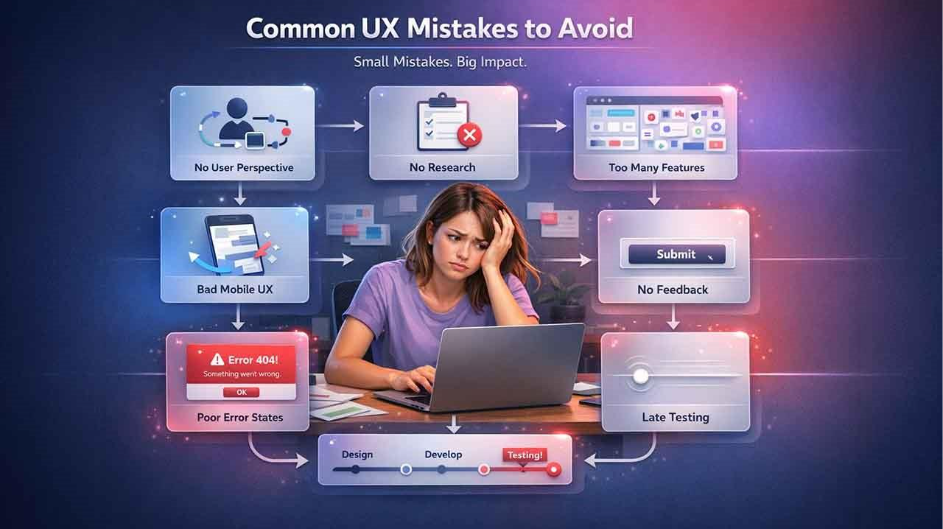
Many products fail due to small mistakes that erode user trust over time. Here are Common User Experience Mistakes that you must avoid:
Designing Without User Perspective
You know your product well, but your users don’t. Assuming users think or navigate the way you do is the most common mistake that designers make. This leads to costly errors, confusing labels, buried features, or skipped onboarding steps.
Skipping User Research
Start designing without conducting thorough research means you’re solving the problems that you imagined rather than actual problems that users face. In such cases, you find the polished answer to the wrong question.
Adding Too Many Features
Many designers think that more features mean more value. However, every added feature is another thing that users must learn which increases the cognitive load. Feature bloat doesn’t just clutter the interface; it buries what users actually came to do.
Ignoring Mobile User Experience
The majority of global web traffic is happening on mobile devices. Still, many products are squeezed into smaller screens as an afterthought. Designing desktop-first and patching for mobile afterward is no longer acceptable as users will abandon your product or service if it feels incomplete on mobile screens.
Poor Error and Empty State Design
What does a user see when their search returns nothing? What happens when something goes wrong? These states are often designed last or not at all. A cold, unhelpful error message or a blank screen with no guidance can undo all the goodwill your product worked to build.
Lack of System Feedback
When users tap something and nothing visibly changes, doubt sets in. Did it work? Should I try again? That brief moment of uncertainty is a UX failure. Users need acknowledgement that their actions have been registered. Without it, confidence erodes fast.
Testing Too Late in the Process
Waiting to run usability tests after development is complete can lead to expensive changes and wasted efforts. At that stage, most findings lead to surface-level fixes, rather than meaningful structural improvements. The ideal time to test is when changes are still cheap, like during wireframing, or prototyping, before a single line of production code is written.
Why User Experience Basics Are Important for Business Growth
A good UX is more than just a design. It's a business decision with measurable consequences. When users can navigate your product easily and quickly, they stay longer, convert faster, and keep coming back. Let's see what strong UX delivers:
Higher Conversion Rates Through Better UX
When customer experience is frictionless, it removes the hesitation between interest and action. When users aren’t confused or frustrated, they are far more likely to complete a purchase, sign up or take whatever steps your business needs them to take.
Reduced Customer Support Costs
When designs feel intuitive, there are fewer confused users flooding up your support team with unavoidable questions. And fewer questions mean that your support team can work peacefully and address important queries more attentively.
Improved User Retention and Loyalty
People value products that respect their time and intelligence and keep coming back. A smooth, consistent experience builds loyalty that no marketing campaign can manufacture on its own.
Stronger Brand Perception and Trust
How your product feels shapes how your brand is remembered. Users may forget the specific features you offered, but they rarely forget how effortless or painful the experience was. A consistent visual identity, supported by a professionally designed AI logo, can further strengthen that perception.
How to Measure User Experience Basics: Key UX Metrics You Should Know
How would you know whether your user experience basics are actually working or not. In this section, let us go through a few key metrics that let you know that you are moving in the right direction-
Task Success Rate- It keeps track of the percentage of users who finish a given task. This includes setting up a profile or completing the checkout process without asking for assistance or abandoning it. A low success rate generally points toward a UI vs UX mismatch; the interface is fine, but the flow does not complement the requirements of the user.
Time on Task- This monitors how long it takes for someone to finish an action. Faster is not better always. Sometimes, a slower path means users are taking their time reading, comparing, or double-checking, which is quite normal. However, a sudden spike in time generally indicates friction that was not there before, which is generally introduced by an update that was not user-tested comprehensively.
System Usability Scale (SUS)- A standardized and short questionnaire that creates a single usability score out of 100. It is one of the quickest ways to benchmark your product against different products in the category. It helps in monitoring whether design changes are giving you value, or things are changing just for the sake of change.
Customer Effort Score (CES)- This metric measures how easy it was for the users to get what they require. Contrary to satisfaction scores, CES mainly emphasizes friction. High effort scores are a leading churn indicator, often get displayed in customer experience strategy long before revenue numbers do.
Error Rate- This measures how often users keep track of wrong inputs, dead ends, or failed actions. A higher error rate can point toward unclear UX design principles neglected in the interface, such as unclear labeling or missing feedback.
Net Promoter Score (NPS) and Retention- While this is not exclusive to user experience, such numbers indicate the cumulative impact of each micro-experience a user can have with your product. A product created with robust user centric design consistently gets you higher retention since users then feel understood instead of being processed.
Conclusion: Why User Experience Basics Matter More Than Ever
UX was never just about tools, pixels, or trends. It is about whether a product respects the intelligence and time of the people utilizing it. If your user experience is right, users entirely stop noticing the design; they just keep on coming back. However, if you get that wrong, any level of genius marketing tactics will not be able to bring them back to your website.
What you really need to know is that user experience basics are not so complex to learn. All you need to have is curiosity, discipline in tracking what is important, and a willingness to resolve small frictions before they become a reason for someone to leave your website for good. Begin with one metric, one flow, or one principle, and start from there. The compounding impact of small UX wins is more important than what teams can expect.
Frequently Asked Questions (FAQs) : User Experience Basics
User experience basics refer to the fundamental principles of designing products that are easy, efficient, and satisfying for users to interact with.
They help improve usability, increase conversions, boost customer satisfaction, and reduce user frustration.
UX focuses on the overall user journey and experience, while UI deals with the visual design and interactive elements of a product.
The five key elements are strategy, scope, structure, skeleton, and surface, which together shape the overall user experience.
Beginners can start by understanding user needs, learning design principles, practicing with tools like Figma, and testing designs with real users.