





HubSpot NetSuite Integration - Your sales team closes a deal, and this news hasn’t automatically reached the finance department yet. They find out later, manually, or sometimes not at all until someone tells them. The operation team is working with old data that somebody updated in spreadsheet days ago. They do not have access to real-time data, so they are making decisions on whatever someone typed last week. Amidst this, a customer is waiting for his invoice that nobody has generated yet. This is what happens inside the business when the CRM and ERP don’t communicate. This problem doesn’t announce itself as a big crisis. It just quietly delays payment, slows everything down, creates errors, and costs money. It's so spread out that it is difficult to pinpoint a single number and say, “this is what costing us?”
The HubSpot NetSuite integration exists to fix exactly this. It's the bridge between where your customer relationships are managed and where your business operations actually run. When it works well, your teams stop chasing each other for updates and start working from the same page.
What is HubSpot NetSuite Integration?
The HubSpot is a CRM software where your sales and customer data lives. NetSuite is an ERP where finance and operations run. HubSpot NetSuite integration is the process which connects HubSpot’s CR, with NetSuite’s ERP, so that they can share data with each other automatically. This eliminates the need for exporting data manually or copy-pasting records across platforms. When a deal closes in HubSpot, it is updated in NetSuite automatically. Similarly, when an invoice is generated inside NetSuite, your sales team can view it inside HubSpot. This is the basic function, but the impact runs much deeper than convenience.
Why HubSpot NetSuite Integration Matters for Growing Businesses
Integrating CRM and ERP together gives your team access to accurate, real-time data that improves visibility, efficiency, and decision-making.
Bridge the Gap Between Sales and Finance: HubSpot stores customer data, leads, deals, contact history, and communication logs. NetSuite is where your business operations such as accounting, inventory, order management, and financials run. Together they support the entire customer journey from first contact to final invoice. When they work separately, they create blind spots that cost real time and money.
Create a Scalable Foundation for Growth: For those businesses that are growing, this alignment between tools is not an option anymore. It has become a necessity. And if you’re new to HubSpot, exploring the full range of HubSpot Integrations early on will help you build a tech stack that actually works together as you scale.
Improve Data Accuracy Across Systems: When data entry is done manually, there are high chances of making errors. Automated data sync means that there will be fewer mistakes, fewer disputes, and fewer awkward conversations about why the numbers in the CRM are different from the numbers in the ERP.
Gain Complete Revenue Visibility: Connection between both systems makes reporting more reliable. The HubSpot NetSuite integration supports data-backed decision-making. So, you don’t have to piece together two estimates from different dashboards.
Accelerate the Lead-to-Cash Process: With this integration, you don’t have to spend time chasing approvals, and there are fewer bottlenecks between departments which leads to faster invoice generation. This means your revenue cycle can now match the speed of your sales team.
Read More: If you're also evaluating other CRM connections, understanding the HubSpot Salesforce integration can help you see how HubSpot handles data sync across different platforms.
Key Features of HubSpot NetSuite Integration
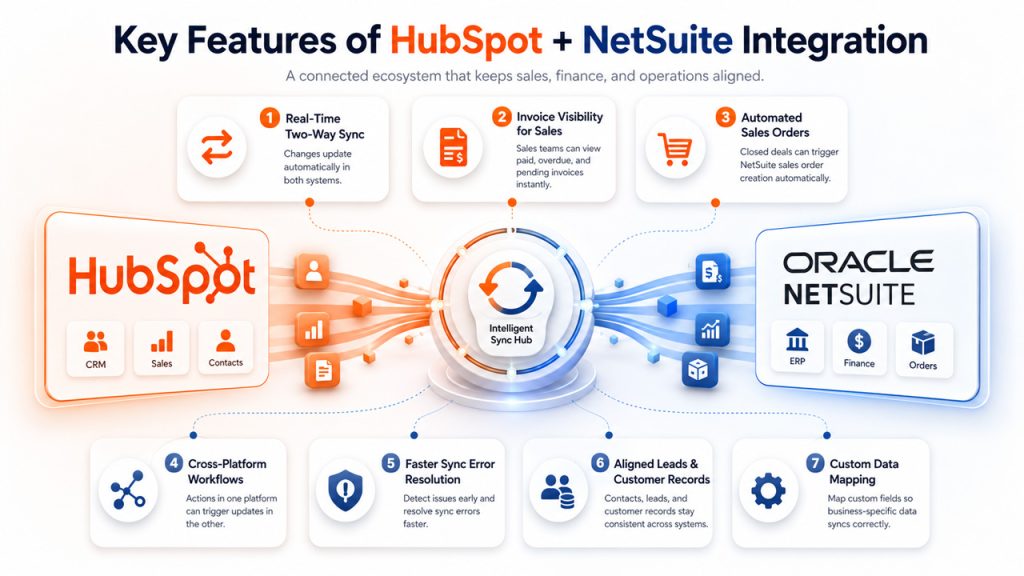
The right integration creates a connected ecosystem that keeps every department aligned. Let's see how this integration helps your business.
Real-Time Two-Way Data Synchronization: Whenever you make changes in HubSpot, it automatically reflects in NetSuite and vice versa. No one has to manually copy or update anything across systems. For instance, edit a contact name in HubSpot, and the edited version shows up in NetSuite automatically.
Give Sales Teams Instant Invoice Visibility: All invoice-related information is easily accessible to the sales team. They can see whether a payment has gone through, what is overdue, and what invoices are pending; all without leaving HubSpot or switching to another tool. Pairing this with a HubSpot email integration ensures your sales team can also track communication history alongside invoice and payment data in one place.
Automate Sales Order Creation: When a deal is marked as done in HubSpot, NetSuite can create a sales order automatically without you having to do anything. Your finance team gets what they need without having to wait on the sales team to inform them or send it over.
Automate Cross-Platform Business Workflows: This integration between HubSpot and NetSuite automates the workflow. When there’s an activity in one system, it triggers actions in the other. For instance, a payment received in NetSuite could automatically update a deal stage in HubSpot.
Detect and Resolve Data Sync Errors Faster: Good integrations do more than just syncing data. They also flag problems when something goes wrong or something unusual happens. This allows your team to catch issues early on and fix them before they escalate.
Keep Customer and Lead Records Aligned: Whenever new contacts and leads show up in HubSpot, this data automatically flows into NetSuite; syncing between both systems. Similarly, customer records from NetSuite can be exported into HubSpot to keep everything aligned.
Customize Data Mapping for Your Business Needs: All businesses operate in their own ways. The integration HubSpot NetSuite integration supports mapping custom fields, so your specific data points carry over correctly. If you want to know more about what HubSpot natively supports before layering on an integration, you can start with exploring HubSpot features.
What Data Can Be Synced Between HubSpot and NetSuite?
Understanding which records and business data can be shared helps you build an integration strategy that supports your goals.
| Data Type | Direction | Details |
| Contacts / Customers | Two-way | Name, email, phone, address fields sync across both platforms |
| Companies / Accounts | Two-way | Company records and account details stay consistent |
| Deals / Sales Orders | HubSpot → NetSuite | Won deals trigger order creation in NetSuite |
| Invoices | NetSuite → HubSpot | Invoice status and amounts visible to sales reps |
| Products / Line Items | Two-way | Product catalog and pricing information kept in sync |
| Payments | NetSuite → HubSpot | Payment status updates visible within CRM records |
| Custom Fields | Two-way | Mapped fields sync based on your configuration |
However, not everything needs to be synced. Setting up a smart integration is also about deciding what data actually needs to move and what can stay where it is. When you over-sync data, it creates clutter, whereas under-syncing defeats the whole purpose of integration.
HubSpot NetSuite Integration Methods: Choosing the Right Approach
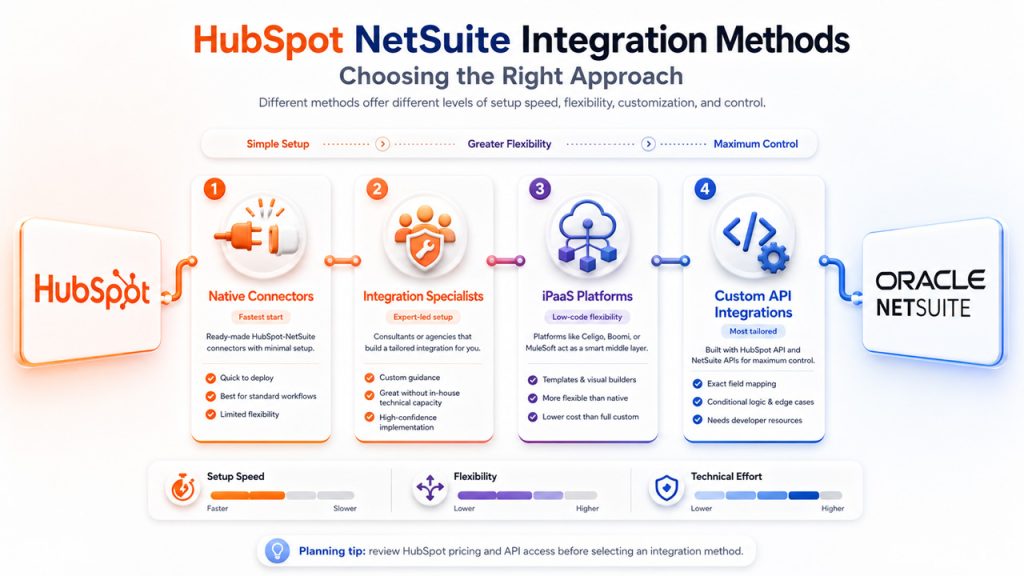
Depending on your business requirements, different integration methods offer different levels of flexibility, customization, and control.
Native HubSpot NetSuite Connectors
These are ready-made connectors that connect HubSpot and NetSuite together, and it requires minimal setup. They work well for those businesses that have fairly straightforward and standard processes. When there are fewer custom workflows, this method is the quickest way to get started. However, the downside is that they are not very flexible for complex or heavily customized workflows.
Third-Party Integration Specialists
Some businesses choose to work with a consultant or agency that specializes in CRM-ERP integrations. This combines the flexibility of custom development with the expertise of someone who's done it before. It is a smart choice if your team doesn't have in-house technical capacity but needs a highly specific setup.
iPaaS Platforms (Integration Platform as a Service)
Tools like Celigo, Boomi, or MuleSoft act as smart middleman between HubSpot and NetSuite. They manage how data moves between them. They have built-in templates and visual builders, so you don’t have to write too much code. They are more flexible when compared to native connectors. They also cost less than a fully custom build.
Custom API-Based Integrations
Businesses that have complex requirements can go for a custom-built integration using HubSpot’s API and NetSuite’s SuiteScript or even REST API. They give you the most control. This allows you to map exactly the fields that you need, build conditional logic, and even handle edge cases that are absent from pre-built tools. However, it needs developer resources and more upfront investment which can be its downside, but it is the most tailored option available.
Before you decide on a method, make sure to review HubSpot pricing as some integration features and API access levels depend on the plan that you’re on.
Common HubSpot NetSuite Integration Challenges (And How to Avoid Them)
When you have full understanding of potential integration challenges, you can fix issues faster and ensure smoother implementation.
Duplicate Customer and Contact Records: When two systems run separately, there are chances that you often end up with duplicate accounts or contacts. So, before integrating, clean your data on both platforms. Additionally, set clear rules for duplication, so the integration knows which record is supposed to be treated as the source of truth.
Field Mapping and Data Structure Issues: HubSpot and NetSuite might use different terminology or field structures. For instance, “Company Name” in one might be written as “Account Name” in the other. That's why take your time to map fields carefully before you go live. If you’re not careful, you might risk landing data in the wrong places.
Data Sync Conflicts: If both systems can write to the same field, you'll occasionally get conflicts when both updates simultaneously. To prevent this from being a recurring headache, you can establish which system owns which data. This eliminates any confusion and ensures smooth workflow.
Over-Automation Without Human Oversight: To automate everything does have a nice ring to it. But not every process should be fully hands-off. You must build in checkpoints for high-stakes actions such as order creation or customer records updates. This is to make sure that nothing critical slips through without review.
User Resistance: This is the most common problem of all. Sometimes people resist new systems and workflows as they get comfortable with legacy systems. Provide your teams with clear documentation explaining the new change, proper training, and enough time, so that they can adjust before you expect them to run integration smoothly.
If you want to evaluate whether HubSpot is the right fit for your business, compare HubSpot vs NetSuite side-by-side to understand where they overlap and where they differ.
Final Thoughts
If your business is running two powerful systems parallelly, then you’re paying a cost in wasted time, in data errors, and in decisions made on incomplete information without even realizing. The HubSpot NetSuite integration removes that cost completely.
It creates a connected workflow where sales, finance, and operations are all working from the same data. It takes planning, clean data, and the right integration method for your specific setup. But for businesses that get it right, the payoff is real. It results in faster deal cycles, cleaner reporting, and teams that spend less time reconciling numbers and more time moving the business forward.
If you're still evaluating platforms, exploring HubSpot Alternatives will help you make a more informed decision.
Frequently Asked Questions (FAQs) : HubSpot NetSuite Integration
It's the connection between HubSpot's CRM and NetSuite's ERP that allows data to sync automatically between both platforms.
Yes; most integration methods support two-way sync, meaning updates in either system is reflected in the other.
Not always. iPaaS tools like Celigo offer no-code or low-code setups, though complex workflows may require developer support.
It varies. Simple setups can take a few days, while custom integrations with complex workflows can take several weeks.
Duplicate and inconsistent data is the most frequent issue, which is why cleaning your data before integration is strongly recommended.