
The blog covers the detailed HubSpot vs Airtable comparison, which includes comparing user interface, contact management, marketing and sales automation, use cases, and pricing of each platform.
Many businesses end up disappointed with the tools they chose, not because they didn’t research enough, but because they compare features only instead of figuring out what exactly their business needs to fix in a day-to-day business operation. HubSpot vs Airtable are both powerful, but they are built to solve different sets of problems. One is ideal for managing customer relationships and marketing pipelines, while the other is the right choice for organizing almost anything. So, let's start breaking this down clearly for you.
What Is HubSpot Actually Built For?
HubSpot is a well-recognized Customer Relationship Management (CRM) platform. It helps you generate leads, manage deals, contacts, and email marketing campaigns under one roof. This solution caters to both sales and marketing teams. In case your primary target is increasing revenue using customer analytics, then HubSpot CRM is the perfect choice for you. Teams looking to get a better understanding of HubSpot features often find that the built-in tools cover most of what a sales and marketing team needs from day one.
The best part is that it easily integrates your marketing, sales, and service departments in order to have all the customer information in one place. Contact history, deal pipeline, email marketing, and various reports come right out of the box without the need for installing multiple complicated tools. Teams weighing their options often look at HubSpot vs ActiveCampaign to understand how HubSpot's built-in tools stack up against dedicated marketing automation platforms.
Who Uses HubSpot?
HubSpot suits those who:
- Have a sales team that works on leads and follow-ups
- Have a marketing team working on email marketing campaigns
- Require reporting on customers’ activities
- Are startups expanding their outreach campaigns?
Therefore, when you have a sales team working on deals, following up leads, and everything else associated with them, you will surely need the sales automation solutions of HubSpot. For businesses focused on sales pipeline and automation, HubSpot vs Keap (Infusionsoft) is a useful comparison to have on hand.
What Is Airtable Actually Built For?
Airtable is a flexible database platform that looks like a spreadsheet but operates more like a relational database system. It helps businesses to track project management, content calendar management, product roadmap creation, inventory management, and more.
This flexibility is Airtable’s main advantage and potential pitfall, because this platform isn’t designed for a specific purpose, users have to create all their workflows themselves. If you know exactly what you want to customize, Airtable is the perfect fit for you. But if you’d like some pre-made solution instead, it might not be for you.
Who Uses Airtable?
Airtable fits well for:
- Operations and project management teams
- Product teams tracking bugs, features, and launches
- Any team that needs a custom database without hiring a developer
- Content and creative teams managing multiple campaigns
The core appeal of Airtable's database features is that you can connect records across tables, filter views by role, and automate simple tasks without writing any code.
HubSpot vs Airtable: Head-to-Head, Where Each Platform Wins
The fact is no tool wins everywhere, and the same goes with these tools. The table below isn't about crowning a winner. It's about matching the right tool to the right job. Read it with your team's daily work in mind, not just the feature names.
| What You're Trying to Do | HubSpot | Airtable |
| Track contacts and customer history | Ready out of the box | Doable, but you'll build it yourself |
| Manage a sales pipeline visually | Core feature, works well | Flexible but takes manual setup |
| Run email campaigns and sequences | Built right in | Not what it's designed for |
| Handle projects and team tasks | Basic at best | One of its strongest suits |
| Build custom workflows or databases | Pretty limited | This is where it shines |
| Pull reports and measure performance | Detailed CRM reporting | Custom views you build yourself |
| Get a new team member up to speed fast | Fairly straightforward | Steeper, needs a system in place |
| Connect with other tools in your stack | Solid options | Broad and well-supported |
One thing to note down: Airtable's flexibility shows up a lot in that middle column. It can technically do many things. But there is a difference between "technically possible" and "easy to manage every day". If your team doesn't have someone who enjoys setting up workflows, automations, and systems, Airtable may become harder to handle.
A similar dynamic plays out in HubSpot vs Monday CRM, where the structure-vs-flexibility trade-off shapes the decision in much the same way.
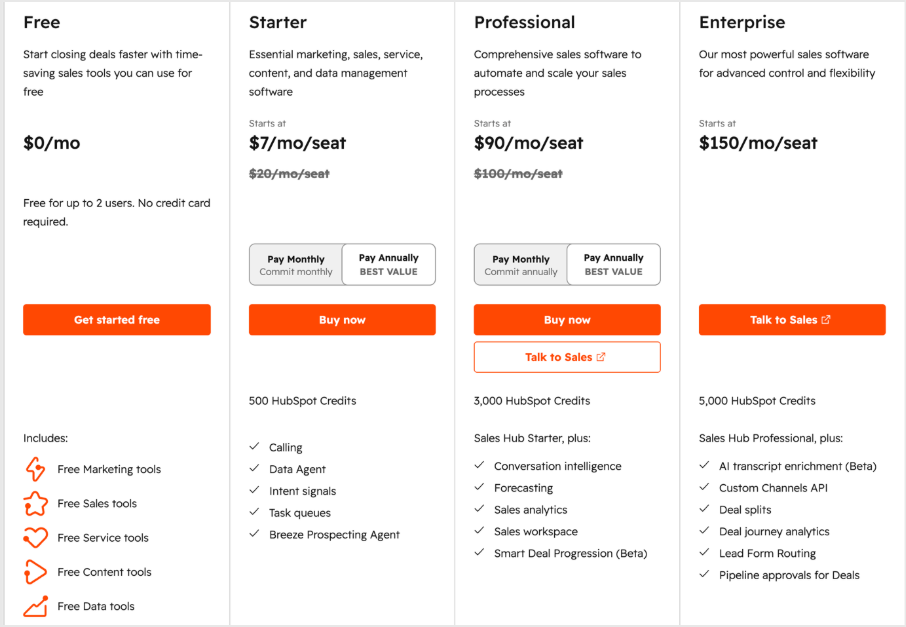
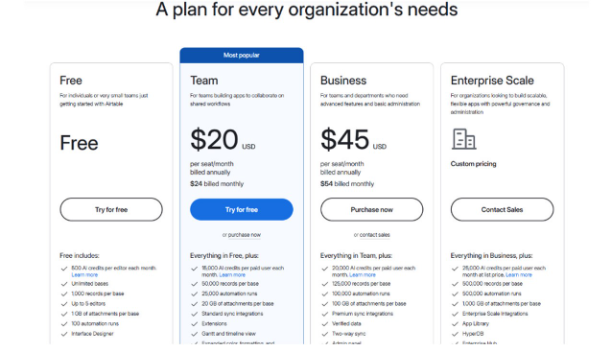
HubSpot vs Airtable: Pricing Comparison
Pricing is an important factor when it comes to deciding which CRM to choose. So, let us break down how HubSpot pricing compares to Airtable in terms of scalability, cost, and overall value.
HubSpot Pricing:
Airtable Pricing:
The Core Difference Between HubSpot vs Airtable
Here's the truth: HubSpot is a dedicated or more focused tool. Airtable is a flexible one.
HubSpot tells you how to work. It includes various stages, funnels, and sequences that are built around how most sales and marketing teams function. That's helpful if you're just getting started or want something that works, makes your sales and marketing work super easy to handle, and keeps it in an organized way.
On the other hand, Airtable project management gives you a blank canvas. You build the structure, define the workflow, and decide what fields matter. All this was done from scratch. That means you have total control over it. But it requires someone who understands the system and its technicalities.
Neither approach is wrong. It all depends on your team's size, technical comfort, and what kind of work you're actually managing every day.
When HubSpot Makes More Sense
If your business depends on tracking customer interactions, running nurture sequences, and closing deals, HubSpot's CRM software is probably the right call. You get a clear record of every contact, every email opened, and every deal stage. Your sales reps don't have to think about how to organize anything; the structure is already there.
HubSpot also connects sales and marketing in a way most tools don't. When a lead clicks on an email, your sales team can view it. When a deal closes, your marketing team can adjust who gets what message. That kind of visibility reduces the gaps between teams and speeds up the whole work process.
For growing businesses that want to scale their revenue operations without building a custom system from scratch, HubSpot automation saves real hours every week. Sales teams that also run email campaigns often find HubSpot vs MailChimp worth reviewing before committing to a stack.
When Airtable Makes More Sense
If the data your team is managing requires some kind of a more complex structure than what a CRM can provide, Airtable's database-based system will be easier to use. For instance, you can create a content calendar with references to particular authors, campaigns, and deadlines. Or you can track product features across multiple sprints and connect them with what customers are requesting.
Airtable also shines when different teams need different views of the same data. A manager might want to see a calendar view, a developer wants to see a grid, or a designer wants to see a Kanban board.
All pulling from the same database, just filtered differently for different professionals. That kind of Airtable collaboration feature makes it a strong option for cross-functional teams. This tool can be integrated with hundreds of other tools, so it fits into most existing tech stacks without much friction, allowing you to make your process even faster and easier. Teams who evaluated HubSpot alternatives before landing on Airtable often chose it specifically for this cross-functional flexibility.
Can You Use Both?
Yes, you can. In fact, many companies involved in sales and marketing use HubSpot for CRM and other interactions with customers, whereas Airtable is used for internal processes, such as planning content and products or managing various projects within the company.
Still, running two separate systems requires additional efforts and, probably, an employee to manage both. It might not be a cost-effective approach if you run a small startup. Therefore, we suggest you pick the one tool that addresses your biggest pain points first.
HubSpot vs Airtable: A Quick Way to Decide Right Now
Ask yourself one question: Is my biggest challenge managing customer relationships and sales, or organizing internal work and data?
If it's customers and sales, go with HubSpot. If it's internal operations and flexible data management, go with Airtable. If you're doing both equally, start with the one your bigger team uses daily. You can always add the second later.
Make the Right Call Before Your Team Falls Behind
The gap between a tool that fits and one that doesn't shows up quickly. Teams using the right platform move faster, communicate better, and waste less time on admin work. The wrong tool creates confusion, workarounds, and frustration that increase over weeks.
So, think about where your business actually spends its time and what matters to you the most. That's the fastest way to figure out which platform belongs in your stack. There is no universal winner between HubSpot vs Airtable. Both platforms are genuinely good at what they do. The only question is what you need them to do.