






Sales teams spend a considerable amount of time transitioning between tools, developing proposals on a single platform, handling deals in another, and updating CRM records manually once the contract is signed. The PandaDoc HubSpot integration removes this friction by incorporating e-signatures, document creation, and deal management into a single and centralized workflow. From the moment a deal goes into the proposal stage to the second contract is signed; the complete process works inside HubSpot without any manual entry of data or switching of apps.
What Is the PandaDoc HubSpot Integration?
The PandaDoc HubSpot integration is a native connector that connects HubSpot CRM with the PandaDoc, automating documentation workflow. It empowers sales teams to create, send, receive, and keep track of signatures on contracts and proposals from within the HubSpot directly without re-entering the data or leaving the CRM.
When you create the document from the HubSpot deal record, PandaDoc extracts deal details automatically which might include company name, contact details, deal value, and line items. Furthermore, it also populates the different fields in the document template with relevant data without any level of manual input. The document status including viewed, sent, or signed, shows up on the real-time timeline in the HubSpot.
The integration interoperates at the Contact, Deal, and Company record level and provides support to both manual creation of document and fully automated workflows which is triggered by the changes in the deal stage. The wide ecosystem of HubSpot makes it simple to further expand these capabilities. If you are interested to know what else HubSpot can connect with, a deeper look at the HubSpot Integrations can enable you to map your entire tech stack.
Main Characteristics of the PandaDoc HubSpot Integration
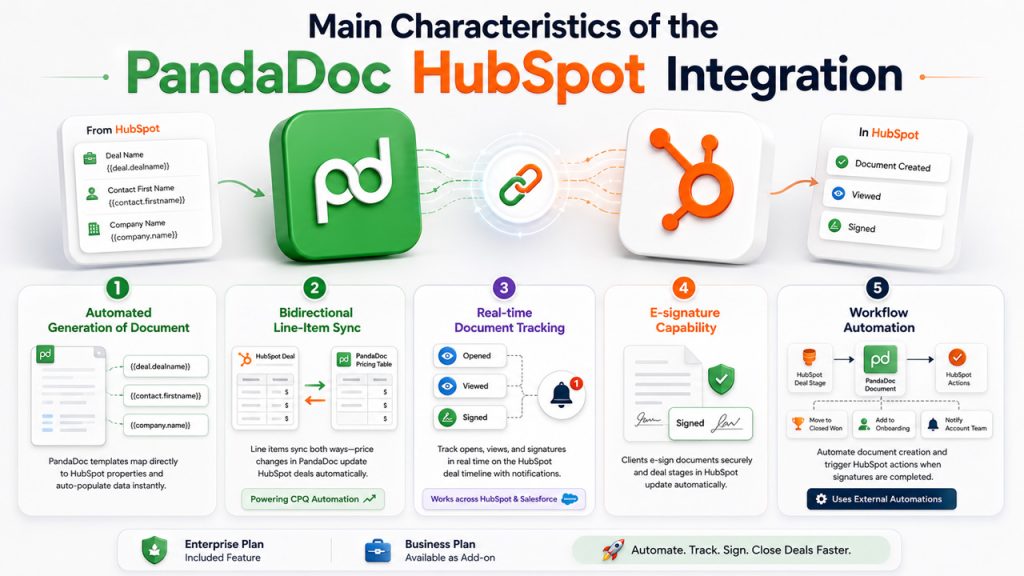
The PandaDoc HubSpot integration provides a complete set of capabilities that go beyond standard e-signatures.
Automated Generation of Document
PandaDoc templates utilize variable tokens that directly map to HubSpot properties. When you create the document from a deal record, fields like {{deal.dealname}}, {{contact.firstname}}, and {{company.name}} automatically populate. It supports both the custom and standard HubSpot properties.
Bidirectional Line-Item Sync
HubSpot deal line items synchronize to PandaDoc pricing tables at the time of creating documents. If the pricing is modified in PandaDoc, quantify discounts, changes, and configuration adjustments. Those updates synchronize back to the HubSpot deal. This ensures that the deal value is accurate without additional step of data entry, creating the foundation of CPQ (Configure, Price, Quote) automation inside HubSpot.
Real-time Document Tracking
Sales representatives can track the status of the document; opened, viewed, and signed, directly from the deal timeline of HubSpot. Whenever a lead opens a document, PandaDoc automatically sends you a notification, allowing follow-ups in a timely manner without chasing email threads. For teams that also depend on Salesforce along with HubSpot, document tracking workflows can be mirrored across both platforms. Check out how HubSpot Salesforce Integrations manage data sync to prevent duplication.
E-signature capability
Clients can electronically sign documents, eliminating the delays related to printing, scanning, or courier-driven signature processes. Deal stages in HubSpot are automatically updated once all parties have signed.
For businesses comparing e-signature platforms, DocuSign is another popular solution for electronically signing and managing digital documents.
Workflow automation
The deal-based workflows in HubSpot can trigger creation of PandaDoc document when a deal reaches a particular pipeline stage. Similarly, a completed PandaDoc signature can set up HubSpot actions — pushing the active deal to Closed Won, entering the contact in an onboarding sequence, or sending the notification to the account team. This automation needs an External Automations feature of PandaDoc, which is a part of the Enterprise plan or available as a paid additional feature in the Business plan.
Advantages of the PandaDoc HubSpot Integration
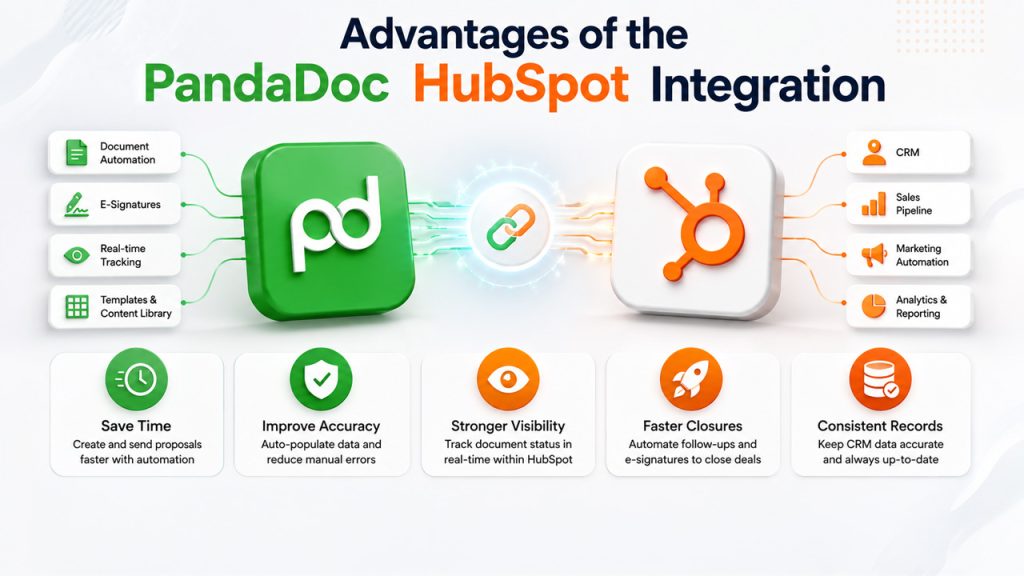
Linking PandaDoc with HubSpot ensures noticeable improvements across the entire sales cycle:
- Minimized Proposal Turnaround Time: Automated generation of documents removes the need to spend time while preparing manual templates. Teams that execute the complete proposal-to-signature loop generally need less time to deliver the document to the prospect.
- Improved data accuracy: Since HubSpot properties automatically populate document fields, the risk of errors from manual entry of data including incorrect contact names or wrong pricing is greatly minimized.
- Stronger deal visibility: Document status directly feeds into HubSpot deal timelines, providing sales managers with a precise view of where every opportunity exists in the document lifecycle.
- Faster deal closure: Automated workflows of follow-up and e-signatures reduce friction for prospects, making the process from proposal to signature a lot faster.
- Consistent CRM records: Signed status, deal value updates, and stage changes all get reflected automatically in HubSpot, making sure that the CRM data remains trustworthy without the need of sales team to update manually.
For teams launching HubSpot along with ERP like NetSuite, these similar data consistency benefits go beyond the CRM. The HubSpot NetSuite Integration can make sure that financial records remain aligned with the deal data without any reconciliation in a manual way.
How to Get Started with the PandaDoc HubSpot Integration?
The overall setup process is simple and needs no custom code or middleware.
Step 1: Connect from PandaDoc
In PandaDoc, go to Settings, then integrations, after that find HubSpot, and select “Connect”. Give authorization to PandaDoc to give accessibility to your HubSpot account by selecting Grant Access. Once the connection is established, the PandaDoc module shows up in the right sidebar of “HubSpot Contact,” “Deal,” and “Company” records. Installation needs credentials of “PandaDoc Account Owner” and “Admin Permissions” in HubSpot.
Step 2: Set Up Variable Mapping in Your Template
Open a template of “PandaDoc” and choose “Extensions” and then HubSpot in the right panel. Include variable tokens to the document wherever HubSpot data must appear. All custom HubSpot and standard properties are available as variables for Contacts, Deals, and Companies. Comprehending how HubSpot Features like deal pipelines and customer properties are organized will enable you to effectively map tokens during this step.
Step 3: Generate and Send a Document from a HubSpot Record
Select a “HubSpot Deal” record and choose the option “Create Document” in the sidebar module of PandaDoc. Choose a template, select recipients from the relevant HubSpot contacts, manually review the document populated automatically, and then hit “Send.” Document status will show up on the deal timeline from then onwards.
Step 4 (Optional): Trigger Automation with HubSpot Workflows
To automate generation of document as per the deal stage, create a deal-based workflow in HubSpot (Automation > Workflows) with a trigger based on deal stage and a PandaDoc Create Document action. To automate updates on the deal stage triggered by signature, create a second workflow based on PandaDoc document status changing to Completed. Both workflows need the “External Automations” add-on to remain active on your
“PandaDoc account.”
PandaDoc HubSpot Cost
The PandaDoc HubSpot integration is free to connect. However, the plan you are using presently can define what features are currently available.
The native integration, which includes e-signatures, document creation, and real-time monitoring from HubSpot records, is accessible on paid PandaDoc plans, beginning with a Starter plan that approximately comes at $35/user/month. Bidrectional line-item sync and standard document workflows are included at the Business plan level that approximately costs $65/user/month.
Workflow automation, which enables deal stage changes to trigger creation of document and vice versa. This needs External Automations feature. This is grouped into the Enterprise plan that involves custom pricing.
As far as HubSpot pricing is concerned, no additional paid plan is needed to utilize the integration. However, deal-based workflows that trigger PandaDoc actions require an Enterprise or HubSpot Professional plan. Teams assessing the overall cost of this stack must factor in both the platform plans along with any add-ons. For a wider cost comparison, reviewing HubSpot pricing along with the plans of PandaDoc can aid in finding the right plan before committing an entire workflow build.
Conclusion
The PandaDoc HubSpot integration eliminates the manual steps that reduce the productivity of sales teams including proposal building, re-entry of data, signature follow-ups, and CRM updates. With automated generation of document, bidirectional data synchronization, workflow automation, and real-time tracking, the integration tethers each stage of the document lifecycle to your HubSpot pipeline directly. Teams that consider HubSpot as the right platform for this level of document automation must HubSpot Alternatives to make a data-driven decision before purchasing a complete workflow build.
No. PandaDoc natively works inside HubSpot CRM. No middleware or plugins are needed. The integration is allowed directly from the settings of PandaDoc.
Yes. PandaDoc templates utilize variable tokens that refer to HubSpot properties. Whenever a document is generated from a deal record, all mapped fields that also include custom properties are automatically populated.
Workflow-triggered document creation needs External Automations feature of PandaDoc. It is included in the “Enterprise Plan” of PandaDoc and is available as a $39/month add-on in the Business plan.
Yes. The integration provides support to bidirectional line-item synchronization. Any changes in pricing in the PandaDoc whether it is discounts, quantity, or configuration, automatically synchronize to the line items of HubSpot deal.
Once all parties have signed, PandaDoc sends a status “Completed” to HubSpot. A deal-driven workflow can update the deal stage then, enroll in the contact in an onboarding sequence, and send notification to the associated team members. All of this happens without any manual action.