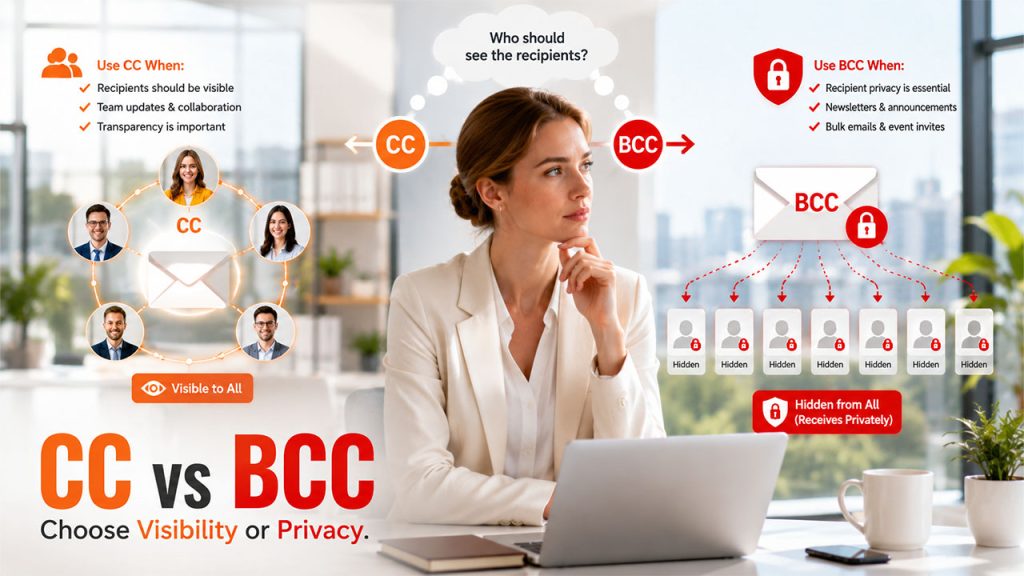






The blog explores the difference between CC and BCC, when to use each section, practical examples, common mistakes to avoid, and best practices.
In the growing global digital landscape, emails remain one of the most effective forms of professional communication. From sending updates to team members to contacting clients or sharing announcements, understanding how each of the email field used correctly is essential for every individual. Among all the fields of an email, CC (carbon copy) and BCC (blind carbon copy) remain the most misunderstood features of all.
Individuals generally use CC and BCC interchangeably, without understanding the core purpose of each field. Using the wrong field can also lead to serious privacy concerns, along with unnecessary email clutter, or even accidental disclosure of the recipient's email addresses. In the growing global digital landscape, emails remain one of the most effective forms of professional communication. Learning proper email etiquette can help avoid communication mistakes and improve workplace collaboration.
What is Meant by CC and BCC?
To, CC, and BCC are among the three primary recipient fields of any email platform, in which “To” is used for the main recipients of the email, whereas “CC and BCC” serve different purposes, helping improve communication, collaboration, and privacy. CC and BCC allow users to send the same emails to multiple people, but the major difference lies in who can see the complete recipient list.
What is CC?
CC, or Carbon Copy, is a field commonly used when someone needs visibility into a conversation without being the primary recipient. Adding someone to CC generally means that they will receive a copy of the email, and every recipient can see their email address. Adding someone to CC also means that they are not usually expected to take direct action but are added to stay informed.
When an email is sent using the CC field, every recipient receives the same email, whereas all recipients can see who is listed in the To and CC fields. The CC recipients are also aware that others have received the same message, and anyone can use Reply All, allowing everyone to view the responses.
What is BCC?
BCC, or Blind Carbon Copy, is primarily used to maintain privacy or send emails to multiple people without revealing the contact information of everyone. The only major difference between CC and BCC is that CC allows users to send a copy of the email to additional recipients, whereas BCC recipients remain hidden from every other recipient.
The other recipient cannot see the email address of the BCC recipient, making BCC an essential feature for maintaining privacy and confidentiality. In BCC, every BCC recipient receives emails, although their addresses remain hidden from all other recipients.
Businesses sending newsletters or promotional campaigns should also follow email marketing best practices to improve deliverability and engagement.
Key Difference Between CC and BCC
The key differences between Carbon Copy and Blank Carbon Copy are as follows:
| Features | CC | BCC |
| Recipient Visibility | All recipients can see everyone listed in the To and CC fields. | BCC recipients remain hidden from all other recipients |
| Privacy | Offer little to no privacy. | Offer higher privacy. |
| Email Address Visibility | Visible to all recipients. | Hidden for everyone, except the sender. |
| Transparency | Higher transparency. | Lower transparency. |
| Ideal for | Team communication, project updates, client conversations. | Newsletters, announcements, event invitations. |
Advantages of CC and BCC

CC and BCC both are designed to improve email communication, but serve different purposes. CC promotes transparency and collaboration, while BCC focuses on protecting recipient privacy and managing large email distributions.
Advantages of CC
The CC field offers key advantages to the user, especially if the user wants to keep additional recipients informed about an email conversation without making them the primary recipient.
Some of the key advantages of CC are as follows:
- Improves Communication Transparency: Everyone in the To and CC section can see who has received the email. This enhances transparency, especially in professional communication, helping recipients understand who is involved in the conversation.
- Encourages Team Collaboration: Including relevant teams ensures that everyone has access to the same information, reducing communication gaps, and helping departments work more efficiently together.
- Reduces Misunderstandings: When every recipient receives the same information, it reduces the chances of miscommunication or conflicting updates.
Advantages of BCC
The BCC field is specifically designed to protect the privacy of the recipient, while also allowing the sender to distribute the same email to multiple individuals. The feature is especially valuable for bulk emails and for situations where confidentiality is more important.
- Protects Recipient Privacy: BCC helps protect the personal contact information of the recipient and respects their privacy.
- Prevent Reply-All Chains: As the BCC recipients are hidden, they cannot send a Reply All response to the entire group.
- Ideal for Bulk Emails: BCC is considered the preferred option for sending bulk emails, such as announcements, newsletters, invitations, or updates.
- Reduces the Risk of Spam: BCC prevents exposing email addresses in a large recipient list, minimizing the risk of spam.
When to Use CC?
CC is appropriate to use when transparency is essential. Some of the common situations where using CC is essential are:
- Informing Team Members: If several team members need awareness of a discussion, but only one person is responsible for responding, CC is considered the right option.
- Creating Transparency: Organizations generally use CC to ensure that everyone involved in the conversations is informed. As everyone can see who receives the email, communication remains transparent.
- Sharing Information without Expecting Action: The CC recipients are not required to respond to the email, generally. This indicates that the recipients only need awareness of the conversation.
When to Use BCC?
CC is appropriate to use when transparency is essential. Some of the common situations where using CC is essential are:
Informing Team Members
If several team members need awareness of a discussion, but only one person is responsible for responding, CC is considered the right option.
Creating Transparency
Organizations generally use CC to ensure that everyone involved in the conversations is informed. As everyone can see who receives the email, communication remains transparent.
Sharing Information without Expecting Action
The CC recipients are not required to respond to the email, generally. This indicates that the recipients only need awareness of the conversation.
When to Use BCC?
BCC mainly focuses on enhanced privacy and confidentiality. Some of the common situations where using BCC is essential are:
Sending Bulk Emails
If the user needs to send bulk emails, such as newsletters or updates, BCC keeps the information of every recipient private.
Protecting Email Addresses
Email addresses are generally considered personal information. If the recipients don't know each other, BCC helps prevent the sharing of private contact details.
Preventing Reply-All Chains
The recipients in the BCC section cannot reply to everyone, and they only reply to the sender. It also reduces inbox clutter.
Common Mistakes to Avoid
CC and BCC are simple email features, although using them incorrectly can often lead to privacy issues, communication confusion, and an unprofessional impression. Here is a list of a few common mistakes that every individual needs to avoid while using CC and BCC.
Using CC instead of BCC for Bulk Emails
One of the most common mistakes to avoid is using the CC field for sending mass emails. This leads to compromising the personal email addresses of all the recipients.
Copying Too Many Recipients in CC
Adding unnecessary recipients to the CC field can overwhelm inboxes and make it difficult for recipients to identify whether they need to act or not.
Using BCC when Transparency is Expected
While BCC is useful for protecting privacy, it should not be used in situations where open and transparent communication is expected.
Using CC and BCC interchangeably can also lead to various other challenges, especially in automating email extraction into Google Sheets or sending bulk emails from Google Sheets.
Conclusion
CC and BCC are generally considered similar fields, but they serve very different purposes. CC is mainly designed for transparency and to keep relevant people informed, while BCC prioritizes privacy by hiding recipients' identities. Using CC and BCC correctly can improve communication, reduce inbox clutter, protect personal information, and demonstrate professional email etiquette. Before sending an email, individuals need to consider whether the recipient should be visible to others or remain confidential. Making the right choice ensures messages reach the right person, in the right way.
FAQs About CC vs BCC
No, BCC recipients cannot see other BCC recipients, and they receive the email individually.
BCC protects the privacy of recipients as it prevents others from viewing their email addresses. It also reduces the likelihood of "Reply All" chains and helps in maintaining professional appearances.
No, using BCC does not affect email delivery. However, for a large mailing list, it is recommended to use professional email marketing services.
Yes, the sender can use both fields, CC and BCC, in the same email.