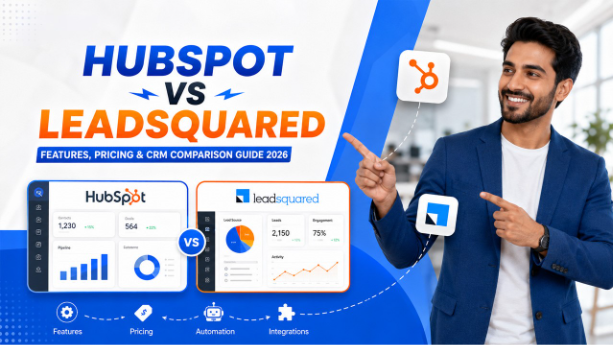

The blog covers the detailed HubSpot vs LeadSquared comparison, which includes comparing user interface, contact management, marketing and sales automation, use cases, and pricing of each platform.
Every business must have gone through this. To choose the right CRM software for their business, they start comparing various CRM platforms, open a few tabs, scan a few comparison charts, and somehow end up getting more confused than before. Every platform claims to do everything, and every table looks the same.
The HubSpot vs LeadSquared comparison tends to create that same confusion, but it really shouldn't. These two platforms aren't chasing the same customer. They weren't built by teams solving the same problem. HubSpot is a global, horizontal CRM designed to connect sales, marketing, and service into one unified system. LeadSquared is a vertical, region-specific tool built for high-volume B2C industries such as education, healthcare, real estate, and BFSI, especially across the Indian market.
Once you understand that difference, the decision becomes a lot clearer. This guide covers everything you need to know.
HubSpot vs LeadSquared: At-a-Glance
| Feature | HubSpot | LeadSquared |
| Primary Focus | Sales, Marketing, Service CRM | High-Volume B2B Sales CRM |
| Free Plan | Yes, genuinely useful | No, free trial only |
| Starting Price | $10/seat/month (starter) | $25/user/month (Lite, annual) |
| Marketing Automation | Advanced (paid tiers) | Separate product, additional cost |
| Vertical Industry Fit | Horizontal, flexible | Strong; education, health, BFSI, real estate |
| AI Features | Breeze AI (built-in across hubs) | AI Propensity Scoring (Paid add-on) |
| Integrations | 1,500+ apps | Limited, region-focused |
| Ease of Setup | 8.1/10 (G2) | 8.7/10 (G2) |
| Best For | SaaS, B2B, Global teams | Indian-based B2C teams, field sales |
What Is HubSpot?
HubSpot is a cloud-based CRM that pulls sales, marketing, customer service, and operations into one connected system. It launched as an inbound marketing tool, but that was a long time ago. Today it's one of the most fully built-out platforms you'll find, used by everyone from five-person startups to large enterprise GTM teams. There's a free tier that actually works, and paid plans that grow with you as your business does. Teams evaluating other horizontal platforms often look at HubSpot vs Zoho CRM before making a final call.
Key Features of HubSpot
- Sales: It covers deal pipelines, records contacts, schedules meeting, and automates the whole sales process. It offers everything that a sales team needs to stay organized and move fast.
- Marketing Hub: Its marketing hub converts leads at scale by providing tools for performing email marketing, building landing pages, lead capture forms, tracking ads, and managing campaigns. It is built to attract leads.
- Service Hub: It keeps customer support connected to the rest of your CRM data by offering help desk ticketing, live chat features, a knowledge base, and surveys to collect feedback from customers.
- Operations Hub: It is less visible than other features but quite important. It connects your third-party tools to synchronize them across the organization and keep data clean.
- Breeze AI: It comes with HubSpot. You can use Breeze AI to draft emails, generate compelling content, and forecast sales. Additionally, it is available across all paid plans.
- Free CRM: It is one of the most attracting features of HubSpot. It offers a permanently free plan with unlimited users. It covers all basic features as contact tracking, basic pipeline management, and core reporting. You can use it without worrying about expiry dates.
What is LeadSquared?
LeadSquared is a sales execution and marketing automation platform built for high-volume B2C businesses and it's particularly strong in the Indian market. Education, healthcare, financial services, real estate; these are its home verticals. The idea behind it is straightforward: some industries have sales motions, compliance requirements, and workflow needs that a general-purpose CRM simply wasn't designed for. So LeadSquared builds those workflows directly into the product.
Key Features of LeadSquared
- Vertical Industry Packs: It has pre-built workflows, custom data fields, and analytics dashboards tailored to education, healthcare, BFSI, and real estate. These are ready to use. You don't have to build them yourself.
- Lead Management: It is designed for high-volume lead capture across multiple sources such as web forms, portals, ad platforms, and telephony. Every lead gets tracked and routed automatically.
- Sales Execution Platform: It includes mobile CRM for field sales teams, call management, task management, and activity tracking; all in one place.
- Custom Automation: It offers a workflow builder for setting up lead nurturing sequences, follow-up reminders, status changes, and notification triggers without writing any code.
- Marketing Automation (separate product): It includes email campaigns, drip sequences, and engagement tracking. One important thing to note: this is a separate purchase, not bundled with the Sales CRM.
- AI Propensity Scoring: It is a machine-learning feature that classifies leads into high, medium, and low categories. It's a paid add-on that requires support enablement to activate.
- Telephony Integrations: It connects natively with local providers like Exotel, Ozonetel, and others. It is built for teams that rely heavily on outbound calling.
HubSpot vs LeadSquared: Feature-by-feature Breakdown
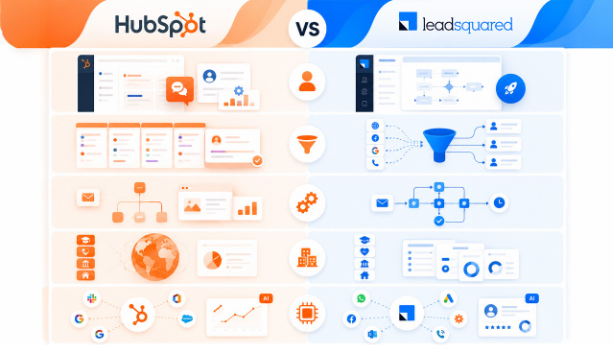
Now let’s look at what these platforms actually differ in day-to-day use.
Ease of Use
Both platforms are reasonably easy to navigate, but they differ in usability. HubSpot offers a clean and guided interface. It offers live chat support from the first step and helps you with the setup. It also allows you to customize the dashboard so that you can show your team what you want.
LeadSquared is more specialized, which actually makes it faster to get running if your use case matches one of its vertical templates. For those teams that aren’t very tech-savvy, LeadSquared’s pre-built workflows reduce the configuration time considerably.
Verdict: HubSpot wins for general usability; LeadSquared wins for speed of setup within its target industries. Sales teams coming from other lightweight tools may also find HubSpot vs Freshsales a useful reference point for onboarding comparisons
Lead and Pipeline Management
HubSpot gives you multi-pipeline management with detailed contact profiles, advanced filtering, and custom properties. It logs every interaction automatically like calls, emails, and meetings without anyone having to do it manually. That's a real time-saver for sales teams.
LeadSquared's lead management is built for scale. It captures leads from dozens of sources simultaneously and routes them automatically based on rules you define. For a team that manages thousands of inbound leads every day across multiple channels; this kind of automation is essential. HubSpot can also handle volume, but LeadSquared’s architecture was specifically designed around it.
Verdict: LeadSquared edges ahead for high-volume B2C lead routing; HubSpot is stronger for structured B2B pipeline management. For teams comparing pipeline-first CRMs, HubSpot vs. Pipedrive covers how HubSpot's pipeline tools hold up against another dedicated sales platform.
Sales and Marketing Automation
This is where the two platforms diverge most sharply. HubSpot's marketing automation is powerful with features like behavioral triggers, dynamic content, lead nurturing sequences, and full campaign management. But most of it sits behind the Professional plan, which starts at $100 per month minimum. That's a significant jump from the Starter tier.
LeadSquared's sales automation handles the basics well: follow-up reminders, status updates, workflow triggers. But marketing automation is a completely separate product with its own pricing. It's not bundled. If you want both sales and marketing automation under one roof, HubSpot has the advantage, provided you have the budget for it. If you only need sales workflows, LeadSquared covers what most teams actually need day-to-day at a lower cost.
Verdict: HubSpot wins on breadth of automation; LeadSquared wins on cost-efficiency if marketing automation isn't a priority.
Businesses weighing email-first tools against CRM-native automation will find HubSpot vs MailChimp directly relevant here.
Vertical Industry Fit
This is LeadSquared’s clearest strength. Its industry packs for education, health, BFSI, and real estate comes with workflows and data fields that reflect how those industries actually operate.
HubSpot takes the opposite approach. It's flexible and powerful, but you're configuring most of those workflows yourself, or purchasing them from the marketplace. For a global B2B SaaS company; that flexibility is an asset. For a 50-person admissions team managing thousands of student inquiries; it's an unnecessary complexity.
Verdict: LeadSquared wins clearly for education, healthcare, BFSI, and real estate; HubSpot is the better fit for every other industry.
Integrations and AI
HubSpot connects with over 1,500 third-party apps. HubSpot has native integration for almost every stack that includes any major SaaS tool. It has Breeze AI embedded across all hubs which helps with generating content, predicting lead scoring, and forecasting sales. It’s not an add-on. It is part of the platform.
In comparison, LeadSquared’s integration library is smaller and more regionally focused. It connects with apps like WhatsApp, Google Ads, Facebook Lead Ads, Zapier, Outlook, and local telephony providers, exactly what Indian B2C teams rely on. Its AI Propensity Scoring is useful, but it requires a paid upgrade and manual enablement from the support team. That added friction can slow adoption.
Verdict: HubSpot wins on integration depth and built-in AI; LeadSquared wins for region-specific tools that Indian B2C teams already rely on.
HubSpot vs LeadSquared: Pricing Breakdown
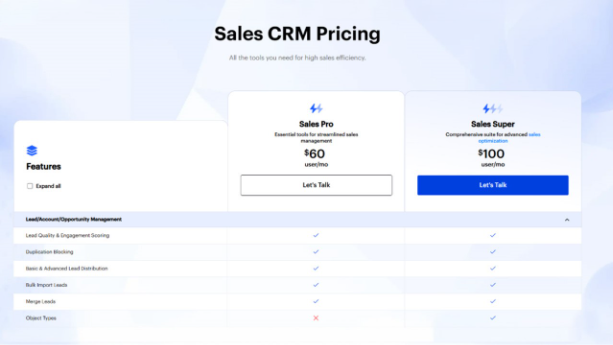
Pricing often becomes the deciding factor, so let’s break down how HubSpot and LeadSquared compare in terms of cost, scalability, and overall value.
HubSpot Pricing:
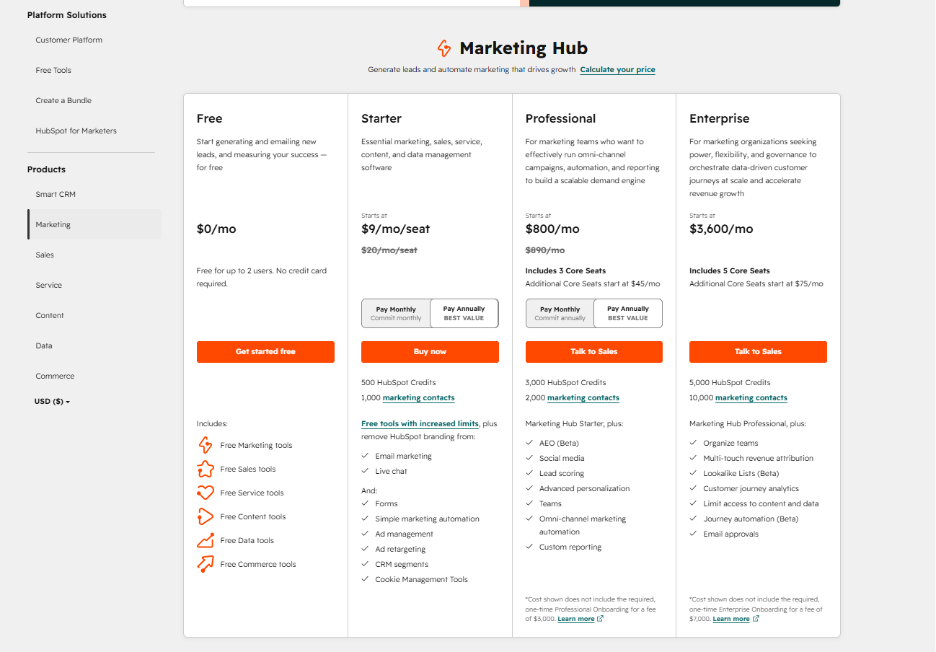
Also Read - HubSpot Pricing: Complete Guide to Plans, Features, and Cost
LeadSquared Pricing:
HubSpot vs LeadSquared: Quick Decision Guide
Here's how you can make a final decision about your CRM:
Choose HubSpot If:
- You run a SaaS company, agency, or global B2B team
- Email marketing and lead nurturing are central to your business growth
- You need sales, marketing, and service connected in one place
- Your tech stack includes major SaaS tools that need CRM integration
- You want AI features available from day one, including on the free plan
- You have the budget for Professional or Enterprise, including onboarding
Choose LeadSquared If:
- You're running high-volume B2C sales in India such as education, healthcare, BFSI, or real estate
- Your team relies heavily on outbound calling and field sales activity
- You want industry-specific workflows ready to use without custom configuration
- Per-seat cost efficiency matters, and you don't need a built-in marketing suite
- Fast setup is a priority, and your team isn't deeply technical
- Local telephony integrations are a core part of your sales process
Final Thoughts
There is no platform that is objectively better than the other. HubSpot is the right choice if your business needs sales, marketing, and service working together in a single ecosystem, especially if you're operating globally and need a large integration library. LeadSquared is the stronger choice if you're running a high-volume B2C operation in India and want a platform that understands your industry from the start.
These platforms were built for different markets, different sales motions, and different business realities. Before you commit to either one, look honestly at your geography, your team size, your sales process, and what you actually need to accomplish. The right CRM isn't the one with the longer feature list; it's the one your team will actually use well. For teams also evaluating enterprise-level options, Zoho vs Salesforce offers useful context on how the broader CRM market is structured at scale.
Frequently Asked Questions : HubSpot vs LeadSquared
1. Is HubSpot better than LeadSquared?
HubSpot is stronger for global B2B teams needing an all-in-one platform. LeadSquared is better suited for high-volume B2C sales in India across education, healthcare, BFSI, and real estate.
2. Does LeadSquared have a free plan?
No. LeadSquared offers a free trial but no permanent free plan. HubSpot's free CRM includes contact management, deal tracking, and basic reporting with no time limit.
3. Is HubSpot's marketing automation included in all plans?
No. Most advanced marketing automation features require the Professional plan, which starts at $500 per month with a minimum seat requirement.
4. Can LeadSquared handle global teams?
LeadSquared is primarily built for the Indian market. Its integrations, telephony support, and industry workflows are optimized for that context.
5. Which platform is easier to set up?
LeadSquared wins slightly on setup ease for teams in its target industries where pre-built templates remove a lot of configuration work. HubSpot has a larger support community and more documentation.