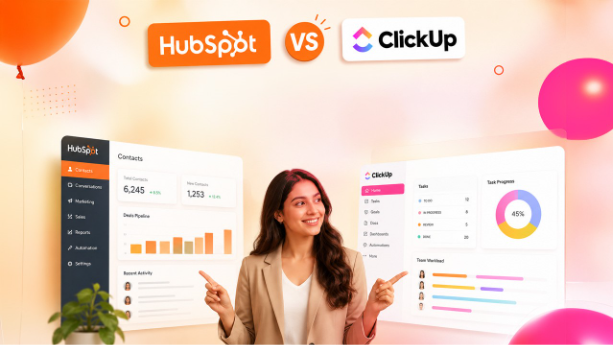

The blog covers the detailed HubSpot vs ClickUp comparison, which includes comparing user interface, contact management, marketing and sales automation, use cases, and pricing of each platform.
HubSpot serves over 228,000 businesses across more than 135 countries, and ClickUp crossed 10 million users faster than almost any productivity tool in its category. Both numbers are pretty impressive. Both platforms are genuinely useful in their own ways.
But the reason why the debate HubSpot vs. ClickUp keeps happening is that businesses continue buying the one software when they literally need the other one. So, here we are showing the real differences in features and use cases so you can clearly determine which tool you actually need for your business.
What Is HubSpot?
what HubSpot is - Hubspot a well-known customer relationship management (CRM) platform that is designed to help businesses manage their customers’ lifecycle. That starts from capturing leads to nurturing them through the sales pipeline and supporting them after a purchase. It basically handles everything related to customer relationships.
HubSpot includes various tools, and each one focuses on one function. One tool helps with Marketing and generating leads, another one helps the sales team track deals and sales automation. Likewise, one handles customer support, and another one manages websites.
SaaS companies, marketing agencies, B2B sales teams, and customer support operations are the most common users of this amazing tool. It's the sort of tool that keeps customer data, communication history, and pipeline activity organized in one place. Teams evaluating similar platforms often look at HubSpot vs Zoho CRM to understand how HubSpot stacks up against another major CRM option before making a decision.
Also Read - HubSpot Features: Everything You Need to Know for Business Growth
What Is ClickUp?
It is an advanced project management solution that manages tasks, documents, goals, and collaboration among teams under one roof. In simple words, it is meant to manage the operations inside a company. You can make use of the tool for planning sprints, managing deliverables, dealing with hectic workflows, and knowing what the next step should be. In other words, by adopting ClickUp, you will get your employees aware of what they should do next.
Some of its most important features include task management across different views (list, board, and timeline), embedded Docs, automation of workflows, dashboards, and even whiteboards.
Startups, remote teams, ops managers, and development teams heavily rely on this tool. Since this tool offers dozens of features in one place, it positions itself as a perfect replacement for multiple productivity tools. This is why it delivers more on its promise for teams.
Quick Side-by-Side Snapshot
Before getting into the details, here's a clear comparison across the most important factors.
| Feature | HubSpot | ClickUp |
| Primary Focus | CRM and sales pipeline | Project and task management |
| Free Plan | Yes (limited CRM features) | Yes (generous features included) |
| Starting Paid Price | $20/user/month | $7/user/month |
| Automation | Sales and marketing workflows | Task and internal workflow automation |
| Native Integrations | 1,500+ | 1,000+ |
| Best For | Sales and marketing teams | Ops, dev, and remote teams |
| Reporting | Revenue and pipeline analytics | Productivity and task dashboards |
| Learning Curve | Moderate | Steeper |
Interface and Ease of Use
HubSpot Keeps the Setup Clean
HubSpot's interface is clean, simple, structured, and approachable. New users can easily access the CRM, add contacts, and build a sales pipeline in a few hours. The navigation is pretty simple and predictable. This means anyone who has used any CRM previously can easily navigate it. So, companies that want to streamline and smooth their operation without a week of configuration, HubSpot is the perfect choice.
ClickUp Is Flexible But Takes Getting Used To
On the other hand, ClickUp gives users a high level of control over how their workspace appears and functions. That control is useful, but in the beginning, it can confuse teams, especially those that are new to project management software. But we assure you that once that phase is over, users can easily get comfortable with it.
HubSpot vs. ClickUp : Features Breakdown

Managing Customers and Contacts
HubSpot leads in this aspect with a clear margin. Its advanced contact management features, like deal tracking, lead scoring, and email communication tools, are custom-built for sales work. Every customer conversation is recorded and organized properly, so reps always know what happened last and what comes next.
Sales teams that also rely on email outreach as part of their pipeline may find the HubSpot vs MailChimp comparison useful for understanding where HubSpot's marketing capabilities begin. ClickUp does have a CRM template option, but it’s not like HubSpot’s CRM, which is highly advanced, loaded with multiple tools to handle the entire operation smoothly.
Task and Project Execution
ClickUp excels here. Kanban boards, Gantt charts, task dependencies, recurring tasks, time tracking, and sprint planning all exist inside ClickUp natively. However, HubSpot has some project-like features in its Service and Operations Hubs, but they're supporting tools rather than the core product.
Automation That Actually Reduces Manual Work
Both systems automate, but each does so differently. To explain, the workflow automation by HubSpot is aimed at selling sequences or marketing activities that involve follow-ups, deal stage changes, and routing of leads to the correct salesperson.
On the other hand, ClickUp's automation deals with internal processes like transitioning cards from one status to another, notifications to teammates, and automatic assignment. The reality is that they both have unique functions, which is exactly why teams often use both.
Reporting and Analytics
HubSpot focuses on revenue, pipeline performance, and marketing ROI. For example, if the company management asks how many deals were closed this quarter, HubSpot has the answer of it.
Conversely, ClickUp's dashboards are built using productive information such as task completeness, workload balance, and sprint speed. Both platforms perform well in analyzing and reporting, but they do so differently.
HubSpot vs. ClickUp : Integrations and Ecosystem
HubSpot connects with more than 1,500 apps through its App Marketplace, including Gmail, Slack, Shopify, and Zoom, giving sales and marketing teams a pretty seamless way to keep everything talking to each other. ClickUp isn't far behind, supporting over 1,000 integrations that lean toward tools like Google Workspace, GitHub, and Zapier.
Both platforms slot into a modern tech stack without much friction. The real difference is in where each one feels most at home: HubSpot gravitates toward sales and marketing workflows, while ClickUp tends to be the better fit for dev and ops teams.
For teams choosing between other pipeline-focused tools, Pipedrive vs HubSpot covers how HubSpot's integration ecosystem compares against another sales-first CRM
Also Read - Best HubSpot Integrations
HubSpot vs ClickUp: Pricing Comparison
While choosing the best CRM for your business, pricing is one of the most practical factors and it is worth examining it closely as pricing structures of both platforms differ significantly.
HubSpot Pricing:
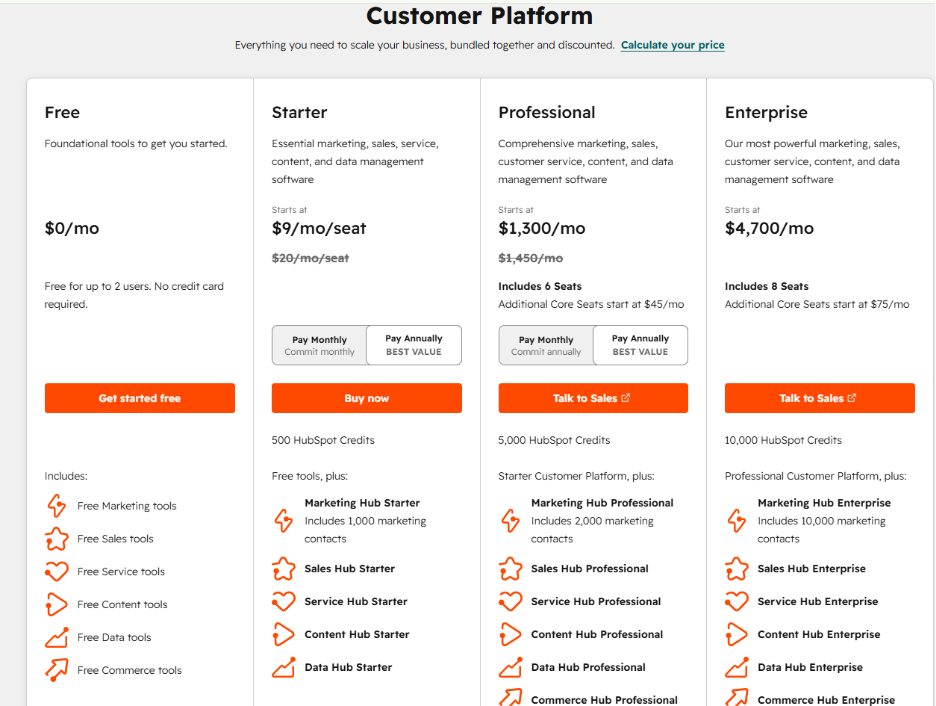
HubSpot Pricing: Complete Guide to Plans, Features, and Cost
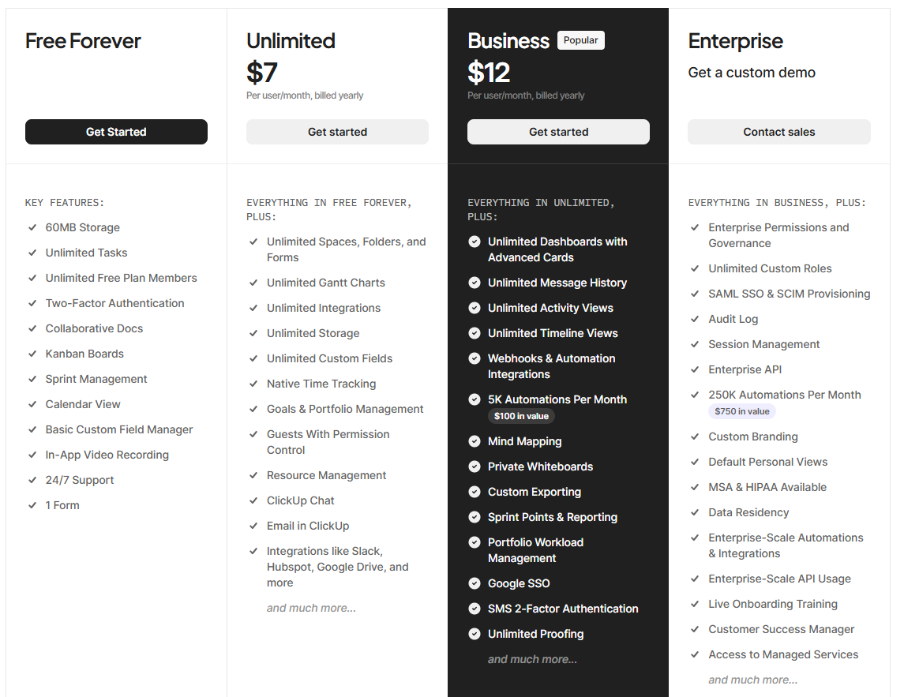
ClickUp Pricing:
Best Use Cases for HubSpot
HubSpot is clearly better suited for teams that operate within the sales cycle. Here’s why:
- SDR teams managing their outreach cadence
- Marketing teams executing nurture campaigns based on contacts
- Agencies managing relationships and deals at their clients’ organizations
- SaaS firms handling customer onboarding and renewals
- Businesses that require a unified place for managing customer communication
The link between all of these cases is that they involve customer interactions. And if relationship management and revenue tracking are the key responsibilities, HubSpot is more than capable of meeting them. Sales teams comparing similar tools focused on pipeline management will also find HubSpot vs Freshsales relevant when narrowing down the right CRM for their team.
Best Use Cases for ClickUp
However, ClickUp works great for teams looking to create and deliver. This includes:
- Remote teams that require visibility into all their projects across different time zones
- Developer teams following agile sprint practices and backlog management
- Content and marketing teams managing editorial calendars
- Start-ups establishing their internal processes and frameworks
These tasks are all about internal execution. ClickUp was designed for organizations that need sophisticated workflow management without growing out of it every six months.
Can You Run Both Platforms Together?
Yes, and most organizations do just that. HubSpot is typically used for customer interactions, whereas ClickUp helps run internal projects. Once the sales team concludes an agreement using HubSpot, the delivery or operations department takes charge of the deal within ClickUp.
There is also an integrated connection available for the two platforms, which minimizes the effort required to operate both simultaneously. While this may not be optimal for all teams, it is highly effective for those with sales and operations working independently.
Also Read
HubSpot vs EngageBay: Choosing the Best CRM for Growing Businesses
HubSpot vs Monday CRM: Which CRM Is Better for Your Business
Strengths and Weaknesses
HubSpot
HubSpot's biggest strengths are its CRM depth, refined sales automation, and relatively clean and easy onboarding experience. The free tier is useful for teams that are not familiar with CRM tools. On the downside, pricing at the Professional and Enterprise levels is a little higher, and the project management features are thin. It works perfectly for mid-size and large sales teams.
Businesses weighing enterprise-level options will also benefit from the Zoho vs Salesforce comparison to see how the broader CRM market is priced and structured.
ClickUp
ClickUp is strong in task management. It offers you a strong free plan and high customizability across use cases. However, weaknesses include the steep initial setup process and occasional performance slowdowns on very large workspaces. It's the better fit for ops-heavy teams, remote teams, and developers.
The Right Choice Depends on How Your Team Operates
The HubSpot vs. ClickUp debate has no single winner. Both tools are crafted for different purposes. The smarter move isn't picking the more popular tool. It’s all about picking the one that matches how your team actually works and what your business genuinely requires.
Therefore, your sales-driven teams may get a strong return on HubSpot's investment, whereas your operations-driven teams will get more value per dollar from ClickUp. Businesses involved in both can take advantage of both tools to improve productivity and scale up their businesses.
Frequently Asked Questions: HubSpot vs. ClickUp
Q1: Is HubSpot better than ClickUp for managing customer relationships?
A1: Yes, definitely. HubSpot is dedicatedly built for customer and sales management, so it is great at contact management, deal tracking, and sales pipeline visibility. Though ClickUp has CRM templates, it is simpler and not considered as advanced as HubSpot due to its depth or automation capabilities.
Q2: Can ClickUp replace HubSpot for sales teams?
A2: Not fully. ClickUp can handle basic sales tracking through custom fields and views, but it lacks native lead scoring, email sequences, and marketing automation features. Sales teams that heavily rely on structured CRM workflows will struggle in the long run, as it has limited capabilities.
Q3: Which platform has the better free plan?
A3: ClickUp’s free version seems to offer better features for daily use by a team than HubSpot, providing unlimited tasks, members, and collaborative documents. HubSpot's free CRM may be fine for contact management, but its feature set is very limited. If you are running a big business, then paid version will be needed.
Q4: How does HubSpot pricing compare to ClickUp for growing teams?
A4: ClickUp scales well as a team grows, while prices start at $7 per user/month. HubSpot starts with a fee of $20/user/month, while the HubSpot Marketing Hub costs will go dramatically higher as you increase your contact database. But it is a worthwhile investment tool.
Q5: Do HubSpot and ClickUp integrate with each other?
A5: Yes, both HubSpot and ClickUp allow seamless integration with proper synchronization between tasks and contacts in the systems. Businesses that use both HubSpot for CRM and ClickUp for project management will definitely configure this integration.