





Here’s a scenario: A company hires a UI/UX designer, hands them a product brief and expects something extraordinary. Six months later, even when the topography looks clean, color gradients are beautiful, animations are smooth, users still abandon your website. The interface is good, but the experience is broken.
UI vs UX is not a debate about preference or specialization; it is a fundamental distinction between two different ways of thinking about design, and confusing the two has real consequences for products, teams, and users.
What Is UX Design?
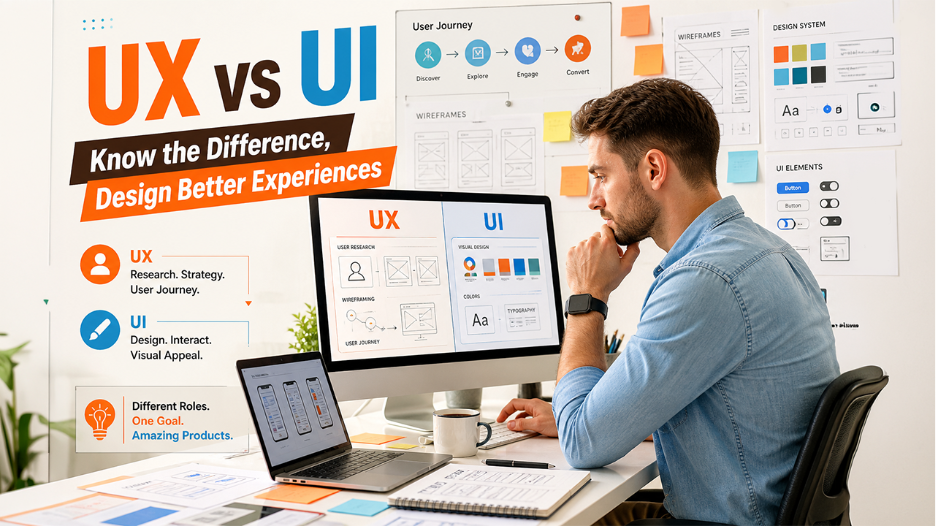
Understanding user experience basics starts here. User Experience (UX) design refers to the process of shaping how a person feels when they first interact with a product whether digital or physical. It is about how a product works and delivers value without friction.
A UX designer asks questions before drawing anything: Who is this user? What problem are they trying to solve? Where do they get confused? What would make this journey easier? UX design encompasses the entire process of acquiring and integrating a product, including aspects of branding, design, usability, and function.
Key Features of UX Design Explained
The elements of user experience span far beyond visuals, here's what UX design actually covers:
- User Research: UX design begins researching user needs, behaviors, motivations, and their pain points by conducting interviews, surveys, and observations.
- Information Architecture: It defines how content and features are structured, so it becomes easy for users to navigate logically and intuitively.
- Wireframing and Prototyping: UX designers create low-fidelity sketches and clickable prototypes to test concepts before any visual design begins.
- Usability Testing: Real users interact with the product at various stages, and their behavior informs what is working and what’s not to make iterative improvements.
- User Journey Mapping: The entire path a user takes; from discovery to task completion is mapped, analyzed, and optimized.
- Accessibility and Inclusivity: UX design considers users of all abilities and ensures the product is usable across different contexts and devices.
What Is UI Design?

If UX is the blueprint of a building, UI is the interior design such as the colors, style, and lighting that sets the mood. UI design refers to crafting the visual and interactive elements that a user actually sees and touches when they engage with the product.
The job of a UI designer is to translate the structure that UX has defined into a polished, cohesive, and visually appealing interface by working on buttons, icons, topography, color systems, spacing, and animations. UI design is the graphical layout of an application which encompasses all the visual elements that users interact with directly; from screens and pages to icons and buttons. It determines whether a product feels trustworthy, playful, minimal, or bold. It is the visual voice of the product.
Key Features of UI Design Explained
These are the essential elements that define how a user interface looks, feels, and responds to user interactions.
- Visual Design: UI designers establish and maintain consistent visual language including color palettes, typefaces, iconography, and imagery.
- Interactive Elements: Every button, dropdown, slider, and form field is designed to communicate its function clearly and respond to user input intuitively.
- Responsive Design: UI design ensures that layouts adapt gracefully across screen sizes, from desktop monitors to mobile devices.
- Design Systems and Style Guides: UI designers build component libraries that are reusable to maintain consistency across an entire product.
- Micro-interactions: Small, purposeful animations and feedback responses like button changing color when hover, are crafted to enhance the sense of responsiveness.
- Brand Alignment: The visual interface must reflect, reinforce, and communicate the brand’s personality, values, and positioning at every touchpoint.
UX vs UI: Key Differences Explained (Side-by-Side Comparison)
A quick side-by-side comparison to clearly understand the core differences between UX and UI design.
| Aspect | UX Design | UI Design |
| Primary Focus | How the product feels and functions | How the product looks and responds |
| Core Activity | Research, strategy, and flow | Visual design and interaction |
| Tools Used | Wireframes, user flows, journey maps | Mockups, prototypes, design systems |
| Deals With | Logic, structure, and usability | Color, typography, and animation |
| Outcome | A smooth, purposeful user journey | A beautiful, consistent visual layer |
| Analogy | The blueprint of a building | The interior design of a building |
| Measures Success by | Task completion, satisfaction, retention | Visual consistency, brand alignment |
Real-World Examples of UX vs UI (Practical Use Cases)
Here are some practical examples that show how UX and UI work together and where they can fail in real products.
Example 1: Google Search
The UX of Google Search is arguably the most refined in digital history. The journey is frictionless; visit Google Search, type your query and receive answers. There are no distractions, unnecessary steps, or cognitive overload. This is due to UX, which offers simplicity in service. The UI, on the other hand, is deliberately minimal: a white background, a single input field, and clean typography. Both work in perfect sync, but they are solving different problems.
Example 2: A Banking App
Imagine a visually stunning banking app with dark mode, fluid animations, and elegant layouts of cards. But when a user attempts to transfer money, they are unable to find the option without navigating through three sub-menus. That is one of the most common user experience mistakes where a beautiful interface is built over a broken journey.
Conclusion
Often, the debate around UI vs UX is framed as a competition, but it is not. UX design and UI design are distinct disciplines with distinct responsibilities, skill sets, and measures of success. You must understand this distinction for professional clarity. Both are essential to build digital products that people actually want to use. It helps your team grasp how products are developed and how success is defined. The companies and creators who grasp it are the ones building digital products that do not just function well or look good but feel right.
Frequently Asked Questions (FAQs) : UI vs UX
UX is how a product works and feels; UI is how it looks and responds visually.
Yes, though at scale, the two roles are typically separated due to the depth each discipline requires.
UX design always comes first, as it defines the structure and flow before any visual design begins.
No, UX principles apply to any product or service where human interaction is involved, including physical products.
Coding is not mandatory, but a working knowledge of HTML and CSS is a significant advantage, particularly in UI design roles.