





Customer relationship management becomes more effective when businesses can manage their daily activities without switching between multiple applications or repeating manual tasks. SuiteCRM offers a flexible platform for managing leads, contacts, sales opportunities, customer interactions, and business operations. However, as a company grows, its standard CRM features may not cover every operational requirement.
This is where SuiteCRM plugins become valuable. They help businesses extend existing CRM capabilities, automate repetitive activities, improve communication, and organize customer information more efficiently. Whether a business wants to streamline lead management, improve email communication, or simplify document handling, the right plugins can make everyday CRM operations easier.
In this guide, we will explore useful plugin categories, practical examples, and important considerations for choosing the right solutions to improve CRM productivity.
Why Are SuiteCRM Plugins Important for Business Productivity?
Managing customer relationships involves several interconnected activities, including lead generation, sales follow-ups, customer support, reporting, and communication. Performing these tasks manually can consume valuable time and increase the possibility of errors.
SuiteCRM plugins help address these challenges by adding specific functionalities to an existing CRM environment. Instead of investing in an entirely new platform, businesses can extend their current system according to their requirements.
Some important advantages include:
- Reduced manual work: Automate repetitive tasks such as data entry, reminders, and record updates.
- Improved communication: Connect email, messaging, and calling tools with CRM records.
- Better data management: Organize customer information and reduce duplicate entries.
- Faster decision-making: Access useful reports and customer insights.
- Flexible customization: Add features according to changing business requirements.
The main benefit is that businesses can improve their existing workflows without unnecessarily complicating their CRM environment.
Best SuiteCRM Plugins and Extensions to Consider
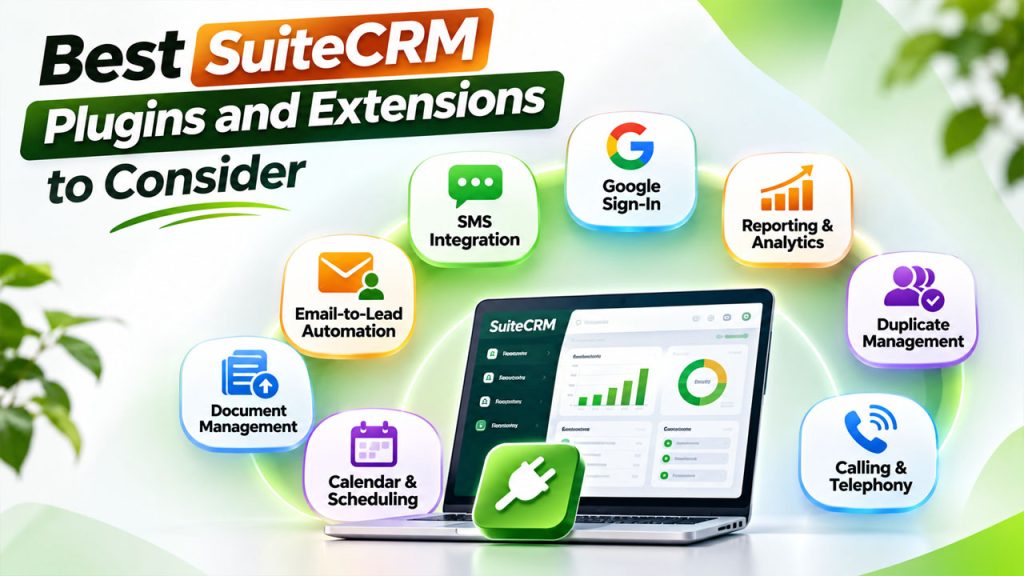
Choosing the right functionality depends on your team's daily activities. Some businesses need better lead management, while others prioritize customer communication or reporting. Here are several useful categories to consider.
1. Email-to-Lead Automation Plugin
Managing enquiries received through different email addresses can become difficult, especially for businesses receiving multiple customer requests every day.
An email-to-lead plugin can automatically convert incoming emails into CRM records. Depending on its configuration, it can capture sender information, email content, and other relevant details before assigning the lead to the appropriate team member.
Key benefits include:
- Automatic lead creation from incoming emails.
- Reduced manual data entry.
- Faster enquiry distribution.
- Better tracking of customer conversations.
This functionality is particularly useful for sales and customer support teams that receive a high volume of enquiries.
2. SMS Integration Plugin
Timely communication plays an important role in maintaining customer relationships. Businesses frequently send appointment reminders, promotional announcements, service updates, and follow-up messages.
SMS integration allows employees to communicate with customers directly through the CRM environment. Teams can use predefined message templates and manage communication more conveniently.
These SuiteCRM extensions can help businesses:
- Send bulk SMS messages.
- Create reusable communication templates.
- Share appointment reminders.
- Improve customer follow-up processes.
- Maintain communication records.
Businesses should also consider customer consent, opt-out requirements, and applicable messaging regulations before implementing bulk messaging functionality.
3. Document Management and Bulk Upload Plugin
Sales representatives, account managers, and support teams regularly handle contracts, invoices, proposals, customer forms, and other business documents.
Uploading these files individually can become time-consuming when working with hundreds of customer records.
A document bulk uploader makes the process easier by allowing users to upload multiple files and associate them with relevant CRM records.
Its practical benefits include:
- Faster document uploads.
- Better organization of customer files.
- Reduced repetitive administrative work.
- Easier access to important attachments.
- Improved document management.
This functionality is especially helpful for businesses that process large volumes of customer documentation.
4. Google Sign-In and Authentication Plugin
Employees often use several business applications throughout the day. Remembering separate passwords for every platform can create unnecessary friction.
A Google Sign-In integration allows authorized employees to access SuiteCRM using supported Google accounts. Depending on the implementation, administrators may also configure domain restrictions and user permissions.
These SuiteCRM add-ons can improve the login experience while helping organizations manage user access more conveniently.
However, authentication should always be implemented with appropriate security controls, including access restrictions and multi-factor authentication where supported.
5. Reporting and Analytics Extensions
CRM data becomes more useful when businesses can understand what is happening across their sales and customer service operations.
Reporting extensions help managers examine business performance through organized reports, dashboards, charts, and other visual summaries.
For example, sales managers can monitor:
- Total leads generated.
- Lead conversion rates.
- Sales representative performance.
- Pending opportunities.
- Customer follow-up activities.
- Monthly revenue trends.
Advanced reporting capabilities can help teams identify performance gaps and make decisions using actual business information rather than assumptions.
6. Duplicate Record Management Plugin
Duplicate customer records are a common CRM challenge. A single customer may appear multiple times because of different email addresses, phone number formats, or manual data entry mistakes.
Duplicate management functionality helps identify similar records and gives administrators options to review, merge, or remove unnecessary entries.
Useful features may include:
- Duplicate detection based on email addresses.
- Phone number and name matching.
- Configurable duplicate identification rules.
- Record merging.
- Periodic duplicate checks.
These features help maintain accurate customer databases and prevent employees from contacting the same prospect multiple times.
7. Calendar and Appointment Scheduling Integration
Sales representatives and account managers regularly schedule meetings, demonstrations, consultations, and follow-up calls.
Calendar integration helps connect CRM activities with external scheduling platforms. Employees can coordinate appointments, review upcoming meetings, and reduce the need for manual calendar updates.
Some useful capabilities include:
- Meeting synchronization.
- Appointment scheduling.
- Calendar reminders.
- Activity tracking.
- Meeting-related customer records.
A well-configured calendar integration makes it easier for teams to manage their schedules and avoid missing important customer interactions.
8. Calling and Telephony Integration
Customer communication often requires direct conversations rather than emails or text messages. A telephony integration can connect calling functionality with CRM records.
Depending on the selected solution, employees may be able to make calls, receive incoming calls, view customer details, and maintain call histories within their CRM environment.
Important capabilities include:
- Click-to-call functionality.
- Incoming call notifications.
- Call history tracking.
- Call recordings, where legally permitted.
- Automatic call logging.
These features can be particularly useful for sales departments, contact centers, and customer support operations.
How to Choose the Best SuiteCRM Modules for Your Business
Not every business needs the same CRM functionality. Installing too many plugins without a clear purpose can increase maintenance requirements and create unnecessary complexity.
Before selecting the best SuiteCRM modules, evaluate your existing processes and identify the areas that require improvement.
Consider the following factors:
1. Identify your business requirements: Determine whether your biggest challenge involves lead management, customer communication, reporting, or document handling.
2. Check version compatibility: Verify whether the plugin supports your installed SuiteCRM version and environment.
3. Evaluate integration capabilities: Make sure the solution works with your existing applications, databases, and business workflows.
4. Review security standards: Check authentication, permissions, data access, and update policies before installation.
5. Test before deployment: Use a staging environment to identify potential conflicts with existing customizations.
6. Consider ongoing support: Choose solutions with reliable documentation, maintenance, and technical assistance.
A practical approach is to start with one or two high-priority improvements, evaluate their impact, and gradually expand the CRM environment.
Common Mistakes to Avoid When Installing CRM Extensions
Although additional functionality can improve productivity, poor implementation can create technical and operational problems.
Avoid these common mistakes:
- Installing plugins without checking compatibility.
- Ignoring security updates and maintenance.
- Adding duplicate functionality.
- Overlooking employee training.
- Modifying production environments without backups.
- Selecting extensions without evaluating their business value.
Businesses should also review how plugins affect CRM performance. Too many unnecessary integrations can increase server workload and complicate troubleshooting.
Final Thoughts
Improving CRM productivity is not simply about adding more features. It is about identifying operational challenges and selecting the right tools to solve them.
SuiteCRM plugins can help businesses automate lead capture, improve customer communication, organize documents, simplify scheduling, and generate meaningful reports. The right combination of functionality can reduce repetitive work while allowing employees to focus on customer relationships and business growth.
Before investing in additional functionality, evaluate your existing workflows, check compatibility, and test each solution carefully. With the right implementation strategy, SuiteCRM can become a more flexible and productive platform that supports your organization's changing requirements.