





Multipoint Control Unit (MCUs) plays a crucial role in allowing scalable video communication. They work as network bridges and allow smooth and efficient ways of video conferencing. MCUs enable numerous participants to establish real-time connections and interactions. By handling video and audio streams, MCUs ascertains a reliable and smooth communication experience. In this article, we will explore MCUs, essentially what they are, their role, and how they interoperate. Let us get right into it-
What Is an MCU?
Definition of MCU: The Multipoint Control Unit (MCU) architecture is defined as a type of architecture for video conferencing that links numerous video call locations simultaneously. It allows many people to join the same video chat. The centralized unit manages the ins and outs between different locations. They are essentially the software and hardware components dedicated to managing, routing, and controlling video and audio streams in a video conferencing system.
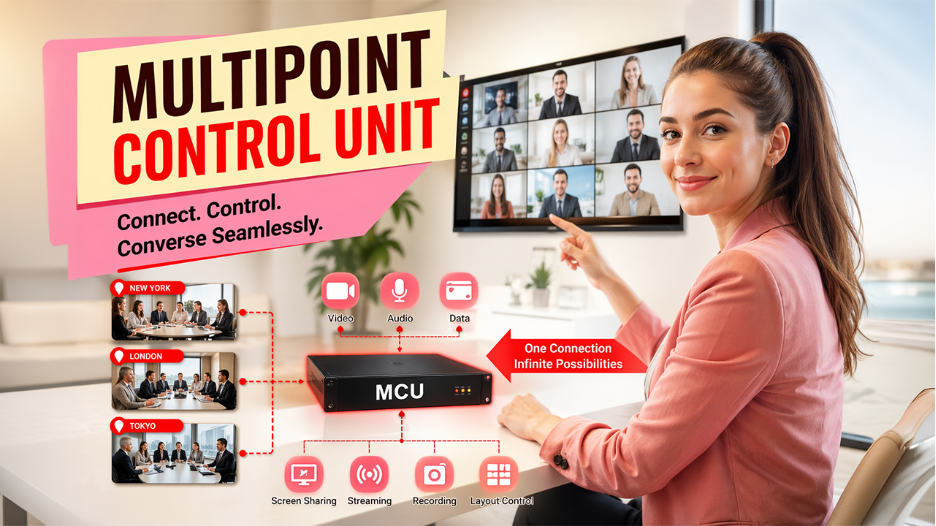
Before MCUs were introduced, video calls were restricted to point-to-point communications. MCUs enable multipoint communication via mixing. The multipoint control unit combines the video, audio, and data from every spot into a single feed. It sends this mix to different locations on the call. So, MCUs basically allow teams working remotely to collaborate in real-time.
The high-user Multipoint Control Units today utilize innovations such as transcoding to provide support to more users per call. MCU systems generally combine with other infrastructure, such as gateways and gatekeepers, to enable more capabilities. Overall, MCUs are quite important for seamless video calls between global companies. They form the pillar of conferencing, uniting teams spread throughout.
How Does the Multipoint Control Unit Work?

Multipoint Control Unit works by fetching video and audio feeds from every participant in video conferencing. The Multipoint Control Unit must mix them smoothly with different audio and video streams going in and out. It involves syncing distinct streams to make sure everyone sees and hears each other in real-time. Consider an orchestra conductor synchronizing different instruments to create a pleasant sound. The MCU performs the same thing for video and audio streams.
There is software and hardware Multipoint Control Units. Hardware MCUs are separate devices used just for video conferencing. Software MCUs are installed on the devices for different use cases. MCUs also come in varying sizes and setups as per the number of people and needed features.
Multipoint Control Units also use distinct algorithms to streamline video and audio quality and minimize the consumption of bandwidth. For instance, they can adjust the resolution of the video feeds, bitrate, and frame rate as per the available bandwidth and the type of devices that people are using. Audio feeds can also be prioritized based on who is speaking or the location of sound.
There are also additional features in MCUs including streaming, recording, screen sharing, and content sharing. They can incorporate other platforms, such as scheduling, room control, and management platforms.
In summary, Multipoint Control Units are crucial parts of systems for video conferencing. They allow multiple people to smoothly interact and collaborate by processing, combining, and receiving feeds. MCUs also provide you with additional features such as screen sharing and recording.
A Quick Look at MCU in Action
Now that you have understood how an MCU (Multipoint Control Unit) works, let us see a simple example with a code to understand it with a perspective. The snippet given below showcases how an MCU connects numerous participants, processes their individual streams, and demonstrates a centralized feed to everyone who is on the call.
# A standard example of setting up a session of MCU video conference:
mcu = MultiPointControlUnit(host="mcu.server.com", port=5060)
# Connect participants
mcu.add_participant("Alice", stream_url="rtsp://alice.stream")
mcu.add_participant("Bob", stream_url="rtsp://bob.stream") mcu.add_participant("Charlie", stream_url="rtsp://charlie.stream")
# Mix and broadcast combined stream
mcu.mix_streams(output="conference_feed")
mcu.broadcast()
What Are the Types of Multipoint Control Units?
Multipoint Control Units vary in types, each specialized for distinct locations. Choosing the right one depends on different things such as how many people will be there in the meeting, the features you need, and your budget. Let us see some different types of MCUs such as:
- Software MCU:
Unlike Hardware MCU, software MCUs are not physical devices, but rather installed on device. It is more flexible and cost-effective, useful for small businesses and last-minute meetings. However, it might not be as scalable or powerful as the hardware version.
- Hardware MCU:
The hardware MCU can be defined as a physical device that is useful for large enterprises that need a large number of virtual meetings daily. It really works well and can manage many people, but it incurs a lot of upfront costs and requires consistent maintenance.
- Cloud-based MCU:
This is a relatively new type of MCU that utilizes cloud resources for video meetings. It is quite simple to scale, and you only need to pay for what you are using. However, you must have a solid internet connection, and there are concerns about security among people.
- Hybrid MCU:
This type integrates both hardware and software. It is flexible, scalable, and adjustable to your requirements. It creates a fine balance between power and cost.
Selecting the right multipoint control unit depends on your requirements. Consider aspects such as how many people will be there in your meeting, how effectively it needs to work, your budget, and whether it aligns with what you are using already. In this way, you can make an intelligent choice that meets your requirements.
MCU Roles in Video Conferencing
Multipoint Control Units play a crucial role in making video conferencing as smooth as possible. They operate as the main coordinator, handling data streams and video connections on a video call. Here are important tasks MCUs do:
- Connect Different Locations:
One of the important roles that MCU plays is connecting numerous video call screens from different spots. The MCU integrates all the audio and video feeds into a single shared video conferencing. This enables people to call from different places to hear and see each other at the same time.
- Handle Conference Layout:
MCUs manage how the video call shows on the screen. For instance, they can transition between a person taking over the mic on a big person and then showing other team members in a distinct grid. MCUs manage smooth optimization of what and why do you see.
- Mix Video and Audio Layout:
MCUs combine video and audio into seamless streams. They make sure that video and audio are clear by managing sound volume, optimizing sharpness in video, and filtering background noise. This provides a top-quality video conferencing experience where everyone hears and sees each other clearly on any kind of device.
MCUs manage the complexities that drive video calls. Ranging from connecting people to handling bandwidth usage and display layouts. This enables a seamless and flexible video call experience that users desire today.
What Are the Advantages and Disadvantages of Multipoint Control Unit Architecture?
By now, you must have had a clear idea on the fundamentals of Multipoint Control Unit Architecture. Now, let us look at their benefits and demerits. This will help you make an informed choice on whether they are right for you or not.
Benefits of MCUs
- Efficiency in Single Stream
Every participant has to subscribe to one combined stream of video instead of numerous feeds. This vastly minimizes client browser resource usage for bandwidth consumption and decoding.
- Streamlined Integration of Client:
Using just a single stream, debugging and integrating seamless video chat experiences is much simpler on the front-end. Complexity moves more toward the back end.
- Centralized Layout:
The central server defines a set conferencing layout, making sure all participants share the same coordinated view without requiring manual control.
Demerits of MCUs
- Limited Control in Layout
Users cannot maximize a specific feed or reorder streams since the layout is fixed on the server side.
- Overhead of High Server
The computational cost of encoding, decoding, and mixing all the video feeds requires great processing power on the back end. Mostly, scaling is vertical through upgrades.
- Improved Latency
Mixing causes minor delays over forwarding streams simply. Errors affect the views of the participants globally.
Selective Forwarding Units (SFUs) Vs Multipoint Control Units (MCUs)
While Multipoint Control Units (MCUs) have been conventionally utilized for video conferences between multiple parties. Numerous solutions for video conferencing are now powered by Selective Forwarding Units (SFUs).
SFUs are software applications that direct and forward video streams between participants in a call. Contrary to MCUs, which integrate streams, SFUs route packets selectively as per each recipient. This prevents redundant scaling and transcoding.
Main Advantages of SFU Architecture
- More Scalable: SFUs can manage thousands of participants without video quality degradation. MCUs are limited in comparison as per the compatibility of hardware.
- Personalizable Viewing Experience: There is total flexibility for viewers to select which streams to showcase, where to view them on screen, and the overall quality in resolution.
- Less Latency: SFUs showcase causes less delay since there is no media encoding/decoding. This allows seamless interaction.
- Cost Effective: SFU software operates on generic servers and has predictable costs as per usage. MCU hardware is extremely costly.
MCU Cost Analysis
MCU servers need considerable resources across the three main categories. Computation costs involve high-performance CPUs for transcoding, GPU acceleration for video processing, and individual video processing software. Network costs involve high bandwidth needs, guarantees of service quality, and global distribution needs of low latency. Operational costs cover 24/7 maintenance and monitoring, failover systems and redundancy, and compliance and security requirements.
SFU Vs MCU: Cost Comparison
| Architecture | Bandwidth Cost | Infrastructure Cost | Client Device Cost |
| MCU | Medium | Very High | Low |
| SFU | High | Medium | Medium |
When to Use MCU Architecture?
Ideal Use Cases
MCU architecture is quite proficient in numerous scenarios. It is specifically well-suited for legacy support of devices, managing older hardware with limited power of processing, devices without modern codec support, and restricted bandwidth ecosystems. Controlled ecosystems include corporate networks, educational institutions, and government applications to benefit from the central control that MCUs provide. Specific requirements that make MCUs more attractive involve the need for processing on the server-side, adhering to recording regulations, and incorporation with legacy platforms.
When Should You Avoid MCU?
MCUs are not ideal for all use cases. Privacy-critical apps such as legal proceedings, healthcare consultations, and confidential business meetings must avoid MCUs because of the inability to render end-to-end encryption. Cost-sensitive projects involving community projects, startup apps, and small-scale deployments may find the infrastructure expenses annoying. Modern apps where devices have adequate processing power, low latency is vital, or end-to-end encryption is needed are better suited by alternative architectures.
Migration from MCU
Numerous organizations are switching from MCU to a more modern architecture:
Migration Strategies
- Hybrid Approach:
- SFU for modern clients
- Utilize MCU for legacy devices
- Gateway between numerous architectures
- Phased Migration:
- Feature parity testing
- Gradual transition by region/department
- Performance tracking
- Complete Replacement:
- Client Upgrades
- Complete migration to SFU/Hybrid
- Modernization of Infrastructure
Conclusion
Multipoint Control Unit is a highly popular foundational technology we use in video conferencing, specifically for legacy platforms, controlled corporate environments, and closely regulated industries. While advanced alternatives such as SFUs provide higher scalability and lower latency, MCUs are still valuable where server-side processing and centralized control are non-negotiable. As businesses continue to grow their communication infrastructure, understanding the advantages and demerits of MCU architecture aids in making future-ready and intelligent decisions for smooth collaboration across distributed teams.