





Most AI detection problems trace back to one decision: the wrong rewrite method for the task. We tested three approaches against ZeroGPT and GPTZero, and this article shows you how to humanize text to avoid AI detection using a proven paraphrasing and humanization workflow.
It maps which method fits which situation and gives you the exact sequence that brought our average detection score to 4.45% across two detectors.
Three Terms That Solve Three Different Problems
Rephrasing and paraphrasing are not the same operation. A Rephrase substitutes words and shifts clause order, but the sentence architecture stays intact, and so does the statistical pattern that the detectors read. A paraphrase forces a full structural rebuild: you read the original once, then reconstruct the idea in different words with a different sentence length and a different clause order. The result is a new sentence that carries the same meaning but none of the original pattern. That distinction matters because detectors track architecture and word-frequency signatures, not individual vocabulary – a conclusion supported by peer-reviewed research confirming that AI-generated text retains statistically detectable stylistic signatures regardless of content. Synonym substitution does not move a score. Structural reconstruction does.
Humanization operates at a level above both. A full article processed paragraph by paragraph can still carry a flat, uniform cadence because AI output has a statistical signature at the document level, not just at the sentence level. To humanize text to avoid AI detection, a dedicated tool targets that document-level signature: rhythm variation across sections, lexical diversity, and transition phrasing that does not repeat on a fixed interval. This is what separates humanization from an attempt to rewrite AI text manually at scale, and it is why the two operations belong in sequence rather than in competition.
The difference between rephrase, paraphrase, and humanize comes down to depth – the table below shows what each method changes and where it runs out.
| Rephrase | Paraphrase | Humanize | |
| What changes | Words and clause order | Full sentence structure and vocabulary | Rhythm and statistical patterns across the full text |
| What stays the same | Sentence architecture and detection pattern | Core meaning and argument | Meaning and factual content |
| Moves detection score? | No | Yes, for rewritten sections | Yes, for the full document |
| Typical use case | Style edits on your own drafts | Rewriting flagged AI paragraphs | Full AI document ready for publication |
Which Method Fits the Task
Use rephrase for style and clarity on text you wrote yourself. It does not lower detection scores. In our tests, rephrased AI text scored within 3 points of the original. The underlying sentence structure is untouched, and that structure is what detectors flag.
Use a paraphrase when a detector flags specific paragraphs or when source material needs to be integrated into your own text without carrying the original structure. When you paraphrase AI-generated text to avoid detection, the method is structural reconstruction, not word replacement. Read the paragraph, close it, and write the idea without the source visible. That single constraint forces a real rebuild. Writers who paraphrase effectively produce text that shares the meaning of the original but none of its pattern signature. A Reddit discussion on the topic confirms the same conclusion: what lowers detection scores is structural rewriting and sentence length variation, not synonym substitution.
Use humanization when the full document is AI-generated or when a paraphrase alone has brought detection below 35%, and you need to close the rest of the gap. Run the humanizer after the paraphrase pass, not before. In our tests, the order outperformed the reverse in every trial because the tool works best on text that has already had its highest-risk paragraphs rebuilt at the sentence level.
Writers who want to further improve detection scores can also explore additional techniques to bypass AI content detection, including manual sentence restructuring and rhythm variation strategies discussed in detail.
How to Paraphrase and Humanize Text to Avoid AI Detection Step by Step
The workflow below runs paraphrasing and humanization in sequence. Use the paraphrase AI-generated text to avoid detection tool in Clever AI Humanizer for the flagged sections first, then run a full humanize pass on the complete revised text.
Step 1. Run the Detector and List the Flagged Paragraphs
Paste your draft into ZeroGPT or GPTZero and note which paragraphs the tool flags as AI-generated. Copy those sections into a separate document before you touch the original. This is the list you work from. Do not start until you have it.
Before rewriting, it helps to understand how modern platforms detect AI writing and why sentence structure, repetition, and predictable rhythm often trigger detection systems like GPTZero and ZeroGPT.
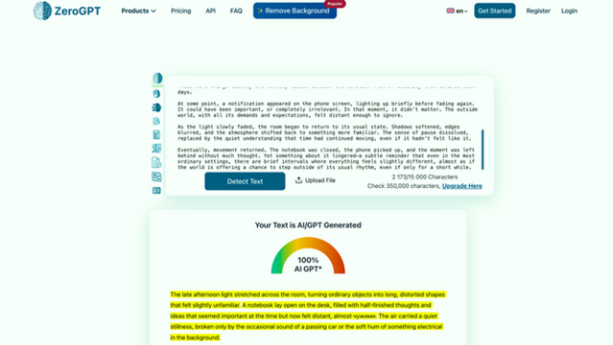
Step 2. Run Each Flagged Paragraph Through the Clever AI Humanizer Paraphrase Tool
Open Clever AI Humanizer and select the Paraphrase tool. Paste one paragraph at a time and check the output against the original for meaning. If the structure is too similar to the source, run it again or move to Step 3.
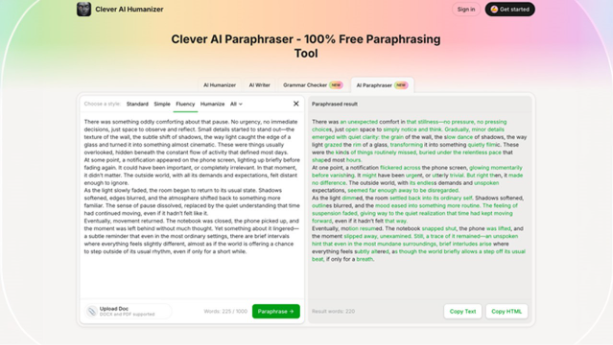
Step 3. Rebuild Any Remaining Paragraphs From Memory
Read the paragraph once, close the source, and write the idea from memory. Without the original on screen, you cannot follow its structure unintentionally. Vary sentence length and replace abstract nouns with specific verbs. Human-like writing techniques share one trait: irregular rhythm. Apply that rhythm here to make writing not AI detectable at the sentence level – before the full humanize pass runs.
Step 4. Run the Full Revised Text Through Clever AI Humanizer at Maximum Mode
Paste the complete revised draft into Clever AI Humanizer to humanize text to avoid AI detection at the full-document level. The tool targets sentence rhythm across sections and lexical range that paragraph-level work does not reach. In our test across three separate texts and two detectors, Clever AI Humanizer returned an average detection score of 4.45%. Individual results ranged from 0% on ZeroGPT to 14.71% on the same detector for a harder text – the two-pass sequence produced results that paraphrasing alone did not approach.
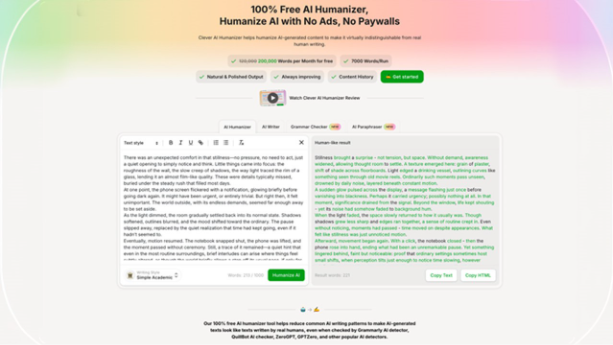
Step 5. Re-run the Detector and Finish with a Grammar Pass
Paste the complete revised draft into Clever AI Humanizer to humanize text to avoid AI detection at the full-document level. Any section still above 20% goes back to Step 3. Read the full text out loud and restore any specifics that the rewrite process stripped from technical sections. Then run Clever AI Humanizer's Grammar Checker as a separate final pass because maximum humanization and grammar quality move in opposite directions at aggressive settings.
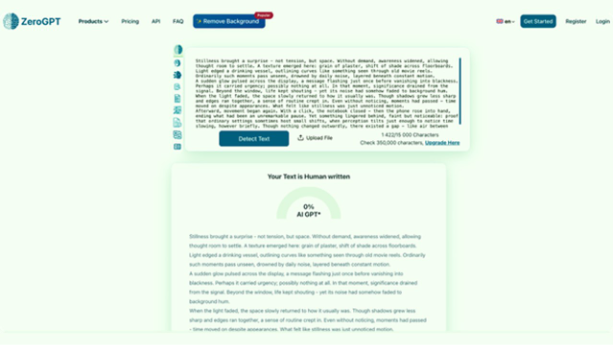
What the Final Output Should Look Like
In our test, Clever AI Humanizer returned 0% detection on ZeroGPT for two of three texts and scored 1% and 11% on GPTZero, respectively. The average across all six detection checks was 4.45%. Grammar scores across the three texts averaged 92.6 out of 100. If a sentence sounds over-edited after the humanizer, a single rephrase on that line restores it.
Rephrase vs Paraphrase vs Humanize at a Glance
The table below shows how each method performs across the five criteria that matter for detection avoidance.
| Rephrase | Paraphrase | Humanize | |
| Depth | Surface – word and clause level | Deep – full sentence rebuild | Pattern-level across the full text |
| Typical use | Clarity edits on your own drafts | Rewriting AI paragraphs or source material | Full AI document ready for publication |
| Changes structure? | Rarely | Yes – intentionally | Yes – at scale across sections |
| Moves detection score? | No | Yes, for rewritten sections | Yes, for the full document |
| Best for AI-generated text? | No | Partially – flagged paragraphs | Yes – full-document solution |
Final Words
Three details did not fit the main workflow but matter in practice.
Clever AI Humanizer runs all three tools on one platform: the Paraphrase tool, the Humanizer, and the Grammar Checker. The five-step workflow above runs without text transfers between services. The word limit on the free plan is 200,000 words – enough to process full articles in one session without hitting a cap.
On detector thresholds: ZeroGPT and GPTZero do not always agree. In our tests, the same text scored 14.71% on ZeroGPT and 0% on GPTZero simultaneously. A different text scored 0% on ZeroGPT and 11% on GPTZero. If you need to pass both, target below 15% on the stricter detector and re-run until both confirm that threshold.
On order of operations: run the humanizer after the paraphrase pass, not before. Unmodified AI output fed into the humanizer at maximum mode does lower the score, but it produces more grammar errors and can lose meaning in technical sections. Paraphrase the flagged paragraphs first, and the humanizer works with cleaner material.
The combined paraphrasing and humanization workflow works best when your goal is to humanize text to avoid AI detection without losing clarity or factual accuracy.
Frequently Asked Questions (FAQs) : Humanize Text to Avoid AI Detection
No. Rephrasing adjusts words and clause order but leaves the sentence architecture intact. Detectors read that architecture, not vocabulary. To paraphrase text to avoid AI detection, you need a full sentence rebuild from scratch, not a synonym pass. Writers who paraphrase effectively do not look at the source while they rewrite.
Yes. Read the paragraph, close the source, and write from memory. The failure mode is the original left visible on screen: you replicate its structure while you change words, which is rephrasing, not paraphrasing. The manual method in Step 3 works well for short texts or resistant paragraphs. For longer documents, use the Clever AI Humanizer Paraphrase tool first.
When the document is long enough that paragraph-by-paragraph rebuilds take more time than the task justifies, or when the paraphrase has brought detection below 35%, and the gap still needs to be closed. Clever AI Humanizer applies rhythm-level changes that manual work does not reach at scale.
It should not. The risk is over-rewrite: too much reconstruction strips specificity, and the output says less than the original text did. Read each rewritten paragraph against the source before you run the humanize pass and restore any missing detail.