






Handling DNS settings can be slightly complicated task, specifically for website owners who require to set up dynamic IP addressing, configure forwarding, or business email, all without an in-depth technical background. Google Domains synthetic records provide a simplified solution that removes the need to create and handle diverse individual DNS records manually. Irrespective of whether you are redirecting a subdomain, configure a home server, or connecting a Google Workspace account, being familiar with Google Domains synthetic records can save a lot of effort and time.
What Are Google Domains Synthetic Records?
Google Domains synthetic records can be defined as a collection of DNS records that are configured automatically. Instead of needing users to add numerous resource records manually like CNAME records, A records, and MX records, a single synthetic records bundles and applies all required configuration in one single step.
It is significant to make note of the fact that synthetic records are a unique concept in Google domains. If your domain name provider is different, then this option does not exist for you.
This feature can be accessed through a DNS settings panel of any domain registered with Google Domains. It is specifically valuable for users who require professional DNS configurations without going through complex structures of record.
Presently, Google Domains provides three key types of synthetic records:
- Subdomain forwarding — Redirects a root or subdomain to a particular URL.
- Dynamic DNS — Connects a subdomain to an IP address that is dynamically assigned.
- Google Workspace (formerly known as G Suite) — Automatically sets up MX records and CNAME for business email.
Different Types of Google Domains Synthetic Records and How Do They Work
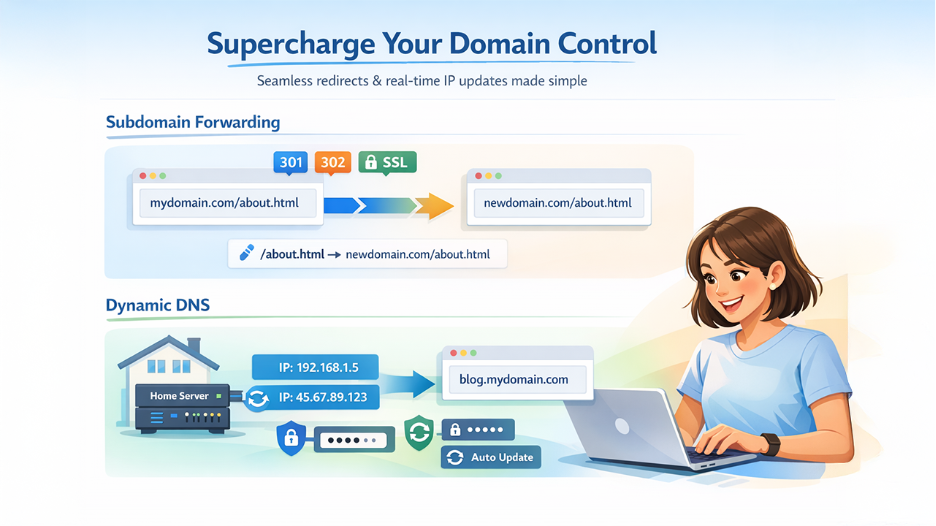
1. Subdomain Forwarding
Subdomain forwarding is one of the most prevalently used Google Domains synthetic record types. It enables domain owners to redirect traffic from subdomain or domain to a different URL, without needing to set up CNAME entries or individual A records.
When you transfer or buy a domain to Google Domains, you can point your domain to a different address to drive your traffic to a single location.
Important configuration options available within subdomain forwarding synthetic records involve:
- Redirect type — Select between a permanent (HTTP 301) redirect or temporary (HTTP 302) A temporary redirect enables fast changes to your forwarding address, while a permanent redirect enables browser cache the forwarding address, which can help in resolving the address quickly on subsequent visits.
- Path forwarding — Path forwarding allows you to forward the path after the domain to the same path at the new domain. When you turn on your path forwarding, a URL like documentationexample.com/about.html easily redirects to example.com/about.html. However, once you turn off path forwarding, it just redirects to example.com only.
- SSL forwarding — When you enable SSL, forwarding is quite effective for both HTTPS and HTTP requests. However, you might see warning that the SSL certificate has not been created yet, as this process can take as much as the whole day to finish.
2. Dynamic DNS Synthetic Records
For users who operate self-hosted applications or home servers, Dynamic DNS (DDNS) is vital. The majority of residential web connections leverage IP addresses that periodically change. A Dynamic DNS synthetic record in Google Domains resolves this issue by enabling a subdomain to update automatically and display the present IP address.
Google Domains ensures a separate username as well as password combination for every domain, which provides a distinct security edge over other dynamic DNS service.
Key Steps to Create a Dynamic DNS Synthetic Record:
- Go to the DNS settings of your domain in Google Domains.
- Go down to the section of Synthetic Records.
- Choose Dynamic DNS from the available list of different synthetic record types, then provide the resource name you plan to assign a dynamic IP, which can be a subdomain or @ for your root domain.
- Select Add to proceed to create the record.
- Select the expand triangle available next to the record to check its values, then see
“Value Credentials” to see the username and password generated for the synthetic record.
- Utilize the credentials to set up a DDNS client on your gateway device or server.
Learn More: Being familiar with how DNS modifications traverse across the web is as important as configuring them. If you need an in-depth look at how the updates spread globally after you change the records, check out our blog on What Is DNS Propagations and Its Impact on Website Performance.
3. Google Workspace Synthetic Records
For organizations utilizing Google Workspace (formerly known as G Suite) having a custom domain, Google Domains streamlines the complete setup process via a dedicated synthetic record type.
By setting up the Google Workspace synthetic record, you can easily authenticate your domain in advance and include the necessary MX records simultaneously, routing to Google mail servers and validating ownership with a CNAME in a single step.
This removes the need to look up and provide each CNAME and MC value individually. Otherwise, this process is quite prone to errors and is time-taking.
Advantages of Utilizing Google Domains Synthetic Records
Google Domains synthetic records provide numerous possible benefits for both non-technical and technical users:
- Streamlined configuration — Numerous DNS records are automatically created through a simple entry, minimizing setup time.
- Error reduction — Pre-set bundled records reduce the possibilities of misconfiguration that can take email services or websites offline.
- SSL support — SSL is supported by forwarding configurations, enabling it to make sure that HTTP connection is secure.
- SEO value preservation — A permanent redirect (301) lets search engines know that your website has moved to a new location permanently, retaining your SEO strength. Proper domain forwarding can aid in retaining a major portion of your SEO value while moving your website.
Read More: SEO Journey for Beginners
- Dynamic IP management — The Dynamic DNS synthetic record ensures that your subdomain is accessible even when your IP address is changed, making it preferable for remote access setups and home servers.
Conclusion
Google Domains synthetic records are an effective feature that enhances accessibility, efficiency, and reliability of DNS management. From set up of subdomain forwarding with SSL and path options, to setting up Dynamic DNS for home servers, to simplifying Google Workspace email set up. Such records automatically manage complex configurations. If you handle a domain on Google Domains, benefiting from synthetic records can minimize manual effort, reduce errors, and make sure that digital presence is more professional and stable. Comprehending the three main types such as Dynamic DNS, subdomain forwarding, and Google Workspace puts you in an effective position to handle DNS of your domain with great confidence.