





Let's understand this with a scenario: suppose your sales team is looking at numbers in one system, the marketing team is pulling reports from another, and finance is working with a spreadsheet that someone updates manually, if they remember. And amidst this, a customer complains that their order status is not reflected correctly. This happens because three different systems have three different answers.
Businesses don’t lack data; rather, they are drowning in it. The real problem is that this data is scattered, lives in disconnected systems, updates on different schedules, and rarely agrees with each other. That's where data integration tools become important. They are an infrastructure that makes modern businesses actually functional.
What Are Data Integration Tools?
A data integration tool is software that extracts data from multiple sources, cleans it up, and brings it together into one unified format that can be used by businesses to achieve their goals. They act like a translator and a matchmaker that takes information from your CRM, e-commerce platforms, accounting software, and marketing tools to extract meaningful insights for people and systems to understand it.
You must be wondering why this matters now more than ever? The answer is simple: AI and speed. Every AI model, dashboard, and smart business decision that your company wants to make depends on accurate, current, and complete data. If you provide AI systems with outdated and fragmented data, you’ll get fragmented and outdated answers back.
Key Functions of Data Integration Tools
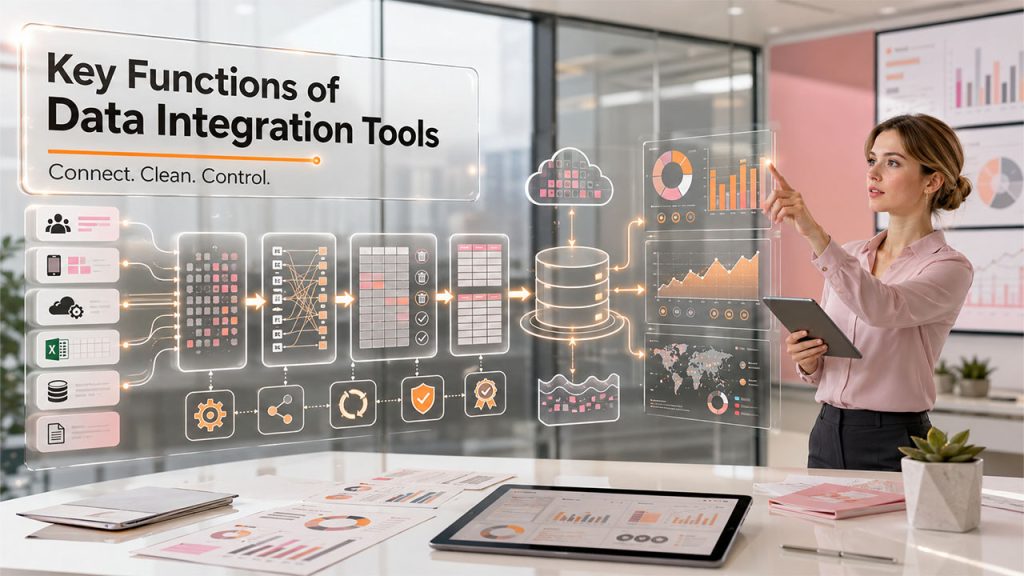
Effective data integration starts with understanding the core functions that collect, transform, govern, and unify data from multiple sources into a reliable, business-ready asset.
Data Extraction: These tools access your various data sources, such as CRM databases, apps, APIs, flat files, and cloud platforms, and pull out all relevant information. It might sound simple, but it’s trickier than you think because every source has its own format, structure, and quirks.
Data Mapping: This essentially means figuring out how a field in one system corresponds to a field in another. For instance, say, matching "Customer_Name" in your CRM to "Client" in your billing software. When you get it wrong, data ends up landing in the wrong place, or worse, it might not land at all. Good mapping is what makes sure everything lines up correctly before the heavier lifting begins.
Data Transformation: Raw data is not fit for use. It needs to be cleaned, standardized, and reshaped to convert currencies, fix inconsistent date formats, and remove duplicates. This is where “ETL” (Extract, Transform, Load) gets its name. However, there are some modern tools that flip the order and transform after loading, which is called ELT (Extract, Load, Transform).
Data Loading: This is where cleaned-up data lands in its destination, usually a data warehouse or data lake. Then it is ready to be queried, analyzed, or visualized.
Data Governance and Quality Control: Good integration tools don't just move data; they track its origin, who can access it, and whether it meets your organization's standards. Without this layer, you're just moving mess from one place to another, faster.
7 Types of Data Integration Tools and Their Use Cases
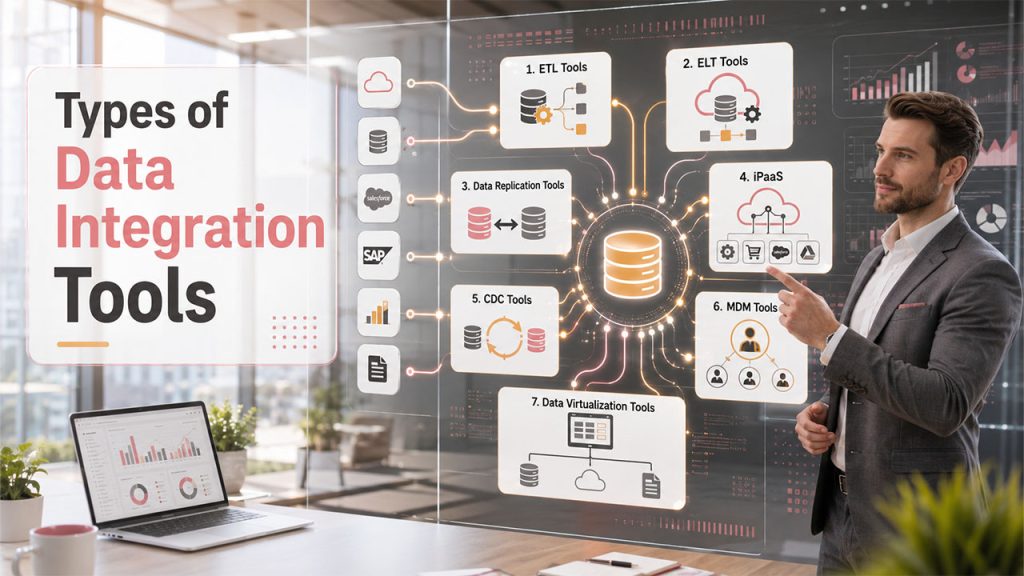
Not all data integration tools work the same way. Some focus on batch processing; others enable real-time synchronization, while some provide a complete integration ecosystem.
1. ETL (Extract, Transform, Load) Tools
ETL tools, like Coupler.io and alternatives, extract data from source systems to transform it into a clean and consistent format and then load it into a centralized warehouse. They typically run on a schedule such as hourly, nightly or weekly rather than instantly.
Best used when your business relies on structured reporting and doesn't need real-time updates, such as monthly financial summaries or quarterly performance reviews.
2. ELT (Extract, Load, Transfer) Tools
They first load data into the warehouse, then transform it right there using the warehouse’s own processing power. It has become popular alongside cloud warehouses like Snowflake and BigQuery because they handle heavy transformation workloads without struggling.
Best used when: you're working with large volumes of raw data and want speed without bottlenecking on transformation upfront.
3. Data Replication Tools
These tools copy data from one system to another, keeping both in sync. This comes in handy during disaster recovery, backup systems, or when you want to maintain a mirrored database for testing without touching the live one.
Best used when: you need consistency across multiple environments or systems without altering the underlying data structure.
4. iPaas (Integration Platform as a Service)
iPaaS solutions are cloud-based platforms that connect applications, systems, and data sources without requiring heavy infrastructure or coding. They often use pre-made connectors, which allow teams to link tools like Slack, Salesforce, and Google Workspace in just a few clicks.
Best used when: your company relies on a growing stack of cloud apps and needs integrations that are fast to set up and easy to scale.
5. CDC (Change Data Capture) Tools
CDC tools are used to track and find changes that happen in a database in real time. The moment a record gets updated, added, or deleted, that change is picked up and reflected wherever it needs to go.
Best used when: your business depends on real-time data integration, like fraud detection systems, live inventory tracking, or up-to-the-minute analytics dashboards.
6. Master Data Management (MDM) Tools
MDM tools make sure that there is one “golden record” for every customer, product, or entity across your entire organization. Instead of five slightly different versions of a client's name floating around in five systems, MDM keeps everything consistent and accurate.
Best used when your business struggles with duplicate or conflicting records across departments and needs one trusted source of truth.
7. Data Virtualization Tools
Virtualization tools don’t move or copy data anywhere; rather, they create a unified view across sources in real-time without having to relocate the actual data.
Best used when: you need fast, unified access to data without wanting to deal with the overload of building and maintaining new storage infrastructure.
Top Benefits of Using Data Integration Tools
By connecting disconnected systems and eliminating data silos, data integration tools help organizations improve efficiency, accuracy, and decision-making.
- Better Business Decision-Making: When all data lives together, leaders don’t have to make sense of conflicting reports from different departments. They now get a single and credible version of the truth.
- Reduced Manual Work and Time Savings: When you input data manually and reconcile it, it takes hours that could be spent on actual analysis or strategy.
- Improved Data Accuracy and Consistency: Automated data cleaning and standardization reduce human error significantly.
- Faster Response to Business Changes: Real-time or near-real-time integration allows businesses to react quickly to market shifts, customer behavior, or operational issues.
- Enhanced AI, Analytics, and Reporting Outcomes: Clean and connected data is the foundation every AI model and business intelligence tool needs to actually deliver value and drive measurable results.
- Elimination of Data Silos Across Departments: When there is no outdated or fragmented data, departments stop working in isolation, which naturally improves cross-team collaboration.
Data Integration Tools vs. Data Integration Platforms: What's the Difference?
Here's where people often get confused, and understandably so. A data integration tool usually solves one specific problem, such as moving data from Point A to Point B or syncing two systems. A data integration platform, on the other hand, is a broader ecosystem that combines multiple tools, capabilities, and often governance features under one roof.
| Aspect | Data Integration Tool | Data Integration Platform |
|---|---|---|
| Scope | Handles a specific task (e.g., ETL, replication) | Manages multiple integration processes together |
| Scalability | Limited to its function | Built to scale across the organization |
| Governance | Basic or minimal | Often includes built-in data governance and monitoring |
| Best for | Smaller teams or single-use cases | Enterprises with complex, multi-system data needs |
| Example use | Syncing two databases | Running ETL, CDC, and API integration under one system |
So, the question is, when should businesses move from a tool to a platform? Usually, when data sources are more than a single tool can handle, or when governance and compliance become non-negotiable. For instance, a startup with three connected apps probably doesn't need a full platform, whereas an enterprise that is juggling twenty data sources across departments certainly does.
Conclusion
Data integration is not a trend that will pass. Instead, it’s becoming the backbone of how businesses operate, especially when AI adoption is making decision-making faster and more data-dependent. The companies that consider their data pipelines as a strategic asset are the ones making faster, sharper, and more confident decisions.
Choosing the right data integration tools isn't about picking the most popular option on the market. It's about understanding your own data landscape, how much data you have, how fast it changes, and how badly you need it connected, and then matching that reality to the right solution. When you get that right, your data stops being noise and starts being an asset you can actually build on.
FAQs About Data Integration Tools
ETL transforms data before loading it; ELT loads raw data first and transforms it afterward, usually within the warehouse itself.
Yes, even a handful of disconnected apps can create costly inconsistencies without some form of integration.
No, it depends on the use case; batch processing works fine for reporting, while real-time suits time-sensitive operations.
Absolutely. Clean, connected data is essential for accurate AI models and analytics.
If you're managing multiple data sources, complex governance needs, or scaling fast, a platform is usually the better fit.