





HubSpot Salesforce Integration - The marketing team is moving to HubSpot as their new marketing automation platform, and for it to work smoothly, it needs to sync with Salesforce in both directions.
If you have been in the sales or marketing space for a while, you must have probably heard about this combination more than once. HubSpot has built its reputation on inbound marketing, while Salesforce remains the go-to CRM for the sales team. The combination of these two ensures that your marketing team and the sales team are on the same page, as there will be no more information discrepancies between the two departments.
But like any integration, it’s not all plug-and-play games. There are real benefits and genuine challenges worth knowing before you dive in. Let’s break down both sides.
What is HubSpot?
HubSpot started out as a marketing automation tool built with small businesses in mind. Over the years, it has grown into a full-fledged Enterprise CRM covering everything from marketing to sales to CMS and customer service, all under one roof.
Today, many businesses use HubSpot alongside Salesforce rather than replacing one with the other. Sales teams stick with Salesforce as primary CRM, while marketing teams lean on HubSpot for campaigns, lead nurturing and automation. It’s a combination that plays the strengths of both sides.
Features of Hubspot
Core HubSpot Features Every Business Should Know:
- CRM Management: Store and manage customer information in a centralize database.
- Marketing Automation: Automate email campaigns, lead nurturing and customer journeys.
- Lead Management: Capture, track, and qualify leads throughout the sales funnel.
- Email Marketing: Create, personalise, and monitor email campaigns.
- Sales Pipeline Management: Track deals, monitor progress and manage sales activities.
- Customer Service Tools: Manage support tickets, live chat, and customer interactions.
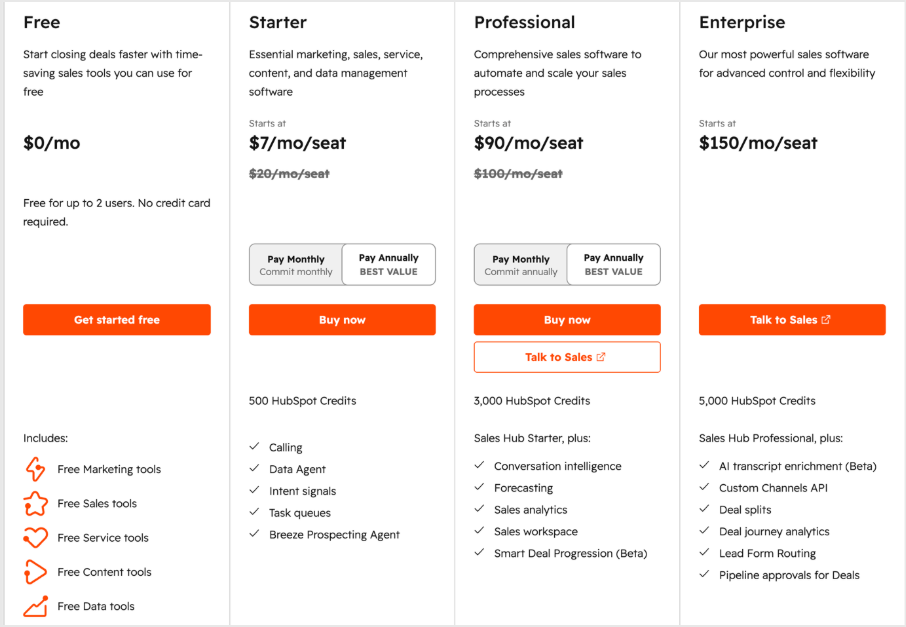
HubSpot Pricing:
Before exploring the integration, it's worth knowing where HubSpot Pricing stands, as your plan directly determines which integration features you can access.
What is HubSpot Salesforce Integration?
The HubSpot-Salesforce integration brings two powerful platforms together, so your sales and marketing teams share the same data. HubSpot handles inbound marketing and leads to nurturing. Salesforce manages the CRM side, and together they keep leads, contacts, campaigns and deals in sync automatically; no manual updates needed.
On top of that, it supports workflow automation, flexible field mapping, and detailed reporting, so every team stays aligned and can move faster.
A few things worth knowing about how it works:
The integration is owned and managed by HubSpot. The process to install the connector starts and ends in HubSpot, with steps completed in Salesforce throughout.
During installation, the following are created in your Salesforce environment:
- 1 Salesforce Managed Package
- 1 Salesforce Permission Set
- 4 Visualforce Pages
Once everything is set up, you manage the integration entirely within HubSpot. That includes field mapping, sync preferences and any sync errors that need attention, all found in the integration settings inside HubSpot.
How Do You Connect Your HubSpot and Salesforce Accounts?
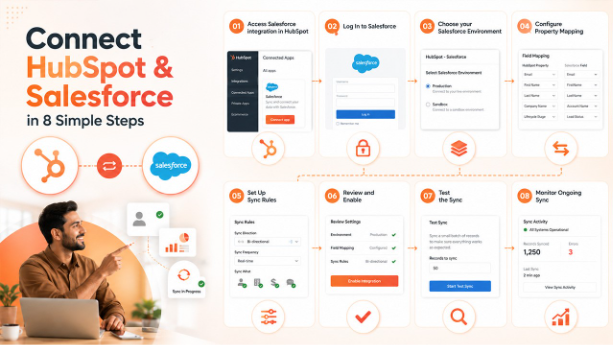
Before connecting HubSpot and Salesforce, make sure you have the right access — you’ll need Super Admin permissions in HubSpot and System Administrator for access in Salesforce.
Step 1: Access the Salesforce integration in HubSpot: Go to Settings> Integration> Connected Apps, select Salesforce and Connect App.
Step 2: Log In to Salesforce: you will be redirected to Salesforce. Sign in with your Admin credentials and grant the permissions needed for both platforms to share data securely.
Step 3: Choose your Salesforce Environment: Select whether you are connecting to your live Production instance or a Sandbox environment for testing.
Step 4: Configure Property Mapping: Map HubSpot Properties to match Salesforce fields.
Step 5: Set Up Sync Rules: Define what data syncs, which direction it flows and when updates should happen.
Step 6: Review and Enable: Double check your settings and turn the integration on.
Step 7: Test the Sync: Start with a small batch of records.
Step 8: Monitor Ongoing Sync: Once live, keep an eye on sync activity and fix any errors promptly to maintain data accuracy over time.
HubSpot vs Salesforce Data Architecture
Before diving into integration, it helps to understand how HubSpot vs Salesforce platforms structure its data, because they think about data quite differently.
The Biggest Difference, how they Handle People?
Salesforce uses two separate objects for people: Leads and Contacts. HubSpot keeps it simple with just one: the Contact object. Every new lead in HubSpot is created as a Contact, and progression through the funnel is tracked using a property called Lifecycle Stage: which gives you stage-by-stage conversion rates and funnel reporting in one place
The other differences between the two are mainly just a difference in nomenclature:
- Deal in HubSpot = Opportunity in Salesforce.
- Company in HubSpot = Account in Salesforce.
- Activity in HubSpot = Task in Salesforce.
HubSpot Architecture – Simple and Integrated
At HubSpot, there are four main entities used for organizing data: Contacts, Companies, Deals, and Tickets. These entities have a high end of interconnections, allowing customers to easily track the entire journey regardless of their technical abilities. While some custom properties may be added, the options will not be as extensive as Salesforce.
Salesforce Architecture – Powerful and customizable
Salesforce uses a more advanced architecture where the company allows users to choose from a variety of standard entities and create fully custom entities for better control over business processes. There are no boundaries for customization, but such an approach requires more time and effort to learn.
Why This Matters for Integration?
Knowledge of these architectural differences is not only important to have background information but also crucial for several reasons. Once you know how each system stores the data, it becomes easier for you to map these fields correctly and avoid synchronization issues between them.
HubSpot vs Salesforce Data Types
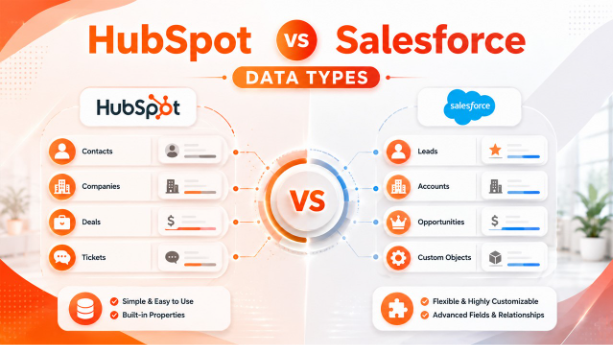
There is a clear difference between how data in each platform is managed; each becomes very helpful in the integration process.
HubSpot keeps things straightforward. It organizes its data into core objects: Contacts, Companies, Deals, and Tickets. Each object comes with built-in properties, and you can add custom ones to capture additional details like name, email address, and deal values. The whole system is designed to be picked up quickly, even for non- technical users.
In Comparison, Salesforce is all about flexibility and customization possibilities. It offers a broad set of standard objects: Leads, Accounts, Contacts and Opportunities, along with the ability to create fully custom objects tailored to your specific business processes. Fields can range from simple types like text, numbers, and dates to more advanced ones like formulas and lookups.
What are the Benefits of HubSpot Salesforce Integration?
When HubSpot and Salesforce work together, the impact goes beyond just connecting two tools, it changes how your sales and marketing teams operate day by day, here are some key benefits:
- Seamless Data Synchronization: Bidirectional sync keeps Leads, Contacts, and Deals updated in real time across platforms, no outdated records or conflicting data
- Enhanced Lead Management: HubSpot nurtures Leads and hands them off to Salesforce, when they’re sales-ready, nothing falls through the cracks.
- Customizable Sync Options: You decide what syncs, which fields transfer, and when tailored entirely to your workflow.
- Improved Sales and Marketing Alignment: Marketers see how campaigns drive sales. Sales reps get marketing context to personalise outreach. Both teams, finally on the same page.
- Automation Capabilities: Less manual work, faster follow-ups. HubSpot’s Lead scoring can automatically route Leads to the right rep in Salesforce without lifting a finger.
Challenges of HubSpot Salesforce Integration?
Like any HubSpot Integration, it’s powerful, but it’s not without its hurdles. Here’s what to watch out for:
- Complex Setup: The integration is powerful but setting it up requires technical expertise.
- Hidden Costs: Free plans sound appealing, but the full integration often demands premium subscriptions, plus potential costs for outside help.
- Data Overload Risks: More data isn’t always better. Syncing outdated or irrelevant records just clutters your database and makes meaningful insights harder to find.
- Customization Limits: It handles most business workflows well, but edge cases can push you toward API workarounds or additional software, adding both cost and complexities.
- Sync Errors and Delays: Proper configuration cannot solve problems such as duplicate records, field mismatches, and sync delays.
Conclusion
The HubSpot Salesforce Integration is a smart move for businesses wanting to close the gap between marketing and sales. When set up correctly, it means cleaner data, smoother lead handoffs, and teams that are actually aligned.
But it’s not a set-it-and-forget-it solution. It takes careful planning, the right expertise, and regular maintenance to get the most out of it.
If your marketing team lives in HubSpot and your sales team lives in Salesforce, connecting the two isn’t just convenient; it’s essential.
Frequently Asked Questions on HubSpot Salesforce Integration
Yes, some technical knowledge is recommended. Configuring field mappings and sync rules can get complex, and mistakes can lead to data errors. If you're unsure, working with an expert is worth the investment.
Yes. Data flows both ways — changes made in HubSpot reflect in Salesforce and vice versa, keeping both platforms in sync in real time.
You can sync leads, contacts, companies, deals, activities, and more. You also have control over which fields to sync and in which direction.
Yes, but it's important to clean up your data before syncing to avoid cluttering HubSpot with outdated or duplicate records.
The integration itself is available on HubSpot's premium plans. Additional costs may come from Salesforce licensing, third-party tools, or consultant fees depending on your setup.