An SSL certificate chain can be defined as an ordered sequence of digital certificates that connects the SSL/TLS certification of your website back to the trusted root Certificate Authority (CA). This chain enables mobile apps, web browsers, and operating systems to independently verify that your website is properly authenticated, legitimate, and safe for communication in an encrypted way.
You can consider it as a chain of guarantees: the certificate of your website is vouched by an intermedia certificate, which is in turn verified by a globally reliable root certificate which is already embedded in operating systems and browsers. Every link in this chain signs the one below cryptographically. This ensures an unbreakable trail of trust.
⚠️ When the chain breaks, users see: Warnings like "Your connection is not private,"
“SSL Certificate Error,” or "NET::ERR_CERT_AUTHORITY_INVALID," which causes instant loss of abandoned visits or loss of user trust.
Comprehending how the SSL certificate chain operates is vital for developers, website owners, SEO professionals, DevOps engineers, and any business that manages confidential digital communication.
Read More: What Is SEO?
Why Do SSL Certificate Chains Important?
SSL certificate chains are the pillar of HTTP security. Without a complete and valid chain, browsers independently cannot confirm whether a website is authentic or not, and how they will warn or block users accordingly.
As per the CA/Browser Forum Baseline Requirements, all TLS certificates that are publicly trusted must link to a root certificate in a trusted browser store. This is no longer optional. It is a core need that is enforced by mainstream browsers.
Technical and Business Impact of a Valid SSL Chain
A SSL certificate that is properly configured ensures trackable advantages:
- Makes sure that all the data in transit is encrypted between server and browser (AES-256 in modern TLS 1.3)
- Protects against various cybersecurity threats and specifically MITM (man-in-the-middle) attacks that authenticates the identity of the server.
- Allows the HTTPS padlock, which around 85%+ of users search for before providing confidential data.
- Satisfies HIPAA, PCI DSS, and GDPR needs for encrypted transmission of data.
- Provides support to Google’s HTTPs-as-a-ranking-signal, which is confirmed as a ranking factor by Google since 2014.
- Minimizes bounce rates which are triggered by the browser security warnings.
💡 Key Takeaway: A broken SSL chain can cause browser warnings even when the SSL certificate itself is valid. Always verify the full chain, not just the end-entity certificate.
What Is SSL Certificate Chain Structure?
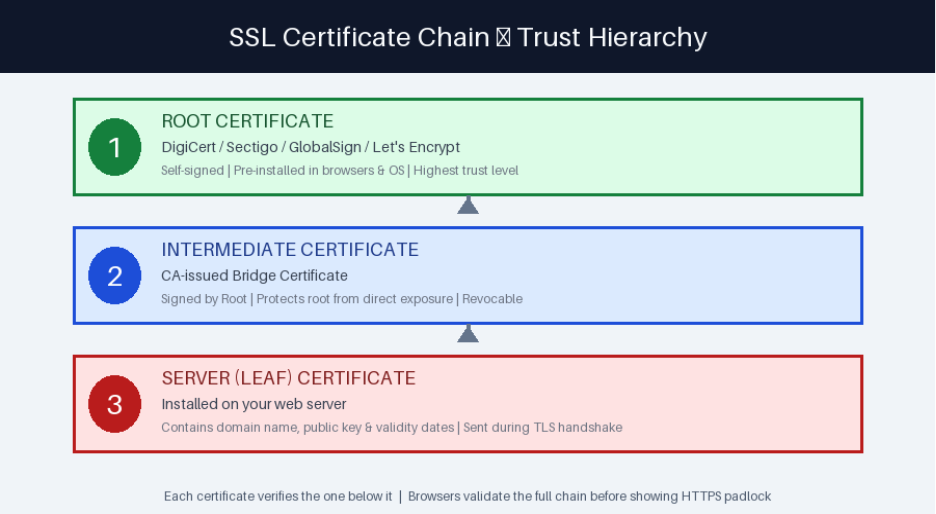
Each SSL certificate chain comprises three main components. Each one plays a particular role in ensuring trust.
1. Root Certificate — The Fundamentals of Trust
The root certificate exists at the top of the trust hierarchy. Root certificates are signed by Certificate Authorities themselves and are pre-loaded into the trusted root stores of operating systems such as macOS, Windows, Android, Linux, and iOS as well as browsers such as Firefox, Chrome, Edge, and Safari.
Since root certificates are already trusted by the end user device, any certificate that links back to the trusted root is trusted automatically. This is the complete basis of the PKI (Public Key Infrastructure) that underlines web security.
Well-known root CAs: Sectigo, GlobalSign, DigiCert, Comodo, Let's Encrypt (ISRG Root X1), GoDaddy, Entrust,
🔒 Security Note: Root certificates are generally kept offline in Hardware Security Modules (HSMs) and are directly utilizing to sign website certificates. This isolation secures the complete trust infrastructure of the internet.
2. Intermediate Certificate — The Security Bridge
Intermediate certificates (also known as subordinate CA certificates) closes the gap between the server certificate of the website and root certificate. Certificate Authorities leverage intermediate instead of directly signing site certificates with the root, for numerous key security reasons:
- In the event that an intermediate is compromised, it can be revoked without having the root CA compromised.
- Intermediates enable CAs to issue certificates to distinct geographic regions or departments.
- They minimize risk exposure, and the root remains secure and offline.
- Allows simpler scalability for issuing millions of certificates for websites.
One of the most common SSL configuration errors is the missing intermediate certificate. A lot of web servers will not serve intermediate certificates automatically, needing manual installation.
3. Server Certificate — The Leaf Certificate
The server certificate (also known as the end-entity certificate or the leaf certificate) is the one that is directly installed on your server. It is basically the certificate that is visible to users in the browser.
A server certificate comprises of the following:
- Your domain name (e.g., wildcard*.example.com or www.example.com)
- The public key of your server for asymmetric encryption.
- Validity period of the certificate (start and expiration dates)
- Issuing Certificate Authority information
- SANs (Subject Alternative Names) for multi-domain certificates.
- Signature algorithm and key usage extensions.
How an SSL Certificate Chain Operates? A Detailed Guide
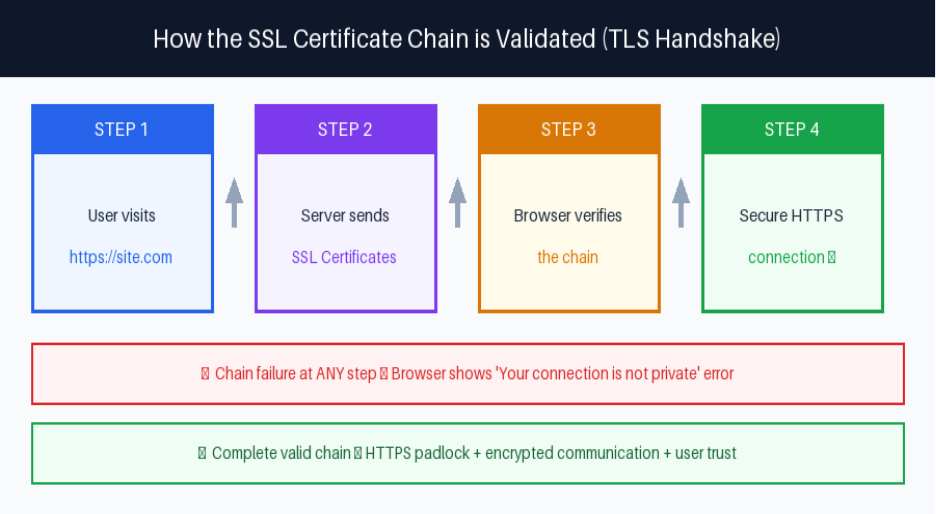
The SSL/TLS handshake can be defined as the process through which a browser can verify the certificate chain and ensure encrypted connection. Here is what happens exactly:
Step 1: Client Hello
The user sends a message “Client Hello” via the browser to the server, including the TLS version it provides support to (TLS 1.2 or 1.3) and a list of supported cipher suites.
Step 2: Certificate Delivery and Server Hello
The server can respond with the server certificate and any instant certificates. Note: the root certificate is not included since it is already embedded in the trusted root store of the browser.
Step 3: Validation of Certificate Chain
The browser implements the below-mentioned checks:
- Validates the digital signature of the server certificate utilizing the intermediate CA’s public key.
- Validates the digital signature of the intermediate certificate utilizing the public key of root CA.
- It can confirm whether the root CA exists in the trusted root store of the browser or not.
- Can check the validity periods of the certificate (not yet valid, not yet expired)
- It can check the OCSP or Certificate Revocation List (CRL) for revocation status.
Step 4: Key Encrypted and Exchange Session
Once the chain is verified, the server and browser perform an important exchange utilizing ECDHE in TLS 1.3 and derive session keys. All further communication is encrypted via symmetric encryption (AES-256-GCM in modern deployments).
TLS vs SSL: Understanding the Terminology
Apart from the broad utilization of the term “SSL certificate,” advanced web encryption does not utilize SSL at all. Secure Sockets Layer (SSL) was the original protocol created by Netscape in the 1990s and has been completely deprecated because of the known vulnerabilities.
Protocol Timeline: SSL 2.0 (1995) → SSL 3.0 (1996, deprecated RFC 7568) → TLS 1.0 (1999) → TLS 1.1 (2006) → TLS 1.2 (2008, still widely used) → TLS 1.3 (2018, current standard — RFC 8446)
TLS 1.3, which is published by the IETF in 2028, removes numerous legacy cryptographic algorithms, minimized the handshake from 2 round trips to 1, and has introduced 0-RTT resumption for the returning visitors. In 2026, TLS 1.3 takes into account of more than 70% of global HTTPs connections as per the Cloudflare Radar.
The term "SSL certificate" persists due to industry conventions. However, technically, these TLS certificates are issued for use with the TLS protocol.
Real-World SSL Certificate Chain Example
Let us see an example of a real certificate chain for a typical website. You can verify this yourself by clicking the padlock icon in Chrome or using the OpenSSL command shown below.
Example Chain: ISRG Root X1 (Let's Encrypt Root) → R3 (Let's Encrypt Intermediate) → www.letsencrypt.org (Server Certificate)
Example Chain: DigiCert Global Root CA → DigiCert TLS RSA SHA256 2020 CA1 → www.example.com
In these examples, the browser relies on the root CA, which verifies the server's certificate. This is a three-step verification which happens in milliseconds during each HTTPs connection.
Prevalent SSL Certificate Chain Errors Explained
Comprehending particular error messages enables you to detect and resolve SSL problems quickly. Let us see the most prevalent errors, their root issues, and how to fix them:
| Error Message | Root Cause | Recommended Fix |
| NET::ERR_CERT_AUTHORITY_INVALID | Missing intermediate cert | Install the full CA bundle from your CA |
| SSL_ERROR_UNKNOWN_ISSUER | Invalid/wrong intermediate | Re-download intermediate from your CA portal |
| Your connection is not private | Chain validation failed | Check cert order, expiry & trust chain |
| Certificate not trusted | Incomplete chain | Ensure intermediate cert is installed |
| ERR_CERT_DATE_INVALID | Certificate expired | Renew immediately; enable auto-renewal |
| Unable to get local issuer cert | Browser cannot find issuer | Update root store; check server config |
Why Are Missing Intermediate Certificates Are So Prevalent?
The missing intermediate certificate error is extremely common since server configuration is verified by the hosting provider. Numerous shared hosting control panels (Plesk, cPanel) automatically manage intermediate certificates. However, dedicated server setups and VPS generally need manual configuration.
When you get an SSL certificate from a CA, they give you a “CA Bundle” file which contains all the required intermediate certificates. Install this bundle always along with your server certificate.
How to Check Your SSL Certificate Chain?
Consistent SSL audits must be part of your website maintenance routine. Let us see the three effective methods:
Method 1: Browser Developer Systems (Quickest)
In Edge or Chrome:
- Select the padlock icon present in the address bar.
- Choose "Connection is secure" → "Certificate is valid"
- Select the “Details” or “Certification Path” tab.
- Check all three levels: Root CA → Intermediate CA → Your domain
Method 2: OpenSSL Command Line (Most Detailed)
System administrators and developers prefer OpenSSL for in-depth chain inspection:
openssl s_client -connect yourdomain.com:443 -showcerts
This command showcases the complete issuer details, entire certificate hierarchy, chain order, and validity dates. All of these are significant for fixing configuration problems.
Method 3: Digital SSL Testing Tools (Most Complete)
Digital tools ensure a complete graded audit of your SSL configuration:
- SSL Labs SSL Test (ssllabs.com/ssltest). This is an industry-standard A-F grading for TLS configuration.
- DigiCert SSL Checker. This checks the completeness of the chain and certificate details.
- Why “No Padlock” (whynopadlock.com) — recognizes chain problems and mixed content.
- Qualys SSL Server Test — in-depth cipher suite analysis.
💡 Pro Tip: Run an SSL Labs test immediately after any certificate renewal, server migration, CDN configuration change, or hosting environment update. Aim for an A or A+ rating.
How to Resolve SSL Certificate Chain Errors?
Fix 1: You Need to Install the Entire Certificate Bundle
Get the CA bundle from your certificate provider and install it along with your server certificate. Configuration changes by server:
- Apache: Utilize the directive “SSLCertificateChainFile”(or SSLCertificateFile for concatenated bundles in Apache 2.4.8+)
- NGINX: Combine your intermediate bundle and server certificate into a single file using: cat your_cert.crt intermediate.crt > combined.crt
- IIS: Import the entire chain utilizing the Certificate Management console, making sure all intermediates are in the Intermediate CAs store.
- OpenLiteSpeed/LiteSpeed: Set the CA Bundle field in the listener's SSL settings.
Fix 2: Renew and Automate Certificate Renewal
You can easily prevent expired certificates. Execute such practices:
- You can set calendar alerts to 30, 14, and 7 days before certificate expiration.
- Utilize Certbot with “Let's Encrypt” for automated and free 90-day certificate renewal.
- Set ACME protocol clients for commercial CAs that provide support to automation.
- Utilize Google-managed certificates or AWS Certificate Manager for cloud deployments.
Fix 3: Validate Certificate Order
You must install SSL certificates in the right order. An incorrect order can fail chain validation on strict clients.
- Intermediate certificate(s) —Server certificate (your domain)
- Intermediate certificate(s) — in order from closest to server toward root
- Root certificate (optional — usually excluded as browsers have it pre-installed)
What Are the Right Practices of SSL Certificate Chain?
Security professionals and industry experts suggest the below-mentioned right practices for ascertaining a healthy TLS/SSL configuration:
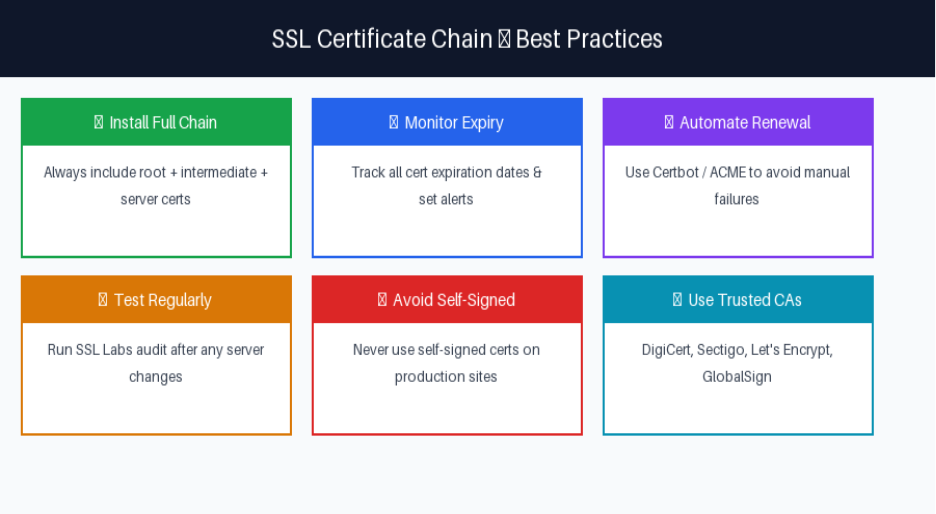
1. Install Entire Chain Always:
Avoid deploying only the server (leaf) certificate. Your CA bundle must involve all intermediate certificates needed to link back to the root. Validate that the entire chain is served using the SSL Labs or OpenSSL after each deployment.
2. Monitor All Certificate Expiration Dates:
Monitor both intermediate and server certificate expiration dates. Intermediate certificates generally have 2–5-year validity period, in which server certificates are restricted to a maximum of 398 days (per CA/Browser Forum needs). Leverage dedicated tracking tools, not just calendar reminders.
3. Allow Automated Certificate Renewal:
Manual certificate renewal can introduce risks like forgetting or other human errors. Certbot (free and open source) incorporates NGINX, Apache, and the most Linux environments in order to automate Let’s Encrypt certificate renewal. Cloud platforms such as GCP, AWS, and Azure provide managed TLS certificates with zero-touch renewal.
4. Utilize OCSP Stapling
OCSP is a short form for “Online Certificate Status Protocol.” Stapling enables your server to pre-fetch and cache the certificate revocation status, directly delivering it to your browsers. This removes the need for browsers to contact the OCSP server of CA, minimizing the latency by 100-200ms per connection and enhancing privacy.
5. Only Utilize Trusted Certificate Authorities:
Obtain SSL certificates from CAs whose certificates are in the most browser trust stores. Leverage a self-operated or obscure CA will result in the browser warning for all kinds of visitors.
Recommended CAs: DigiCert, Let's Encrypt (free), GlobalSign, Sectigo, Entrust, AWS Certificate Manager (for AWS deployments), GoDaddy, etc.
6. Execute Certificate Transparency Tracking
Certificate Transparency (CT) logs are append-only and public records of all issued TLS certificates. Track CT logs for your domains to detect mis-issued or unauthorized certificates instantly. Platforms such as crt.sh and Facebook’s CT give you free domain tracking.
SSL Certificate Chain and SEO — What You Must Know?
SSL/HTTPS has always been an important ranking signal as confirmed by Google since August 2014. While HTTPS cannot be defined as a lightweight ranking factor alone, the downstream effects of SSL problems on user behavior are important:
- Users who observe warning "Your connection is not private" have a >90% abandonment as per the security transparency report of Google Chrome.
- Browser warnings dramatically improve bounce rate, which signals bad user experience to search engines.
- Googlebot gives preference to HTTPS URLs and can de-prioritize HTTP pages in crawl budgets.
- User engagement metrics and Core Web Vitals (Page Experience signals) are directly impacted by SSL disruptions
For SaaS, eCommerce, SaaS, banking, healthcare and membership websites, SSL integrity is not just a concern for SEO. It is a regulatory and legal need under DSS, PCI, HIPAA, and GDPR frameworks.
💡 Key Takeaway: While a valid SSL certificate is table stakes for any website in 2026, a broken or misconfigured certificate chain can undo all your SEO and conversion optimization work in seconds.
Next Read: Your SSL chain is only as robust as the server it operates. If your hosting environment does not support complete certificate bundle installation or does not have effective TLS configuration, even a valid SSL certification will not be sufficient. To learn more, check out our blog “Is Hosting Secure Enough for Your Websites Safety Measures?”
Frequently Asked Questions (FAQs) : SSL Certificate Chain
An SSL certificate chain can be defined as a hierarchical sequence of digital certificates linking the server certificate of your website to a trust root Certificate Authority. It comprises three layers: one or more than one intermediate certificates (the bridge), the root certificate (trusted by browsers), and the server certificate (which is installed on your web server).
Without a valid or complete certificate chain, browsers cannot verify the authenticity of your website and can display security warnings that can push visitors away. An effective chain makes sure HTTPs connections are encrypted; user trust is ensured, regulatory compliance is maintained, and SEO performance is uninterrupted.
The most common cause is missing intermediate certificates. When you install an SSL certificate, you can complete installation of the CA bundle (intermediate certificates) given by the Certificate Authority. If you install only the server certificate without intermediaries, it can break the chain.
Yes, the impact is indirect but significant. Google utilizes HTTPS as a ranking signal, and browser security warnings that is caused by SSL chain errors can almost cause near-total abandonment of user, increasing bounce rates dramatically and damaging the metrics of user engagement, all of which can impact search performance negatively over time.
There are three options of checking “my SSL certificate chain”: (1) Click the padlock icon in Chrome → Certificate → Certification Path; (2) Run openssl s_client -connect yourdomain.com:443 -showcerts from the command line; (3) Use SSL Labs' free SSL Server Test at ssllabs.com/ssltest for a detailed graded report.