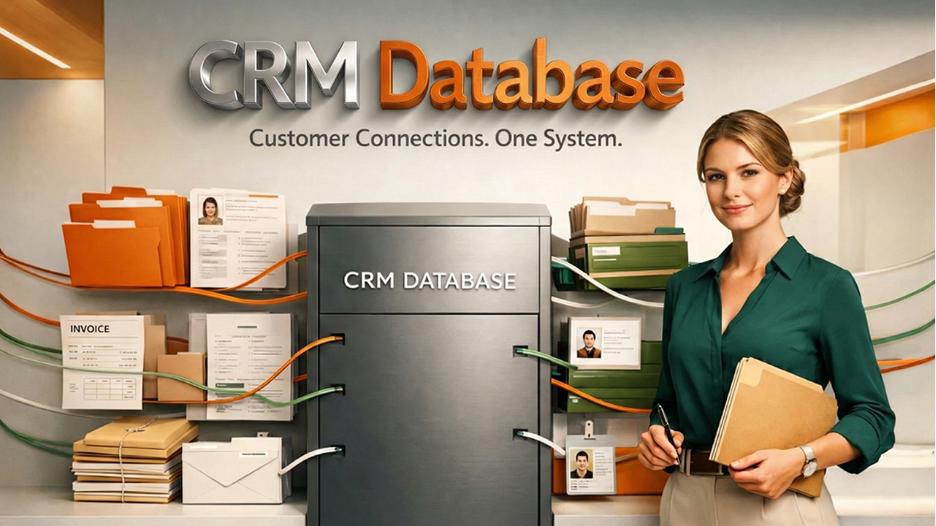






In the current business environment, having a smooth flow of data across the business is paramount. This is because CRM databases are beneficial in the management of customers’ data in businesses. This complete 2026 guide explains everything you need to know about CRM databases. This includes what a CRM database is, how it works, its components, types, advantages, as well as the best practices. Therefore, irrespective of the nature of your business, it is important that you know the fundamentals of CRM databases. This will help you in the long run since knowing how CRM databases operate will help your business in having a smooth flow of data.
Comprehensive Summary of What is a CRM Database
CRM Database Fundamentals: In a CRM database, centralization of customer information, like contact information, interaction, purchase, and preference, is made in one place.
Impact on Business and Efficiency: The use of CRM increases customer retention rates, accelerates the sales process, and facilitates teamwork by eliminating information silos and providing real-time sharing.
Types and Deployment Modes: There are operational, analytical, and collaboration types of CRM databases depending upon the requirements of the company. These CRM solutions may be deployed in the cloud environment as well as on-premises.
Integration and Scaling: Today, CRMs easily integrate with existing solutions and scale with the growth in customer data.
Security & Compliance Standards: The CRM database is protected by encryption, access controls, and backups done within the framework of the GDPR law.
What is a CRM Database?
In the absence of an appropriate system, customer data gets scattered across various spreadsheets, inboxes, and teams, leading to confusion and missed opportunities. A CRM database solves this problem by providing a single centralized hub for customer information. It hosts all information regarding contact details, communication history, purchase records, and preferences in one place in an organized fashion. This will ensure that the sales, marketing, and support teams get accurate and timely access to customer information whenever they want. It reduces reliance on memories or having to sift through numerous files, allowing teams to quickly comprehend past interactions and understand customer behavior. The CRM database truly forms the backbone that drives effective Customer Relationship Management.
How Does a CRM Database Work?
A CRM database works by gathering information from every touchpoint a customer has with your company, then organizes that information in a way that makes sense for your business.
Here's the basic flow:
- Data Collection: Information flows into the system through various touch-points: website forms, email interactions, telephone calls, social media interactions, purchase transactions, and customer service tickets.
- Data Organization: It organizes this information into logical categories like contact records, interaction history, deals, tasks, and notes.
- Storage of Data: Information is stored in an interconnected yet secure manner in tables and fields to provide an overall view for each customer.
- Data Retrieval: Through the CRM interface, the users are able to find, filter, and retrieve data in very minimal time.
- Data Updates: This is the system that keeps on updating as every interaction happens, thus keeping the records current and complete.
That’s where the actual strength of the CRM database comes from—together, different pieces of information connect in powerful ways. When you view a customer’s file, you can’t simply view that customer’s name and email address. Rather, you are treated to the customer’s entire history with your business.
Key Components of a CRM Database
A CRM database contains several elements that are crucial for the smooth functioning of customer relationship management.
Contact Management: This is the basic structure of every CRM database. Contact management organizes basic customer information like names, phone numbers, email addresses, companies, and titles in one single contact field.
Interaction History: Every email, calling activity, meeting, or conversation is recorded with time stamps. This way, there is an easy timeline of past interactions, which helps in having a seamless flow of conversations.
Sales Pipeline Data: The CRM system follows the progress of deals from the time they enter the sales process until completion, and this includes details such as deal value, deal stage, close probability, and closing dates.
Task & Activity Management: Scheduled tasks, reminders, & follow-ups are maintained to act on them at the right time, avoiding missed opportunities.
Custom Fields and Tags: With customizable fields and tags, companies can arrange their contacts in accordance with industry, preference, and other areas as per their requirement.
Notes and Documents: All notes, contracts, proposals, and files can now be attached right to customer files, and everything is organized in the same place.
Analytics and Reporting: The CRM system provides information regarding sales, customer activity, and campaign and productivity reports from their databases.
Types of CRM Databases
Various organizations demand different kinds of CRM databases according to the nature of interaction they have with their customers as well as the objective they aim to achieve.
- Operational CRM Databases are concerned with the management of daily customer activities. This type of CRM is involved in the tracking of sales leads and offers features that aid in the creation and management of marketing campaigns, as well as customer service in handling customer complaints.
- Analytical CRM databases are data analysis-oriented. Their functionality includes analyzing vast amounts of customer information to determine their trends and behaviors. Businesses apply these to understand their customers, segment their audience, predict market demand, and analyze the effectiveness of their marketing campaigns.
- Collaborative CRM databases focus on the sharing of information. Collaborative CRM databases allow sales, marketing, and customer service to share the same information about their customers. This kind of database is very effective for those companies and institutions that involve collaboration and partnerships.
- Strategic CRM databases go for a long-term strategy, as their focus is on customer retention and value. It assists in identifying and forecasting valuable customers, as well as building effective and sustainable customer relations.
Nowadays, there are several CRM systems that integrate both approaches for companies to select the functions that fit the desired organizational objectives.
Benefits of Using a CRM Database
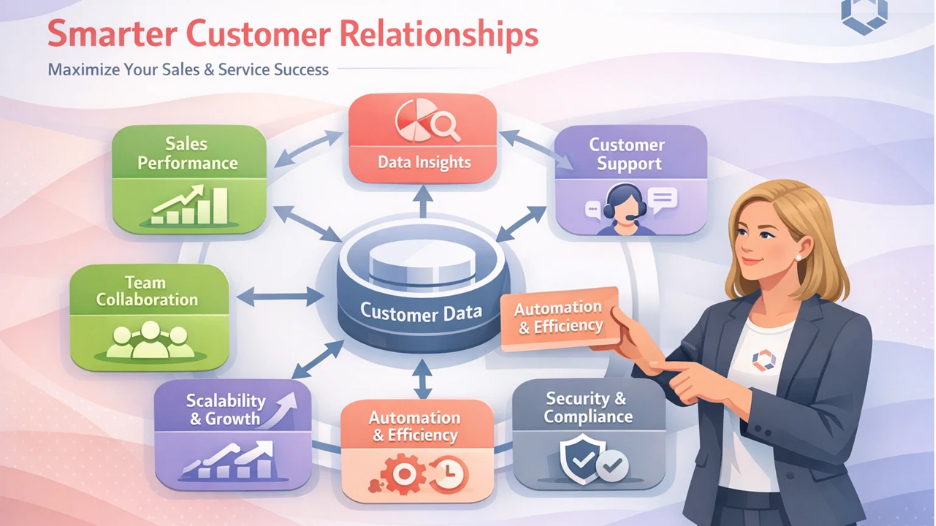
Centralized Customer Information: A CRM system stores all the customer information in one location, ensuring that it can be easily accessible by teams for reference purposes to avoid any confusion that comes with using emails, notes, or other spreadsheets.
Enhances Sales Performance: Sales representatives are fully informed about leads and deals, enabling them to effectively prioritize, monitor, and close opportunities based on factual information, not estimations.
Improved Customer Service Experience: Customer service representatives have the ability to see the entire history of communication with the customer, thus facilitating quick resolutions to their concerns, personalized communication, and increased levels of customer satisfaction.
Improved Team Collaboration: CRM databases help in removing silo effects by providing common access to everyone in marketing, sales, support, or other such departments, allowing them to communicate effectively.
Data-Driven Decision Making: Organizations are able to make informed decision-making based upon customer activities, sales patterns, as well as marketing results.
Scalability or Expansion: The CRM database can easily expand with the growth of business, supporting high volumes of data for customers without creating any inconvenience.
Time Savings and Automation: Sensitive tasks such as follow-up communications, sending reminders, and generating reports are automated, so teams have time to nurture relationships and resolve customer complaints.
Security and Compliance: The current databases used in a CRM have security features such as encryption, compliance, and access control to ensure safety against GDPR regulations.
Best Practices for Managing a CRM Database
A CRM database is only as good as the data inside it and how well your team uses it. Follow these practices to maximize value.
Establish Data Quality Standards- Define what complete and accurate data looks like for your business. Create guidelines for how information should be entered—formatting for phone numbers, naming conventions for companies, required fields for new contacts. Enforce these standards from day one to prevent messy data down the road.
Regular Data Cleaning- Schedule periodic reviews to identify and fix duplicate records, outdated information, and incomplete entries. Even with good initial standards, databases accumulate junk over time. Regular cleaning keeps your CRM database reliable and trustworthy.
Define User Permissions- Not everyone needs access to everything. Set up role-based permissions so team members can see and edit only the information relevant to their jobs. This protects sensitive data and prevents accidental changes to important records.
Train Your Team Properly- A CRM database only works if people actually use it correctly. Invest in comprehensive training when implementing the system and provide ongoing education as you add new features. Make sure everyone understands not just how to use the CRM, but why it matters.
Integrate with Other Systems- Connect your CRM database to other business tools—email platforms, marketing automation, accounting software, customer support systems. Integration eliminates duplicate data entry and ensures information flows seamlessly between systems.
Monitor Adoption and Usage- Track whether your team is actually using the CRM database. Low adoption usually signals problems—maybe the system is too complex, maybe people don't understand the value, or maybe it doesn't fit their workflow. Address these issues early before bad habits form.
Customize Thoughtfully- Tailor the CRM database to match your business processes, but don't overcomplicate it. Every custom field, workflow, and automation should serve a clear purpose. Too much customization makes systems harder to use and maintain.
Common Challenges and Solutions
Even the most successful CRM database implementation may have some difficulties. Here's how the most frequently encountered difficulties could be overcome.
Low User Adoption: Resistance to using the CRM can be caused by teams preferring other methods such as using spreadsheets or emails. To solve this, it’s critical to demonstrate how the CRM system can make life easier for them. Emphasis should be put on quick wins, data entry simplicity, and senior management using the software as a role model.
Data Quality Concerns: The presence of duplicate or old information creates a trust deficit in the system. Implement validation rules, remove duplicates, and designate ownership of information. Instill a culture where accurate information matters.
Integration Challenges: When the CRM system fails to interface with other applications, data silos are created. It is important to select a CRM system that interfaces well with existing applications in a business and focus first on integrating with the most critical applications using APIs or middleware.
Excessive Complexity: Too much functionality can confuse people. Begin with an intuitive installation process, ensure that sophisticated functionality is hidden, and implement role-based training for necessary functionality.
Cost Concerns: CRM system implementation and associated cost outlays may escalate. Be prepared for total cost and begin small and expand only if there are positive ROI results from improved sales or efficiency and retention.
Choosing the Right CRM Database
Selecting the appropriate CRM database involves, first and foremost, understanding what you need as a business. Start by identifying your business requirements, including the number of people who will use the system and the business processes you want to automate. Also consider the functionalities you need to integrate with the system and the level of analytics required
Next, you'll have to weigh the advantages and disadvantages of cloud-based CRMs over the benefits and drawbacks of on-premises CRMs. Cloud-based CRMs have lower initial costs, updates occur automatically, and they have the ability to be accessed from any location. Both advantages are always favorable to SMEs.
It is important that it is user-friendly. A CRM system will only be useful if it is actually used by your organization, and with this considered, it will serve you well if it has a user-friendly system interface.
Another important point is customization. The CRM needs to adapt to your workflow processes via fields, reports, or automation.
Ensure that there are smooth integration features with your current applications such as email, marketing, accounting, and support tools.
Vendor reputation, level of customer support, as well as overall long-term viability should also be factored. Lastly, the overall cost of ownership should be examined.
Final Thoughts
A CRM database changes the way companies interact with their customers because it provides all the information in the same place, which makes it possible for everyone in an organization to use this information in order to work smarter, rather than simply storing peoples' contact information.
An effective CRM database helps avoid the problem of information silos, reduces the time spent on busy work, and prevents anything from dropping through the cracks. Sales teams close more business with more context. Marketing teams target their campaigns more effectively. Customer service teams resolve issues with the entire history right in front of them.
Success with a CRM database does not happen on its own. It takes a thoughtful selection, correct implementation, consistent quality standards of the data, and true user adoption. When done right, this investment yields substantial returns: growing revenue, increased customer satisfaction, better team collaboration, and growth that can scale.
No matter if you're a small organization outgrowing the spreadsheet or want to centralize customer information across different departments within an enterprise, a well-designed CRM database provides one of the most effective decisions you would make toward long-term business success. The key lies in starting with clear goals, picking the right system to help you reach them, and committing to maintaining quality data as your foundation grows.