






In this blog, we will explore what Usenet search is, understand how it works, the types of Usenet search engines, and its limitations.
Usenet is one of the earliest decentralized discussion systems on the internet, which was established long before social media platforms, online forums, and instant messaging became common. Created in 1979, Usenet has remained one of the most valuable resources for users seeking archived knowledge, discussions, and binary files.
However, the content available in Usenet is unorganized and unstructured, making it hard for users to navigate through the vast collection of content. This is where Usenet Search tools offer their capabilities. A reliable search tool helps users efficiently locate exactly what they are looking for, from text discussions, software, images, videos, or historical archives.
What is Usenet Search?
Usenet Search is the process of locating relevant articles, discussions, or binary files that are stored within Usenet newsgroups. Usenet contains a large amount of content, spread across thousands of newsgroups. Locating specific content manually can be impractical. For this, a Usenet search engine helps in solving this problem by indexing posts and making them searchable through keywords, categories, file type, dates, and other filters.
Unlike traditional search engines that index websites on the internet, Usenet search tools focus more on content exclusively available on Usenet servers. Usenet search allows users to efficiently locate text-based discussions, software, images, videos, documents, and other binary files without navigating through countless newsgroups.
Read also: What Are Search Engine Basics? A Complete Beginner’s Guide 2026
Benefits of Usenet Search?
Usenet search offers various benefits to users, among which is easy navigation through the largest and oldest discussion network on the internet. Some of the key benefits of Usenet search are as follows:
- Better Organization: Usenet search engines categorize results based on date, search, file type, newsgroups, posters, and completion status, making content discovery simple.
- Enhance Overall Usenet Experience: A reliable Usenet search tool offers intuitive interfaces, advanced filters, and accurate indexing, ensuring ease for users in exploring discussions and archived content.
- Easy Access to Binary Files: Usenet search tools index various binary content, such as images, software, documents, and multimedia files, making it easier to locate without manually searching through binary newsgroups.
- Improves Accuracy: The advanced algorithm of Usenet search helps in reducing irrelevant results and prioritizes the most relevant matches.
Similar to other search-based technologies, optimizing search algorithms plays an important role in improving content discoverability and user experience. Understanding Search Engine Optimization for Mobile Apps can provide insights into how optimization strategies help improve search visibility and accessibility across digital platforms.
Key Features of Usenet Search
The Usenet search tools offer key capabilities, which are as follows:
- Faster Indexing: A reliable search engine constantly updates its database, ensuring newly uploaded content becomes searchable within minutes.
- Advanced Filters: The Usenet search engine offers advanced filters, which include data range, newsgroup, file size, category, file type, poster name, and language.
- NZB Generation: The search engine enables automatic NZB generation, which allows users to begin downloading without manually collecting article IDs.
- Spam Filtering: An effective search tool removes duplicate, incomplete, or spam posts from search results.
How Does Usenet Search Work?
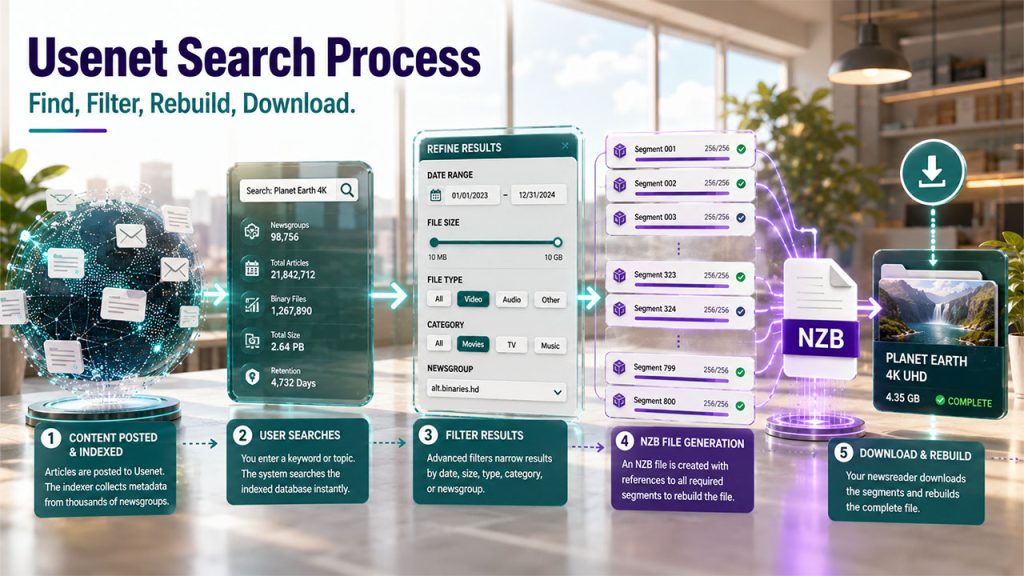
Usenet search generally works by indexing the vast amount of content posted across thousands of Usenet newsgroups, which allows users to quickly locate articles, discussions, and binary files without manually navigating through each group.
The complete, detailed workings of Usenet search are as follows:
Step 1: Content is Posted and Indexed
The process begins when the user posts content to Usenet. The search engine scans and indexes important metadata, which includes subject or title, keywords, newsgroup name, upload date, poster name, file size, file type, number of file segments, or completion status.
Step 2: User Enters a Search Query
When a user searches for a specific topic or file, the system analyzes the query and searches its indexed database for matching content.
Step 3: Search Filters Refine Results
Usenet search tools use advanced filtering options to narrow their search. This filter includes data range, file size, file type, category, or newsgroup, among others.
Step 4: NZB File Generation
For binary content, the search tool generates an NZB file, which acts as a download guide and contains references to all the message segments required to reconstruct the complete file.
Step 5: Client Downloads the Content
Once the NZB file is loaded, the newsreader communicates with the Usenet provider of the user to download the required article.
Types of Usenet Search
Usenet search tool is mainly designed to help users locate different types of content across the Usenet network. The search engine of Usenet is generally divided into three main categories, which are text/header search, NZB indexing, and global provider search.
Text/Header Search
The text search is used to locate discussion posts and articles, which are published in Usenet newsgroups. The text searches are ideal for finding key content, such as technical support and troubleshooting, programming discussions, academic and research topics, historical conversations, and product reviews, among others.
NZB Indexing
The NZB indexing or File search is primarily used for specific binary files. This search utilizes specialized indexers that use Newznab-based APIs.
Global Provider Search
Various Usenet providers often provide native global search engines directly through their web interface. In this, the user enters keywords directly into the provider's portal, which scans their entire server for retention.
Free vs Premium Usenet Search

While choosing a Usenet search engine, the biggest discussion is whether to go for a free or paid search platform. Both platforms help in finding content across the Usenet network, but the primary difference lies in terms of features, performance, indexing speed, and overall user experience.
The free Usenet search service is suitable for occasional users, while the paid or premium services are designed for users who require faster indexing, advanced search tools, and access to a larger database.
Free Usenet Search Tools
The free Usenet search engine allows users to search Usenet content without paying for any subscription fee.
Advantages
- No Cost: With a free Usenet search tool, users can explore Usenet without any financial commitment.
- Easy to Get Started: Most of the free Usenet search tools offer an intuitive interface, making it easy to search.
- Basic Search Functionality: The free Usenet search tool generally offers standard search features, allowing users to locate text discussions and some binary content.
Limitations
- Limited daily or monthly searches
- Smaller indexed databases
- Fewer filtering options
Paid/Premium Usenet Search
The premium or paid Usenet search service is a subscription-based platform that offers enhanced performance, along with more comprehensive indexing and advanced search capabilities.
Advantages
- Larger Search Indexes: The platform often maintains indexes that contain billions of articles and binary posts.
- Faster Content Indexing: Premium search tools often feature faster indexing, allowing users to discover recently posted content sooner.
- Advanced Search Filter: The premium platform includes powerful search options, such as data range, file size, file type, poster name, category, and subject line, among others.
Limitations
- Limited availability of some content
- Advanced learning curve
- Higher subscription cost
Limitations of Usenet Search
Although Usenet search tools help in locating the large amount of content available on the Usenet network, but it also have certain limitations. Along with search limitations, users should also consider security and privacy factors while accessing online platforms. Following proper Three Goals of Cybersecurity practices helps protect data, maintain privacy, and ensure safer digital interactions.
- Limited Index Coverage: Not every article or file posted on Usenet is indexed by every search engine. The size and quality of an index also depend on various factors, like the number of supported newsgroups, the frequency of indexing updates, data retention policies, and search provider resources.
- Content Retention Restrictions: Usenet content is not generally stored permanently on all servers. News providers maintain articles for a specific period, known as retention time, after which historical discussions or older files may produce incomplete results.
- Incomplete or Missing Files: The binary contents on Usenet are generally divided into multiple segments before being uploaded. If some segment is missing, damaged, or removed, the complete file may not be recoverable.
Conclusion
Usenet contains decades of valuable discussions, archived knowledge, and binary content, but navigating through this vast and decentralized structure can be challenging without an efficient search solution. Usenet search tools have transformed the way users explore and access content from the network. It simplifies the search processes by indexing content, providing advanced filtering options, generating NZB files, and helping users quickly locate relevant information.
Whether the user is searching for historical conversations or a developer looking for technical discussions, choosing the right search tool for Usenet can significantly improve the overall user experience. With continuously evolving indexing technologies, the Usenet search tool is set to remain an indispensable tool for accessing one of the oldest and largest repositories of shared knowledge.
FAQs About Usenet Search
An NZB file is a file format that is used to simplify Usenet downloads. It contains references to the article segments required to reconstruct a complete file.
A reliable Usenet Search engine should include key features like fast indexing, advanced search filtering, NZB generation, spam filtering, accurate metadata, and ease of use.
The Usenet search engines help in improving accuracy by using advanced indexing algorithms, along with metadata analysis, filters, and spam detection.
Yes, a Usenet search filter can locate historical discussions and archived posts, depending on the retention period of the Usenet provider.