SuiteCRM has long been a go-to choice for businesses seeking flexibility and cost efficiency in their CRM systems. With the growth of the business, the need for CRM evolves beyond basic customer management. SuiteCRM has helped various businesses and organizations in building a cost-effective and flexible CRM ecosystem. Often, scaling operations expose various limitations in performance, integration, and automation capabilities. To manage these limitations, Salesforce emerges as a powerful next step.
The process of migrating SuiteCRM to Salesforce is far more complicated than a simple data transfer. The process of migrating involves rethinking workflows, rebuilding integrations, and aligning the CRM with long-term business goals.
Making this transition successfully requires more than just data migration—it demands strategic planning and expert salesforce development services.
When Does SuiteCRM Become a Bottleneck?
SuiteCRM is widely appreciated for its flexibility, open-source ecosystem, and minimal up-front costs. It also works well with mid-sized businesses or startups, which require a customizable CRM. However, with the expansion or growth of businesses, the platform can begin to slow up and show limitations.
One of the main limitations of SuiteCRM is the performance degradation with a large dataset. Another issue arises from growing workflow complexity and CRM and ERP system integration limitations.
While SuiteCRM is powerful, certain challenges emerge at scale:
- Slower performance with large datasets
- Increasing complexity in workflow management
- Limited integration capabilities
- Higher maintenance overhead
These issues can impact productivity and growth.
Why Businesses Choose Salesforce

Businesses generally choose Salesforce mainly because it provides a highly scalable, cloud-native CRM platform, which is designed to support the long-term growth and digital transformation of businesses. The Salesforce CRM system does not struggle with increasing workloads and handles large volumes of data efficiently, without compromising performance.
Salesforce also offers other major advantages, like a vast ecosystem of integrations and applications, through the AppExchange marketplace. With the Salesforce CRM system, companies can easily connect it with third-party business applications.
Salesforce is also known for its powerful automation capabilities. With the Salesforce CRM system, businesses can automate repetitive tasks, along with streamlining workflows and improving collaboration across teams. It also offers advanced AI-powered capabilities through its Einstein AI, which enables predictive insights, smarter sales forecasting, and personalized customer interactions.
Salesforce offers:
- Cloud-native, scalable architecture
- Extensive ecosystem of apps and integrations
- Advanced automation tools
- Built-in AI capabilities (Einstein)
However, unlocking these benefits requires customization.
As organizations adopt more cloud-based tools, implementing an effective SaaS management platform also becomes important for maintaining visibility, security, and operational control across integrated business applications.
Migration Is a Multi-Layered Process
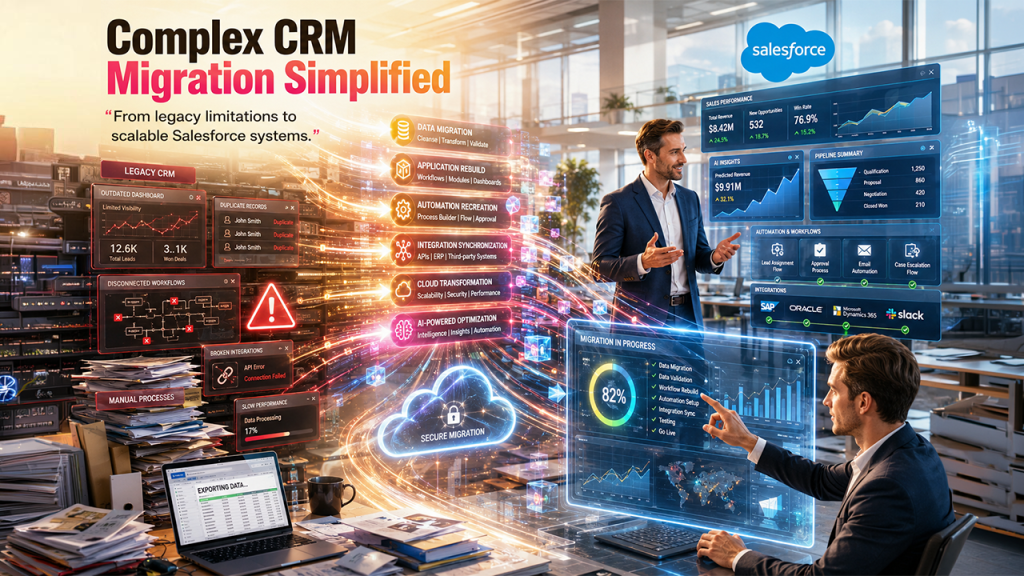
The process of migrating SuiteCRM to Salesforce involves a much more complex process than just transferring the customer records from one system to another. The migration is a complex and multi-layer process, which requires careful planning, along with technical expertise and a clear understanding of the business organization. A successful migration ensures that the new CRM not only preserves, but also improves scalability, efficiency, and user experience.
The first layer of migration is transferring data, which includes extracting data from SuiteCRM, cleaning duplicate and outdated records, and mapping fields correctly. The process also includes validating data accurately before importing it into Salesforce. The next layer includes migration of the application. Businesses often rely on customized workflows, modules, dashboards, and automation. These features need to be redesigned and rebuilt in Salesforce, using the native tools and custom development capabilities.
The process also includes integrating migrations. The organization typically connects its CRM with external platforms, like ERP systems. These platform integrations must be recreated, APIs need to be reconfigured, and synchronization processes tested, to maintain seamless data flow across all the systems.
A successful migration involves:
Data Migration
- Cleaning and deduplicating data
- Mapping fields accurately
- Ensuring data integrity
Application Layer Migration
- Rebuilding workflows
- Recreating custom modules
- Implementing automation
Integration Layer
- Connecting with third-party tools
- Rebuilding APIs
- Ensuring data synchronization
Custom Development Requirements
The process of migration often requires custom development, mainly to align the platform with specific business processes and operational goals. The process may involve developing custom logic using Apex, along with building a responsive user interface with Lightning Web Components.
Salesforce customization often includes:
- Apex programming
- Lightning Web Components
- API integrations
- Workflow automation
Organizations often underestimate the complexity of this phase.
At this point, many partner with an AI-powered digital development company like to handle both migration and advanced customization.
Businesses with highly specific operational workflows often benefit from custom CRM software development to ensure the new Salesforce environment fully aligns with long-term business goals.
Key Risks and How to Avoid Them
By mainly focusing on data quality, user readiness, and realistic project planning, the organizations can significantly reduce migration risks and ensure that a more successful CRM transformation.
- Migrating poor-quality data → Clean before migration
- Ignoring user training → Plan adoption strategy
- Underestimating customization → Conduct detailed scoping
Cost vs Value Consideration
While Salesforce may have higher upfront costs, it delivers long-term ROI through:
- Increased efficiency
- Better customer insights
- Scalable growth
Final Thoughts
The transitioning process from SuiteCRM to Salesforce is a significant step that helps unlock higher scalability, automation, and operational efficiency. However, the success of migration majorly depends on careful planning, clean data migration, and seamless integration.
The businesses that approach the migration process strategically can minimize the risk significantly, while also maximizing long-term ROI. A well-executed Salesforce migration helps in creating a smarter and more agile CRM for sales, future growth, and better customer engagement.