





Managing customer information efficiently is one of the most important aspects of running a business. Whether you handle customer inquiries, sales opportunities, invoices, or service requests, keeping records organized makes everyday operations easier. However, manually assigning unique numbers to CRM records can become time-consuming and confusing, especially when your business deals with hundreds or thousands of records.
This is where Outright Autoincrement Fields for SuiteCRM can make a difference. They help businesses automate the process of generating unique record numbers, reducing manual effort and making record identification more convenient.
Instead of entering reference numbers manually, users can rely on an automated numbering process. This not only saves time but also helps maintain consistency across CRM records.
Let's explore how this functionality works, why businesses need it, and how it can improve everyday SuiteCRM operations.
What Are Outright Autoincrement Fields for SuiteCRM?
Outright Autoincrement Fields for SuiteCRM are designed to automatically generate sequential numbers for CRM records. Whenever a new record is created, the system assigns a unique number based on the configured numbering sequence.
For example, when a business creates a new customer inquiry, the system can automatically generate an identification number such as:
- INQ-1001
- INQ-1002
- INQ-1003
- INQ-1004
Users no longer need to think about which number should be assigned next.
These automatically generated values can be useful for identifying customer records, tracking business transactions, organizing internal references, and maintaining structured CRM data.
The primary purpose is simple: make record numbering automatic, consistent, and easier to manage.
Why Does Your Business Need Automatic Number Generation?

As a business grows, the number of CRM records also increases. Managing each record manually may seem manageable initially, but it can quickly become difficult.
Here are some common challenges businesses face without automated numbering.
1. Manual Errors
When employees enter record numbers manually, there is always a possibility of duplication, incorrect entries, or skipped numbers. Such mistakes can create confusion during record searches and reporting.
2. Time-Consuming Processes
Employees spend unnecessary time creating and checking reference numbers instead of focusing on customer communication and business activities.
3. Difficulty Tracking Records
Without a consistent numbering structure, finding a particular customer inquiry, transaction, or business record can become challenging.
4. Inconsistent Data Management
Different employees may follow different numbering formats, resulting in inconsistent CRM data.
Using SuiteCRM Autoincrement Fields helps address these challenges by automating sequential number generation and reducing dependency on manual data entry.
Key Benefits of Outright Autoincrement Fields for SuiteCRM

Automated numbering offers several practical advantages for businesses that rely on CRM systems for daily operations.
1. Automatically Generates Unique Numbers
One of the biggest advantages is automatic number generation. Every newly created record can receive a sequential identification number according to the configured sequence.
This makes it easier for employees to identify and reference records without manually assigning numbers.
2. Saves Time and Improves Productivity
Manual numbering might take only a few seconds per record, but those seconds add up when employees handle large volumes of data.
Automation removes this repetitive task and allows teams to concentrate on more important responsibilities.
3. Improves Record Organization
A structured numbering system makes CRM data easier to organize. Employees can use reference numbers when discussing customer records, handling internal requests, or coordinating with other departments.
4. Reduces Human Errors
Automating number generation minimizes the chances of employees accidentally entering duplicate or incorrect reference numbers.
It also encourages a consistent approach to record management.
5. Supports Better Business Workflows
Different departments often need unique identification numbers for their records. Sales teams, support teams, and finance departments can benefit from consistent numbering practices.
For example, a business may use separate prefixes for leads, customer requests, and invoices.
How SuiteCRM Autoincrement Fields Work
How SuiteCRM Autoincrement Fields Work
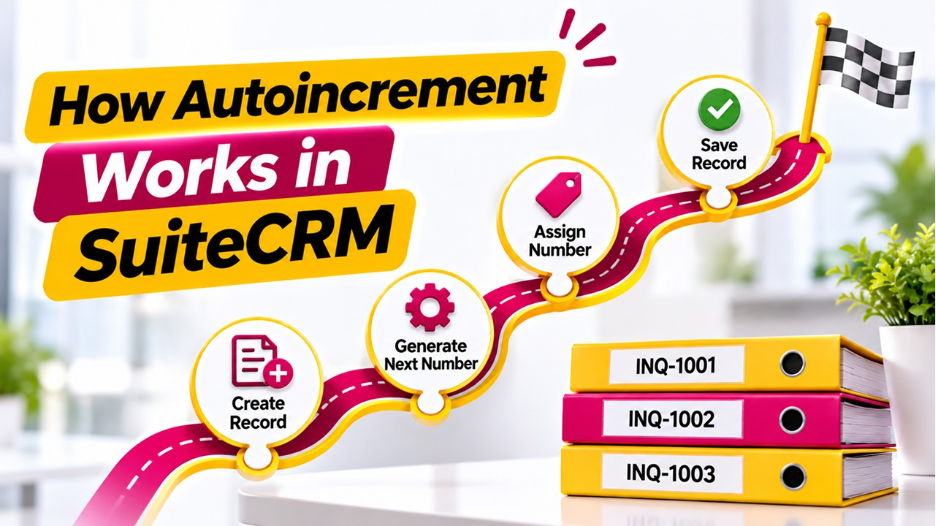
The basic working process is straightforward. Once the numbering functionality is configured, the system generates the next available number whenever a new record is created.
A typical workflow includes the following steps:
Step 1: Create a CRM Record
A user creates a new record in the required SuiteCRM module.
Step 2: Trigger Automatic Number Generation
The configured functionality identifies the appropriate numbering sequence.
Step 3: Assign the Next Number
The system generates the next sequential value based on the configured settings.
Step 4: Save the Record
The generated number is stored with the CRM record and can be used for future identification.
For instance, if the previous record number was OUT-2050, the next record may automatically receive OUT-2051.
The exact configuration and behavior depend on the installed functionality and its supported settings.
Practical Business Use Cases
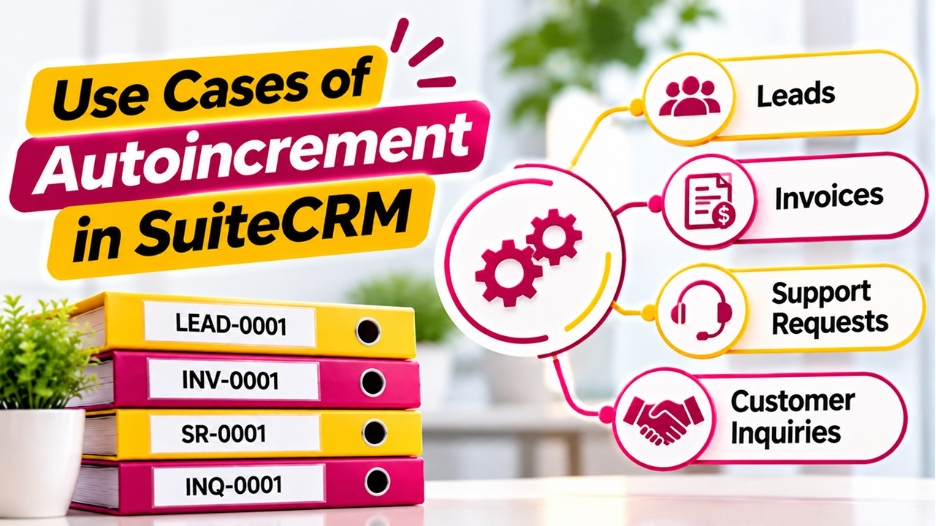
Outright Autoincrement Fields for SuiteCRM can be useful across different business departments and industries.
Here are some practical examples.
Customer Management
Businesses can assign unique customer reference numbers to simplify customer identification and communication.
Sales Management
Sales teams can use sequential numbers to identify opportunities, quotations, and other sales-related records.
Customer Support
Support teams can generate unique ticket references, making it easier to track customer issues and follow up on pending requests.
Invoice and Transaction Management
Finance teams can use structured reference numbers to organize transaction-related records and improve internal tracking.
Project Management
Businesses managing multiple projects can assign unique project reference numbers to make internal communication and documentation more organized.
Why Choose Outright Autoincrement Fields for SuiteCRM?
SuiteCRM offers businesses flexibility in managing customer relationships and organizing business information. However, certain repetitive activities can still require additional customization or functionality.
This is where Outright Autoincrement Fields for SuiteCRM become useful.
Instead of depending on manual numbering practices, businesses can introduce an automated approach that supports more consistent record management.
The functionality can be particularly valuable for organizations that:
- Create a large number of CRM records regularly.
- Want to reduce repetitive manual tasks.
- Need consistent record identification.
- Want to improve internal data organization.
- Require structured reference numbers for different business processes.
By introducing automated numbering into everyday CRM workflows, businesses can make their operations more convenient and organized.
Best Practices for Using Automatic Numbering in SuiteCRM
To get the most out of automated numbering, businesses should follow a few practical guidelines.
Choose a meaningful numbering format: Use prefixes that help employees understand the type of record they are identifying.
Maintain consistency: Establish a standard numbering structure across relevant CRM modules.
Avoid unnecessary manual changes: Restrict modifications to automatically generated values wherever possible.
Test the numbering sequence: Verify that numbers are generated correctly when records are created through different supported workflows.
Consider multiple users: Test record creation by different users to ensure that numbering remains unique and reliable.
These practices help maintain a dependable numbering process as your CRM database grows.
Conclusion
Efficient CRM management is not just about storing customer information. It is also about making everyday business processes simpler, faster, and more reliable.
Outright Autoincrement Fields for SuiteCRM provide a practical way to automate record numbering, reduce manual work, and maintain consistent identification across CRM records.
From customer management and sales tracking to support requests and transaction records, automated numbering can make information easier to organize and retrieve.
For businesses looking to improve their SuiteCRM experience, implementing an automated numbering solution can be a valuable step toward more streamlined CRM operations.
Frequently Asked Questions (FAQs)
They are functionality designed to automatically generate sequential identification numbers for CRM records, reducing the need for manual number assignment.
Yes. They can be configured to generate sequential record numbers. The implementation should also account for concurrent record creation to prevent duplicate values.
Depending on the extension's supported configuration, businesses may be able to use prefixes, numeric sequences, and customized numbering formats for different record types.
They reduce repetitive manual work, minimize numbering mistakes, and make it easier for employees to identify and manage CRM records.
Absolutely. As the number of CRM records increases, automated numbering helps maintain consistency, improve organization, and simplify record identification.