





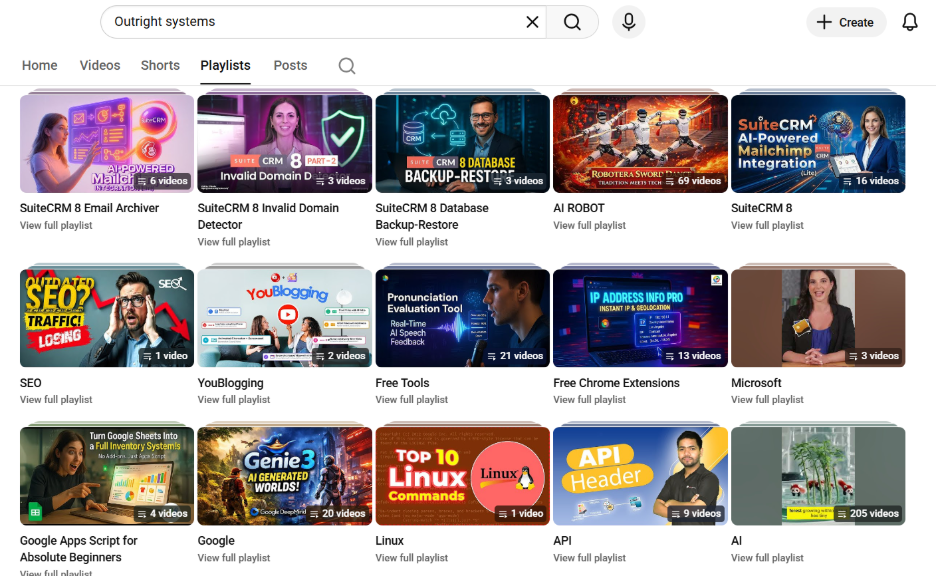
Creating a playlist on YouTube is an extremely simple process to organize videos on YouTube channels and enhance overall viewing experience for everyone, including yourself. Big brands with a large following on YouTube have diverse playlists. Let us use OutRight Systems as an example. They have a playlist for each of the products that they have launched, categories that they explore including SuiteCRM 8, AWS Tutorial, AI, Google Apps Script, Gmail, free Chrome extensions and tools, etc.
Once you have created a YouTube playlist, viewers can watch all kinds of videos in one go without having to manually select videos every time. This will naturally lead to improvement in views.
What Is a YouTube Playlist?
To put it simply, a YouTube playlist can be defined as a collection of videos that are collected together at one place. Once you watch the first video, the next one will play automatically and so on.
Creating a playlist title during the phase of creation is important as it helps in displaying and managing your YouTube content in a structured way. You have probably come across such playlists while listening to music on the website. Artists collect all of these songs from one album in a centralized place and create a playlist solely placed on that album.
Anyone who has a YouTube account can create a playlist. It is important to keep in mind that you do not have to own the videos you are adding to your playlist. This means that you can also add Microsoft and Google tutorials to your personal playlist. This is very similar to creating a playlist of music on a music streaming platform.
Reasons to Make a Playlist on YouTube
If you are not sure whether creating playlist on YouTube is a right option for you, then this section can help you-
Playlists are the right option if you want to create a group of videos, share collections with friends, and save videos to watch later. For brands, they are a great way for audiences to watch a high volume of content and bookmark them for later. Furthermore, playlists do not even have to be public. You can set a playlist to be unlisted or private.
And it is easy to switch up the details and content once it is live.
Like a music playlist, a YouTube playlist enables content organization to be automatically played back, improving engagement and user experience through thematic collections such as relaxation or workout.
Creating a playlist is easy fortunately. If you do it one time, you will never require a tutorial again. We will walk you through the complete process later in this guide.
We will also see how you can edit and streamline your playlist once it is live and go into some sophisticated options for taking your playlist to the next level.
Read More: How Do I Block a YouTube Channel?
What Are the Advantages of Making Playlists on YouTube?
- As a YouTube user, playlists are the perfect option for you if you want to organize your favorite videos.
- You can create playlists for anything you want. For example, maybe you want to learn what is IoT from scratch. You can save all your tutorials at one place in Watch Later and then watch them one by one.
- For a YouTube influencer or brand, playlists are extremely useful for categorizing the content. You can consider it like running your own station with different popular shows airing one after the other.
- A good playlist can enhance the visibility of your channel since it is the playlist that people search for when they look for content and not your channel page.
- Once you create a playlist, it is extremely easy to share it. You can embed it even on websites.
- As a personal user, the videos that you have clicked “Like” on are saved as a special list. You can find them again later easily. You can then add these videos to your YouTube playlists.
Pro Tip: Growing your channel also means focusing on your audience. It can help you understand which playlists are attracting loyal viewers over time.
Creating playlists can help you retain viewers for a long time. Watching one video can encourage users to watch more videos and ultimately go through the entire playlist. Thus, the engagement and overall watch time will grow naturally.
How to Make a Playlist on YouTube: Your Detailed Guide?
Creating a playlist on YouTube takes more than just a few minutes. Here is how you can do it:
Step 1: Log into your YouTube account:
First, you need to sign in to YouTube. If you do not have an account, you can create one before creating any playlist.
Step 2: Access the Option of Playlist Creation:
On the left-hand side under the “You” tab, select the option “Playlists.” Select “Create” and then “Create a New Playlist.” And, then choose the videos (that you own) which you want to add. If you want to add any other video to your playlist. Go to the video and then click on the three dots and after that click on “Save to Playlist.”
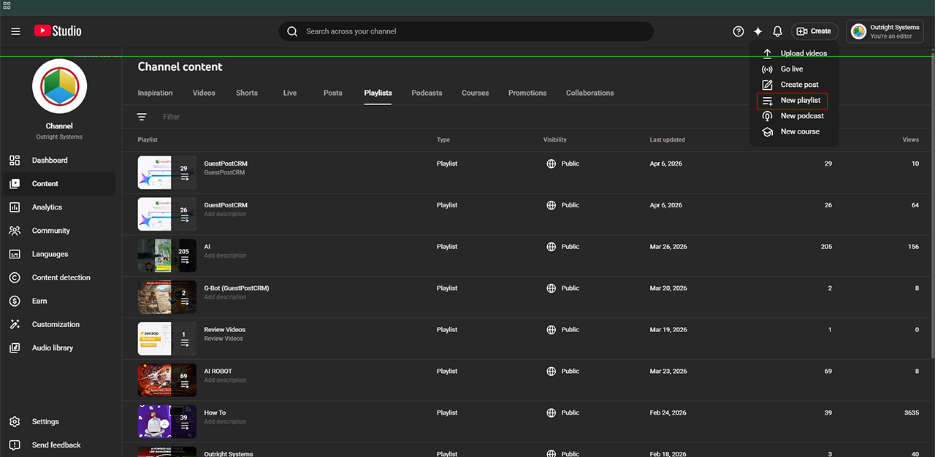
Fig: From “Create” option and Select “New Playlist.”
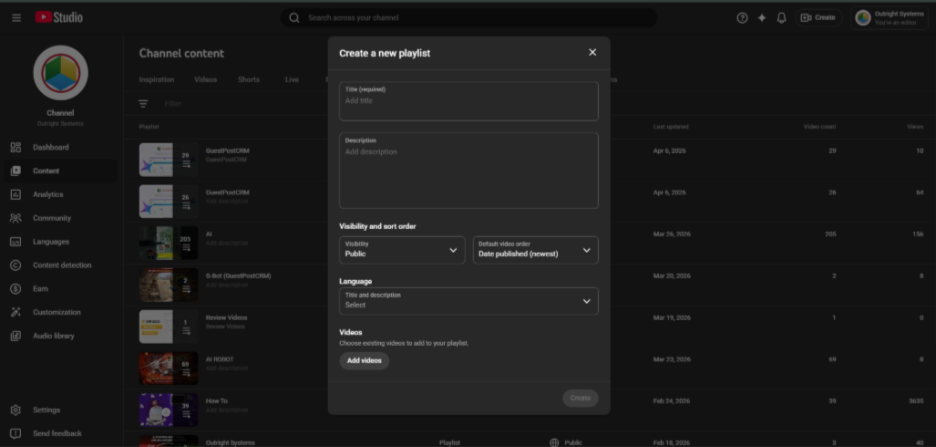
Fig: Fill the details and create custom playlist
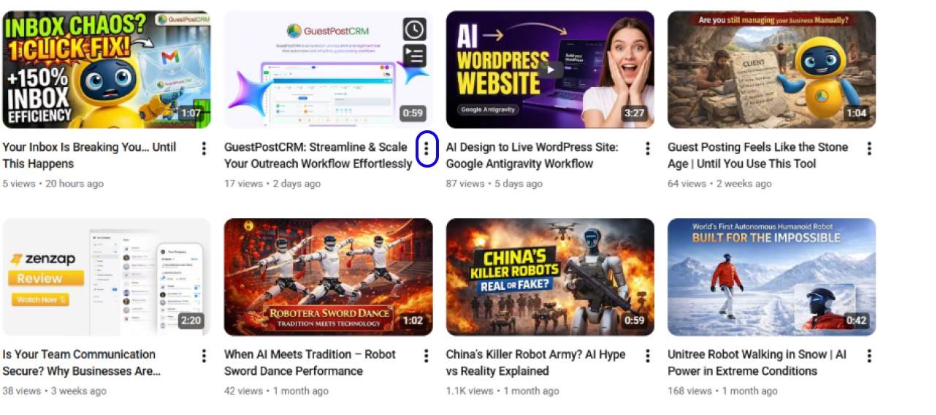
Fig: Select three dots
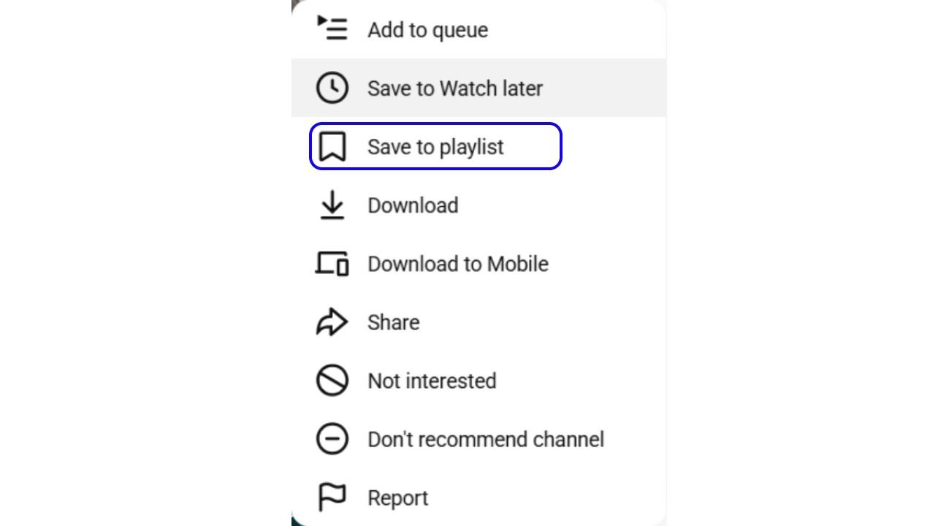
Fig: Select “Save the Playlist” Option
Step 3: Name the Playlist and Set Privacy:
Provide a name to your playlist. If it is a public playlist or the one you want people to see, you must make sure that it is search-friendly. You can choose among different privacy options including unlisted (only people with access to playlist URL can see), public (anyone can watch and find video), or private (only you can see it). Select “Create” to create a new playlist.
Step 4: Keep on Adding Content to Your Playlist:
You can make your playlist as long as you want. Just find the video you want to add. Click on the three dots and then select “Save to Playlist.” From there, you can choose whether you want to add the video to an existing playlist or create a new playlist.
Step 5: Organize Your Playlist:
You can rearrange your videos by choosing a newly created playlist (or whichever the one you want to). After that, select and drag videos to new positions.
You can also change the order, remove videos, or add a few notes.
How to Optimize Your YouTube Playlist?
Creating a playlist is just the first step. If you are a brand, you want to attract more people to come to your playlist and then go over to your profile. Your goal should be to get engagement and views. In this section, we will see how you can do that-
Use Descriptive Keywords and Titles:
The first step in optimizing your YouTube videos is to include keywords in your title and description that can help your playlist appear in search results. For example, if you want to create a playlist on How to Use Google Takeout, then you should include relevant keywords in title and description to enhance its visibility.
Pro Tip: We published a video on How to Use Google Takeout which has garnered close to 70K views as of 2026. We focused on optimizing title and description and offering only authentic information to users.
You can simply start by making your description detailed and updating your titles from time-to-time to ensure that they are relevant and fresh.
Use Thumbnails That Can Attract Clicks:
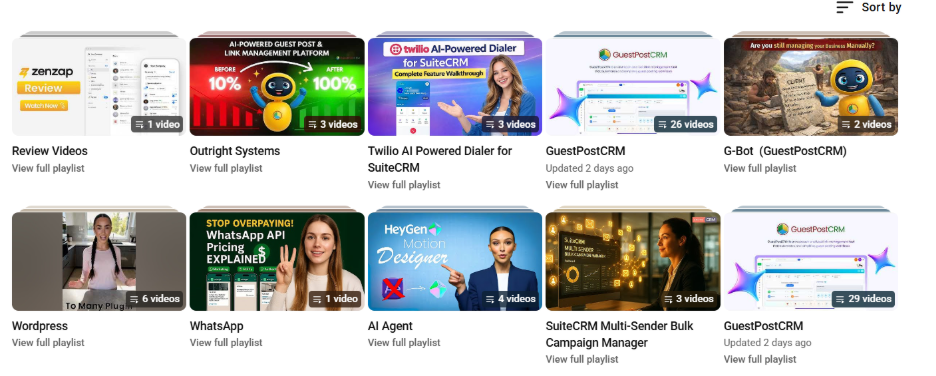
Numerous influencers and brands utilize custom thumbnails to make their playlist stand apart in their YouTube channel as well as in search results. Let us take another look at OutRight Systems’ playlist page. We used relevant thumbnails that can capture users’ attention and can relate to them. You should make your thumbnails bright, consistent, and relevant to the category. This can give a comprehensive look at your channel and aid in establishing brand recognition.
Advanced Options for YouTube Playlists
YouTube playlists have far-reaching advantages other than going for standard organization of videos. You can collaborate with others and monitor performance to maximize the impact of your playlist. So, let us take a look at these options in a lot more detail-
Collaborate With Other Users on Playlist:
YouTube Studio allows you to add collaborators to your playlist. This proves to be helpful for curating content or team projects that involve your peers or friends. It saves a lot of time and is a lot more efficient.
To invite collaborators, proceed to go to YouTube Studio and select “Playlists” on the left menu. Choose the playlist you wish to share and then select the option “Edit” and then select “Collaborate.” Then, provide email addresses of people you want to invite.
Collaborators can remove or add videos, edit playlist details, and change the order. You can ensure different permission levels for every person.
Leverage Analytics to Monitor Playlist Performance:
YouTube Analytics showcases how effectively your public playlists are performing. In order to access playlist analytics, just open YouTube Studio. From the left-hand menu, select “Analytics,” then choose “Playlists” from the top menu. You will notice metrics such as watch time, views, and audience retention for every playlist.
This is quite effective if you want to understand the performance of your YouTube channel. You can also utilize a professional tool such as “Brandwatch” that can provide you with latest data and deeper insights.
Conclusion
Creating a playlist in YouTube is one of the effective decisions that can help you organize your YouTube content and ensure that the viewers remain engaged for long. Irrespective of whether you are a casual user saving videos for later or a brand creating structured content library, playlists can be useful for you. Use the right thumbnails, titles, and keywords to make your playlist rank higher in YouTube search results and ensure consistent traffic to your channel.
Playlists also make it simpler for audiences to binge-watch your content without any level of interruptions, improving your “engagement rates” and “watch time.” Furthermore, you can also collaborate with others on playlists and monitor performance through YouTube Analytics, giving yourself a competitive edge.
We have covered YouTube comprehensively on our website. From how to check subscribers to how to delete your channel, you will find a relevant blog rich with unique insights.