






Slower MySQL queries significantly impact the performance and responsiveness of web applications. This decreases the user experience in the application and can also lead to potential business losses. For a developer, understanding the process to identify, diagnose, and optimize slow MySQL queries is considered a critical skill. It provides developers with a practical and step-by-step approach to managing slow or sluggish MySQL queries. They can incorporate best practices, along with modern techniques, to ensure that the application runs smoothly and efficiently.
Why MySQL Query Optimization Matters
In developing an application, an efficient database operations are considered as the backbone to achieve high-performance. Slow queries can manifest in various ways:
- Pages load slowly. Users don't wait around. They bounce.
- Your server works way too hard. CPU, memory, disk I/O — slow queries eat all of it, and at scale, that gets expensive fast.
- Your app can't handle traffic. Fewer requests per second means a hard ceiling on how much your app can grow.
- Users get frustrated. Ultimately, a sluggish app kills engagement. People remember bad experiences.
The earlier you catch and fix these issues, the better off you'll be.
Identifying Slow Queries
The first step in fixing slow queries is to identify them. MySQL offers various built-in tools and features that help users identify a slow query.
1. Enable the Slow Query Log
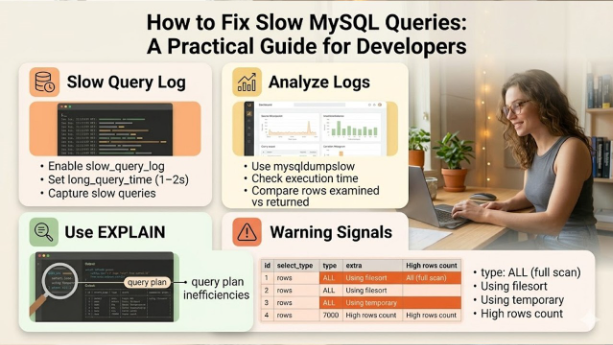
The MySQL slow query log is an invaluable tool, which helps in recording queries that exceeds a specified execution time. By default, the log is often disabled or configured with a high long_query_time threshold. [1]
To enable and configure the slow query log, you typically modify your my.cnf (or my.ini on Windows) file:

- slow_query_log = 1: Enables the slow query log.
- slow_query_log_file: Specifies the path to the log file.
- long_query_time = 1: Sets the threshold to 1 second. Queries taking longer than this will be logged.
- log_queries_not_using_indexes = 1: Logs queries that don't use indexes, even if they are fast.
After modifying the configuration, the user needs to restart the MySQL server for the changes to take effect.
2. Analyze Slow Query Logs
Manually sifting through large slow query logs can be tedious. Tools like mysqldumpslow (a command-line utility provided with MySQL) can help summarize and analyze the log content, grouping similar queries and showing their impact.
mysqldumpslow -s at -t 10 /var/log/mysql/mysql-slow.log
This command sorts queries by average time (at) and shows the top 10 (-t 10).
3. Utilize APM Tools
If you want more than just raw logs, tools like New Relic, Datadog, or Percona's PMM (Monitoring and Management) give you a much richer view — query execution plans, historical trends, visual dashboards. Well worth it if you're running a production app at any real scale.
Diagnosing Slow Queries with EXPLAIN
Once a slow query is identified, the next step is to understand how MySQL executes it. The EXPLAIN statement is crucial for this, providing details about the query execution plan. [2]

It shows you MySQL's execution plan — basically, what MySQL is actually doing under the hood to run your query. The columns that matter most:
- type — How MySQL is scanning the table. You want system, const, eq_ref, or ref. If you see ALL, that's a full table scan — usually a red flag.
- key — Which index MySQL actually used. If this is NULL, no index was used.
- rows — How many rows MySQL had to look at. Lower = better.
- Extra — Look out for Using filesort or Using temporary. These can indicate serious performance bottlenecks.
Make EXPLAIN a habit. Run it on any query you care about.
Optimizing Slow Queries: Practical Techniques
With a clear understanding of why a query is slow, you can apply various optimization techniques.
1. Indexing Wisely
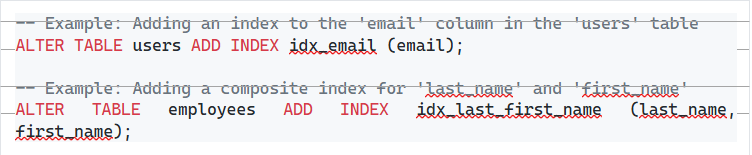
Indexes are arguably the most impactful optimization technique. They allow MySQL to quickly locate rows without scanning the entire table. [3]
- Index columns you use in WHERE, JOIN, ORDER BY, and GROUP BY
- B-tree indexes work for most cases; use full-text indexes for text searches
- Don't go overboard — every index slows down writes (INSERT, UPDATE, DELETE) because the index has to stay updated
- For queries with multiple conditions, composite indexes often beat several single-column indexes. Column order matters here.
2. Optimize SELECT Statements
Select only necessary columns: Avoid SELECT *. Instead, specify only the columns you need. This reduces the amount of data transferred and processed.

- Use LIMIT for pagination: When retrieving a subset of results, LIMIT is essential for performance.
3. Optimize JOIN Operations
- Always index the columns you're joining on
- Use the right JOIN type for the job — don't default to LEFT JOIN when INNER JOIN is what you actually need
- If you're joining 5+ tables, it might be worth rethinking your data model or materializing some views
4. Refine WHERE Clauses
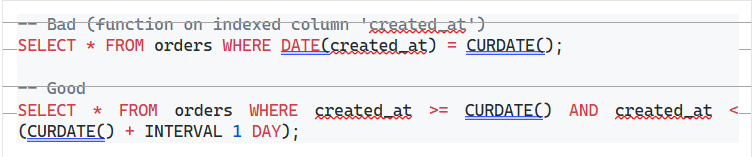
- Avoid functions on indexed columns: Applying functions to columns in the WHERE clause can prevent MySQL from using indexes.
Read More: Schema changes during plugin updates are a common cause. You can easily trace all plugin failures in WordPress to a database query that gets invalidated because of the change in table structure.
4. High Concurrency and Lock Contention
When numerous queries compete for the same columns or rows simultaneously, lock contention happens. This occurs as queries that go beyond excessive time waiting instead of implementation.
How to Fix This MySQL Query Issue:
- Recognize lock waits utilizing “SHOW PROCESSLIST” to see active queries as well as their implementation times.
- Maintain short transactions to reduce the window during which locks are held.
- Make sure replica servers have sufficient CPU, memory, and I/O capacity to manage replication workflows without any log.
What Are the Right Practices of MySQL Query Optimization?
Apart from resolving individual problems, ensuring that MySQL query performance is consistent needs an ongoing discipline:
- Track Proactively: Utilize tools such as PMM (Percona Monitoring and Management) or APM (Application Performance Monitoring) tools to continuous monitor query performance, not just when problems emerge.
- Select Relevant Data Types: Smaller and more accurate data types minimizes storage needs and expedite queries. Avoid utilizing VARCHAR where a fixed-length type would be sufficient.
- Balance Performance and Normalization: Schemas that are highly normalized can lead to slow and complex joins. In scenarios that are ready-heavy, choosing denormalization can enhance throughput.
- Fine-tune MySQL Configuration: Parameters such as innodb_buffer_pool_size (Set to 50-80% of available memory server ideally for dedicated MySQL servers), tmp_table_size and max_connections have a significant impact on overall performance of database.
- Verify After Every Modification: Once you apply any optimization, whether a rewritten query, a new index, or an update in configuration, run “EXPLAIN” again and track the slow query log to verify whether the resolution is working or not.
Conclusion
Understanding “how to fix slow MySQL queries” is not a one-time process — it is an ongoing process of diagnosis, measurement, and validation. The most efficient fixes consistently involve adding fixes on columns frequently filtered, verifying query plans after changes in schema, and rewriting inefficient SQL.
By allowing the slow query log, utilizing “EXPLAIN” to comprehend behavior in execution, and applying the techniques of optimization given in this developers’ guide, data administrators can improve MySQL query performance drastically and ensure more reliable and quicker application. What is significant is to work methodically: recognize the query that causes problems, comprehending why it is underperforming, applying a tailored fix, and verifying the result.
Frequently Asked Questions (FAQs) for How to Fix slow MySQL Queries
Slow MySQL queries are generally caused by inefficient indexing, poor query design, and server resources.
The MySQL slow query log is a diagnostic log that records SQL statements that take longer than a defined amount of time to execute.
In the process of optimizing SELECT queries in MySQL, the user needs to focus on reducing the number of rows scanned and minimizing the amount of data transferred.
The N+1 query problem in MySQL is a performance anti-pattern, in which an application executes many small database queries, instead of executing one or two large ones.