





Anyone who has tried to make a video knows how it works. You need a script tool for one part, an editing app for another, maybe an avatar generator for a talking-head clip, and then a separate subscription just for voiceovers. You are paying for five different apps to finish one video, and it takes more time than it should. But there is no need to worry because DeeVid AI solves that exact problem. However, it is worth asking whether stuffing a dozen models into one subscription actually works, or whether it just adds another layer between you and the video you wanted to make in the first place.
This review walks through what DeeVid AI actually does, how it works, what it costs, and where it falls short based on real testing and user feedback, not marketing copy.
What Is DeeVid AI?
DeeVid AI is an AI-powered tool for video generation. It turns written prompts, photos, or existing footage into short, animated clips within a minute. It consists of more than 14 models, including Sora 2, Veo 3.1, Kling, and Runway, behind one subscription, plus one-click effects like AI hugs and AI kissing generators, and it runs on the web, iOS, and Android.
It is especially useful for people who are not willing to learn traditional editing software. This makes it a great fit for marketers, social media creators, and small businesses. More businesses now lean on AI-generated videos to cut production time without sacrificing quality.
How Does DeeVid AI Work
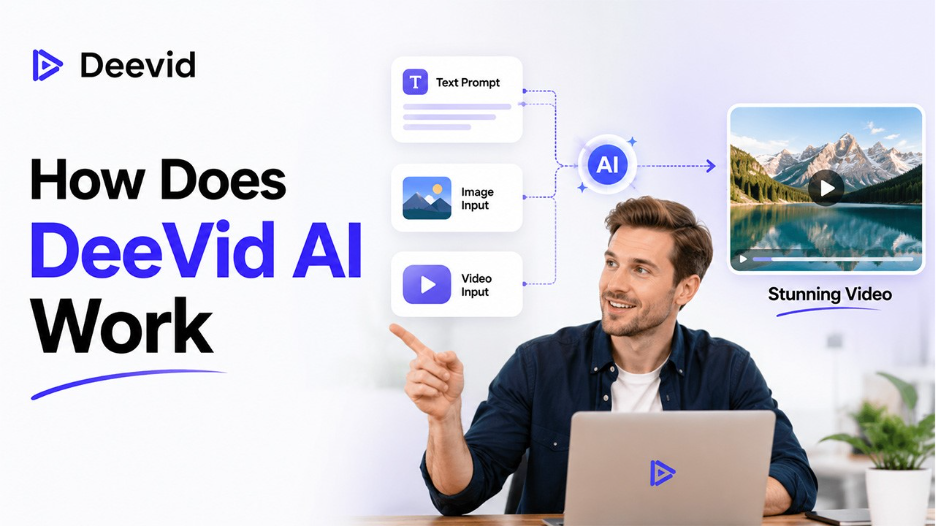
DeeVid AI has positioned itself as an all-in-one video generator tool. You just have to type in your prompt, upload an image, or upload an existing clip, and the app will give you back a short video. Templates and automatic media matching are part of the same shift reshaping the future of video content. Here's what's actually happening behind that promise:
- Prompt or Script Processing: You enter a written prompt or a short script describing what you want, and the AI reads through it to figure out what scenes and visual elements it needs to generate.
- Template-Based Structuring: It does not build a video from a blank canvas every time. Rather, it uses pre-designed templates to organize scenes, layout, and transitions. This is what makes it feel faster than manual editing.
- Automatic Media Selection: The system automatically selects background visuals, stock clips, or animations that match what you described in your prompt. So, you don’t have to look for footage manually.
- Customization: Once the rough draft exists, you can adjust elements to fit what you actually wanted, whether that's swapping a scene, tweaking pacing, or changing a visual style.
- Rendering and Export: After you've made your edits, the platform processes everything and exports the finished video in a shareable format.
On top of this core flow, DeeVid AI also splits its tools by input type, which is worth knowing before you start a project:
- Text-to-Video: It generates a clip from a written prompt, with the platform claiming lifelike motion and cinematic transitions.
- Image-to-Video: It takes a static image and animates it, including adding camera moves to give it a sense of motion.
- Video-to-Video: It restyles the footage you already have. It comes in handy for turning things like regular clips into an anime-style look.
- Ad-Oriented Workflows: It is a separate AI Ad Video Generator built specifically for short, product-focused creatives, aimed at marketers who need high-converting ads rather than general content.
Key Features of DeeVid AI
- Multiple AI Video Generation Modes: You can generate videos in multiple modes as it supports all forms, such as text-to-video, image-to-video, and video-to-video. This way, you’re not limited to just one workflow depending on what assets you already have.
- Multiple AI Video Models in One Platform: You don’t have to buy separate subscriptions for Runway or Kling. You get access to multiple models under a single DeeVid AI account. This saves money as you don’t have to pay for two or more tools at once.
- Ready-Made AI Video Templates and Effects: It offers built-in effects like Ghibli-style animation, AI hugs, and dancing clips in shareable content rather than long-form and time-consuming production
- AI Voiceovers and Music Generation: You can generate a back track or a synthetic voice without having to export your project to a separate audio tool, which cuts a step out of the usual workflow.
- Multilingual Video Creation: It allows you to input text and voiceovers in multiple languages, which matters if your audience isn’t limited to one region.
- Custom Branding Options: Paid tiers let you add logos, brand colors, and other identity elements, which are useful for agencies producing client work.
- Web, iOS and Android Access: The DeeVid app works on web, iOS, and Android, so you're not tied to a desktop to generate or review clips.
Each of these features is fairly common on its own in the AI video space. What makes DeeVid AI different is having them all inside one login instead of five.
DeeVid AI Pricing and Plans
DeeVid AI runs a credit-based system across four tiers, and paying yearly knocks roughly 29% off the monthly rate. Credit-based subscriptions like this reflect the wider economics behind AI video editing replacing hourly production costs. Here's how the plans break down:
| Plan | Monthly Price | Yearly Price | Credits | Resolution | Notes |
| Free | $0 | — | 20 credits on signup (about 4 videos) | Watermarked | Good for a real try-before-you-buy test |
| Lite | $10 | $120 | 200 credits/month (about 40 videos) | Up to 720p | No watermark, private generation, full commercial use |
| Pro | $25 | $300 | 600 credits/month (about 120 videos) | Up to 1080p | Everything in Lite, best credits-to-price ratio |
| Premium | $119 | $1,428 | 3,000 credits/month (about 600 videos) | Up to 1080p | Fast generation mode, priority support, built for agencies |
One thing is worth mentioning: DeeVid AI has a strict, no-refund policy. Several users have reported difficulty getting their refunds even when the output didn’t match what they expected. So, before committing to paid plans, treat the free tier as your real trial rather than assuming you can get your money back later.
DeeVid AI Pros and Cons

Pros of DeeVid AI:
- Access to several major AI video models under one subscription, which cuts down on tool-hopping and separate bills.
- Fast turnaround as you can generate most short clips in about a minute.
- No prior editing experience required. The interface is simple, easy to navigate, and built around plain-language prompts.
- Built-in voiceover and music generation save a step most competitors make you handle separately.
- Works across the web, iOS, and Android. So, you’re not restricted to just one device.
- The free tier gives you a genuine way to test the tool before paying and getting no refund if expectations don’t hold up.
Cons of DeeVid AI:
- Some users report inconsistent output quality, including issues with text rendering, distorted faces, and rendering artifacts.
- Credits can burn through faster than expected, especially if you work on heavier or longer generations.
- The no-refund policy is strict, and getting a refund when something goes wrong has been difficult for some users.
- User review scores on independent platforms have skewed low recently, with complaints centering on video quality and how quickly credits get used up.
- Not built for advanced, frame-by-frame creative control if you need precise camera movement or fine motion editing, a dedicated tool will likely serve you better.
5 Best DeeVid AI Alternatives to Try in 2026
If DeeVid AI doesn’t quite meet your expectations, here are five tools that are worth comparing. Each has a slightly different strength:
| Tool | Best For | Starting Price | Standout Feature |
| HeyGen | Talking head and avatar videos | ~$24/month | Strong avatar realism and lip sync |
| Synthesia | Corporate training and enterprise use | Custom pricing | 230+ avatars, 140+ languages, SCORM export for LMS integration |
| Runway | Precise creative control | ~$12/month | Full timeline editor with motion brushes and camera control tools |
| Pika | Fast, playful creative clips | Free tier, Pro ~$35/month | Good for visual clips, intros, and creative scenes |
| InVideo AI | Script-to-video marketing content | Free tier available | Turns scripts or prompts into structured, ready-to-post videos |
In contrast to DeeVid AI, none of these tools do everything in one place. That's the trade-off you have to accept. Specialized tools do their one job better, while DeeVid AI trades some of that precision for breadth and convenience.
Conclusion: Is DeeVid AI Worth It?
So, does bundling over a dozen AI models into one platform actually work? Mostly, yes. Deevid AI genuinely saves hours and money that you’d spend paying for two or three separate video tools, and the speed of generation is hard to argue with. However, it’s not flawless. It comes with its shortcomings, such as inconsistent output quality, faster exhaustion of credits, and a no-refund policy. This means you should test properly before you commit any real money.
Start with the free tier and see how you like the output for your specific use case. If you’re a solo creator or small business that wants quick, varied video content without managing five different subscriptions, DeeVid AI is worth trying.
Frequently Asked Questions (FAQs)
Yes, DeeVid AI offers a free tier with 20 sign-up credits, enough for about four watermarked videos.
The Pro plan at $25/month is generally the best balance of credits, resolution, and price for regular users.
No, DeeVid AI has a strict no-refund policy, so it's best to test thoroughly on the free tier first.
Yes, but only on paid plans. The free tier doesn't include commercial usage rights or watermark-free exports.
It bundles multiple AI video models, like Sora and Veo, into one subscription instead of requiring separate tools.