






Picture this: you open your YouTube on a Tuesday morning, coffee in one hand, and the first thing that you notice is rise in your subscriber count. You feel a small rush of satisfaction, close the gap, and get back to editing. Most creators live in this loop. They check the number, feel good or anxious, and move on. But here’s what rarely gets asked: who are those people? Which actual humans decided your content was worth following? What do they watch? What does their presence tell you about what you’re doing right?
Knowing how to view your subscribers on YouTube isn’t a technical skill. It is the beginning of a more intentional relationship which helps you understand your audience better and grow your community. But seeing your subscribers is actually quite tricky. Worry not, this guide shows you exactly how to see your subscribers on YouTube using both mobile and desktop.
Why YouTube Doesn’t Show All Your Subscribers on YouTube
YouTube doesn’t show you every subscriber you have. That’s a deliberate privacy feature. Every user has an option to keep their subscription activity private, which means that a portion of subscribers will always remain invisible to you.
When you follow the steps given below, you will only see those subscribers who have made information publicly available. Don't let that discourage you; even a partial window to your audience is far more useful than you think. This will help you create better content and connect with your viewers.
Note: if you come across a third-party tool that claims to reveal a full subscribers list, take it with a grain of salt. No external tool has access to that data. YouTube simply doesn’t make it available, and chasing those tools is a waste of time.
If you're exploring other ways to get value from the platform, learning how to Convert YouTube to MP3 Legally is one example of using YouTube tools the right way within what the platform actually allows.
How to See Your Subscribers on YouTube Using Desktop (YouTube Studio Guide)
The most complete way to view subscribers is through YouTube studio on a browser desktop. Mobile apps give you count, but the desktop version shows you actual names, profile pictures, and subscription date which is where things get genuinely useful.
These simple steps show you how to do it:
- Sign in to Your YouTube Channel: After signing in with your email address and password, go to studio.youtube.com. This is your creator dashboard where all the meaningful data lives.
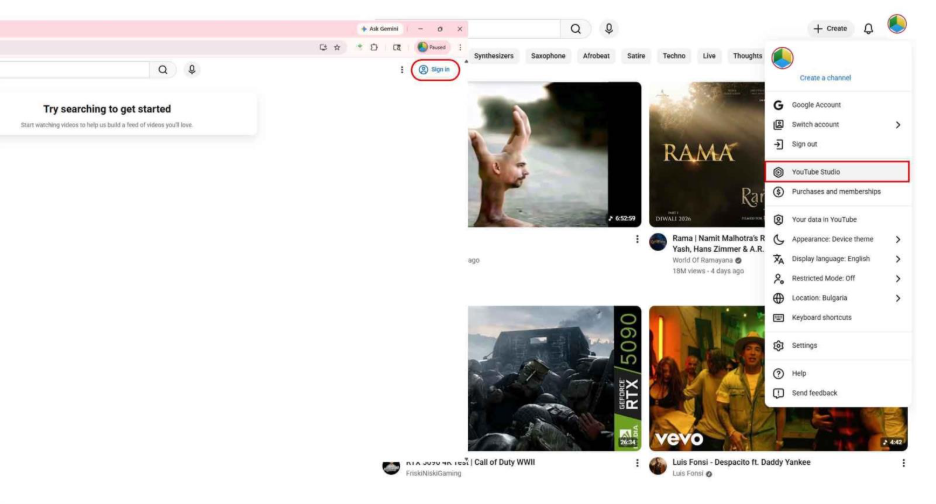
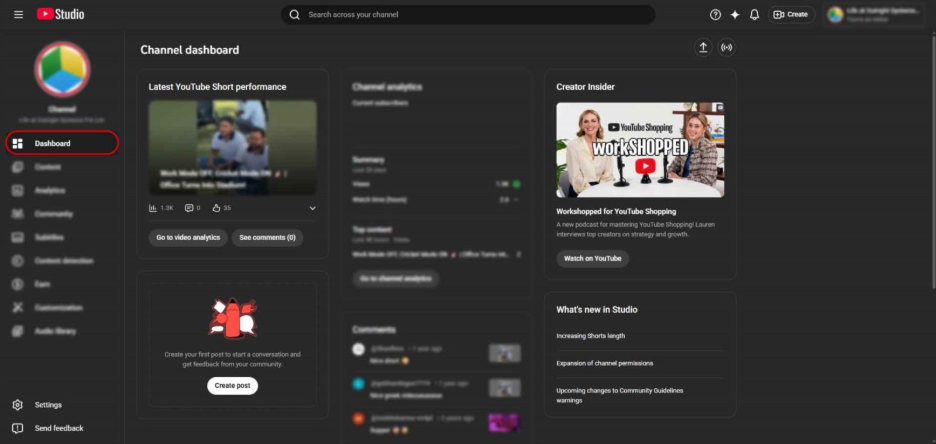
- Click “Dashboard” In YouTube Studio: In the left-hand navigation panel, click on the dashboard. This gives you a quick overview of your channel’s performance and recent activity.
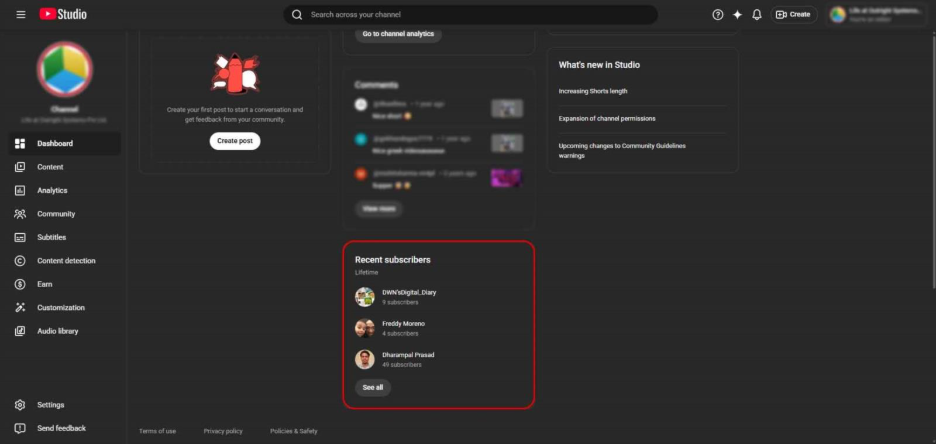
- Find the Recent Subscribers Panel: Scroll down to lower section of the dashboard and find Recent Subscribers Panel. You will find the list of your subscribers here who have their accounts set to public.
- Sort Your YouTube Subscribers: You can sort your subscribers by the date they subscribed or by the size of their own subscriber count. Sorting by subscriber count is especially useful as it helps you spot if any established channels have started following your content.
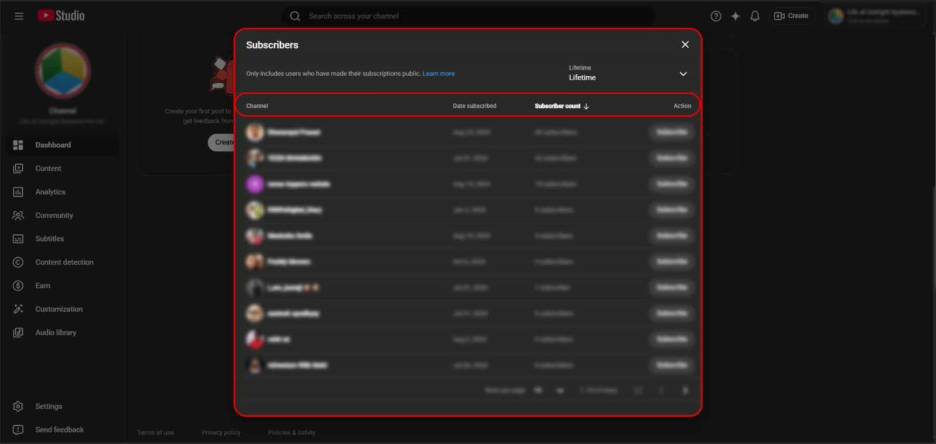
- View Individual Subscriber Profiles: You can explore individual profiles of your subscribers to visit their channels directly. This is where real value begins. You start to see what your audience watches, what they create, and what common threads run through the people who decide to follow you.
How to See Your Subscribers on YouTube Mobile App
If you manage your YouTube from your phone, the YouTube studio app available on both Android and iOS does provide you with some subscriber information, though it’s more limited than the desktop version. However, it comes in handy if you want a quick overview of your subscribers.
Here’s how to see your YouTube subscribers on mobile:
- Open your YouTube studio app and navigate to the Dashboard when it loads.
- View your total subscriber count displayed at the top of the screen next to your channel profile photo.
- Track how your count shifts over time as you upload new content.
What to Do After You See Your Subscribers on YouTube
This is the section that most how-to guides skip, which is a real shame because this is where knowing how to see your subscribers on YouTube stops being a technical exercise and starts becoming a creative one.
Here's how to actually use what you find:
Look for Content Inspiration on Their Channels
When you browse the channels of people who follow you, patterns tend to emerge. Maybe a chunk of your subscribers is into a topic adjacent to yours; something you haven’t covered yet but that clearly interests your existing audience. That's a video idea with a built-in audience already waiting for it.
Identify Potential Collaborators
Collaboration is one of the most reliable growth strategies on YouTube, and your subscriber is surprisingly a good place to find candidates. If a channel with its own audience subscribes to yours, there’s already mutual interests. Reaching out becomes a much more natural conversation when overlap already exists. Whether you're growing on TikTok, Instagram, or YouTube, reaching out becomes a much more natural conversation when overlap already exists.
Understand How Your Audience Communicates
Knowing your subscribers isn't only about topics; it's about tone and depth. If your subscribers tend to be seasoned enthusiasts, you don't need to over-explain fundamentals. If they skew toward beginners, that changes how much context you provide in every video.
Build a Strong Community
When you recognize names that keep appearing, people who comment, make their own content, engage meaningfully; you can nurture those relationships more deliberately. Responding to their comments or even leaving a thoughtful note on their channel creates loyalty that passive subscribers never develop. YouTube is just one piece of the larger puzzle of social media platforms where community-building plays a decisive role in long-term growth.
What YouTube Analytics Tells You About Your Subscribers
Once you've explored your visible subscribers, the next step is the Audience tab inside YouTube Analytics. This goes beyond individual profiles and into behavioral patterns: how your audience actually moves around the platform.
To get there, go to YouTube Studio, click "Analytics" in the left panel, and select the "Audience" tab at the top. Three things are especially worth your attention:
Channels Your YouTube Audience Watches
It is one of the most useful data points available to any creator. YouTube surfaces a list of other channels your viewers tend to follow, which gives you a clear map of the creative landscape your audience already lives in. These channels are your closest peers; study them, learn from their approach, and consider reaching out.
Videos Your YouTube Audience Recently Watched
It gives you a real-time snapshot of what's currently capturing your viewers' attention. It's updated regularly and filtered specifically to your audience, so you're not looking at generic trending content; you're looking at what your people actually care about right now.
How Your YouTube Audience Watches Content
This reveal viewing habits and format preferences; whether your subscribers tend toward long-form videos, shorts, or live streams. If you've been unsure whether to experiment with a new format, this data can push you in the right direction with actual evidence behind it. Tracking this kind of audience data consistently is what separates creators who plateau from those who keep growing.
None of this requires you to change your channel overnight. Think of it as small, informed tuning adjustments made consistently over time rather completely changing the way you do things.
Conclusion: How to See Your Subscribers on YouTube and Grow
Here's a thought worth sitting with: the best creators on YouTube aren't just watched; they watch back. They pay attention to who's engaging with their content, what those people care about, and what their own content looks like through that lens.
Knowing how to see your subscribers on YouTube is a small, practical action. But it builds the habit of treating your audience as real people rather than a growing number. This is what separates channels that hit plateau from channels that keep growing. Your subscribers chose you for a reason. It's worth taking a few minutes each month to find out what that reason is.
FAQs: How to See Your Subscribers on YouTube
No. YouTube lets users keep their subscription activity private, so you'll only see subscribers who have made their information publicly visible.
Not fully. The YouTube Studio mobile app shows your total subscriber count, but browsing individual subscriber profiles requires a desktop browser through YouTube Studio.
YouTube doesn't offer an export option for subscriber data, and third-party tools can't access it either. YouTube doesn’t simply make this information available.
Once a month works well for most creators. It gives enough time for meaningful changes to accumulate while keeping you connected to who's joining your audience.
Your subscriber list shows you individual people who follow your channel. YouTube Analytics, particularly the Audience tab, shows you behavioral data about your broader viewer base.