






Most developers hit the same wall eventually. Their HTTP client is too simple; it shows nothing, logs nothing, and gives them zero control over what's moving across the wire. But enterprise proxy solutions are overbuilt, expensive, and intimidating for what should be a straightforward engineering need.
So, they end up stuck in the middle. They debug blindly, guess at headers, and run the same requests fifteen times, hoping the error finally reveals itself. There's a tool that fits exactly in that gap. It's not flashy, and it doesn't have a marketing budget, but developers who discover it tend to make it a permanent part of how they work. That tool is the ProxyPy web proxy, and if you haven't looked at it seriously yet, this is worth your time.
What Is ProxyPy Web Proxy?
ProxyPy web proxy is an open-source, lightweight HTTP and HTTPS proxy server written entirely in Python. Maintained on GitHub as proxy.py, it was built by developer Abhinav Singh with clear priorities: keep it fast, keep it transparent, and keep it extensible.
At its core, ProxyPy sits between your client — a browser, a script, an automation tool and the internet. Every request your client sends passes through ProxyPy first. Every response that comes back passes through it on the way home. That positioning gives ProxyPy the ability to see, modify, block, log, or redirect traffic in real time.
What separates it from a basic packet sniffer is that ProxyPy is programmable. Using a well-designed plugin system, developers can write custom Python code that hooks into the lifecycle. This can also shape traffic as per the workflow demands. ProxyPy is popular among backend engineers, QA teams, and security researchers because it offers visibility, control, and extensibility.
How ProxyPy Web Proxy Works
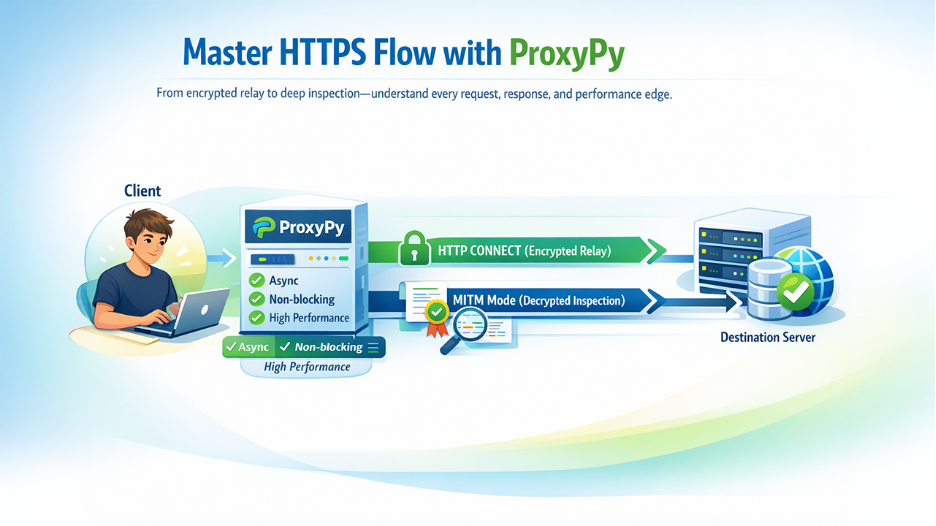
When a client sends an HTTP request through ProxyPy, the proxy receives it, applies any plugin logic, and forwards it to the destination server. The response follows the same path in reverse. For plain HTTP, the content is fully readable and available for inspection or modification.
HTTPS is more nuanced. ProxyPy handles it two ways:
- HTTP CONNECT: ProxyPy relays encrypted traffic without decrypting it. It is the default behavior which is suitable for most routing and filtering needs.
- MITM mode: Here, proxyPy decrypts HTTPS traffic using its own Certificate Authority, which enables complete inspection of encrypted content. This mode requires installing ProxyPy’s CA certificate on the client device. Once configured, HTTPS traffic becomes as readable as HTTP.
Under the hood, ProxyPy runs on Python's async architecture. It is an event-driven, non-blocking model that handles many concurrent connections without high memory overhead. This is what keeps ProxyPy performant in real development environments, not just simple demos.
Key Features of ProxyPy Web Proxy for Developers
ProxyPy is lean by design, but its feature set covers everything developers genuinely need:
HTTP and HTTPS Traffic Support: Both protocols work out of the box. CONNECT tunneling handles HTTPS by default, with MITM mode available for full traffic inspection when needed.
Plugin-Based Extensibility for Custom Workflows: Developers can hook into every stage of the request/response lifecycle. They can modify headers, block domains, redirect traffic, log requests, and cache responses all through clean and consistent Python plugins.
Async Non-Blocking Performance: ProxyPy manages concurrent connections efficiently without spawning expensive threads. It stays responsive under load, making it reliable for automated workflows.
Open-Source Transparency and Security: Every line of code is publicly auditable. There is no hidden telemetry, no opaque behavior, and no license clauses granting data rights quietly in the background. Pairing it with dedicated web application security tools gives development teams a more complete picture of their security posture.
Easy Setup and Minimal Configuration: Runs on Python 3.8+, installs with one pip command, and starts with one terminal command. There is no GUI, no service registration, and no infrastructure dependency.
Cross-Platform Compatibility and CI/CD Integration: It works on Linux, macOS, and Windows. ProxyPy web proxy integrates cleanly into CI/CD pipelines, Docker containers, and local development environments.
Benefits of Using ProxyPy Web Proxy in Development and Testing
Features describe what a tool does. Benefits describe what it does for you, and ProxyPy's benefits are immediate and concrete:
Complete Network Visibility in Real Time: The moment ProxyPy is running, every request, header, and response code appears in your terminal in real time. The network stops being a mystery.
Faster Debugging and Issue Resolution: Instead of adding log statements and redeploying, you see the problem directly in proxy output. What used to take twenty minutes of guesswork takes two minutes of reading traffic.
Full Traffic Control Without Infrastructure Complexity: Block domains, modify requests, redirect endpoints — all from a local Python script. No firewall rules, no DevOps tickets, no cloud configuration required.
Improved QA Testing and Simulation: QA teams can intercept and modify responses to simulate edge cases and verify application behavior without any additional test infrastructure. Understanding how websites protect themselves from scraping also helps QA teams build more realistic test scenarios that reflect real-world defenses.
Free, Open-Source, and No Vendor Lock-In: ProxyPy is free, open source, and carries no vendor relationship. You can modify it, extend it, run it anywhere without any licensing concerns attached.
How to Install and Set Up ProxyPy Web Proxy (Step-by-Step Guide)
Getting ProxyPy running takes less time than most developers expect. Here's the complete process:
Step 1: Check Python Version Requirements
ProxyPy requires Python 3.8 or higher. Run python --version to confirm before proceeding.
Step 2: Install ProxyPy using pip
pip install proxy.py
That's the full installation. No manual dependencies, no build steps.
Step 3: Run ProxyPy on Localhost
proxy --hostname 127.0.0.1 --port 8899
ProxyPy is now running locally on port 8899.
Step 4: Configure Browser or HTTP client
Point your browser or HTTP client to use 127.0.0.1:8899 as its proxy. For code-based clients, set it as an environment variable or constructor parameter.
Step 5: Monitor Network Traffic in Real Time
Send a request. Request and response details appear in your terminal immediately. You're now running a live, fully functional proxy.
Step 6: Add Custom Plugins for Advanced Control
Write a plugin class extending ProxyPy's base, then start ProxyPy with the --plugins flag pointing at it. Your custom logic runs on the very next request.
From a clean machine to a running, configurable proxy in under five minutes. Most developers wish they'd set it up sooner.
Limitations of ProxyPy Web Proxy and How to Overcome Them
ProxyPy is excellent at what it does, but one structural limitation is worth understanding before building serious workflows around it.
Regardless of how many requests pass through ProxyPy, they all exit from one place; the IP address of the machine running it. For local debugging and testing, that's perfectly fine. But for workflows involving high request volumes to external targets such as web scraping, automated data collection, account-based automation; a single IP is a liability. Websites rate-limit by IP, block by IP, and flag unusual volumes coming from the same address. ProxyPy has no mechanism to address this, because IP management is simply outside its design scope.
The solution experienced developers reach is pairing ProxyPy with an upstream residential proxy service. The architecture is clean. ProxyPy runs locally as the control and customization layer, while outbound traffic routes through a residential proxy network that handles IP rotation and geographic targeting. ProxyPy adds the intelligence; the residential proxy service adds scale and identity diversity. Together, they form a system capable of handling production-grade workloads without the fragility of a single-IP setup.
Final Thoughts: Is ProxyPy Web Proxy Worth Using in 2026?
Here's a straightforward way to think about it. ProxyPy belongs in your workflow if you're debugging a web application and need to see exactly what's being sent and received. It belongs there if you're running automated tests and need to intercept or modify responses to cover edge cases. It belongs there if you're doing security research and need visibility into encrypted traffic, or if you're building a scraping pipeline and want a programmable control layer before requests hit the network.
If your primary challenge is IP rotation and avoiding bans at scale, ProxyPy alone won't solve that but paired with a residential proxy service; it becomes a powerful part of the solution. For teams looking to extend ProxyPy with custom plugins or deeper integrations, working with a specialist in Python development can significantly speed up that process. The proxyPy web proxy isn't trying to be everything. It's trying to be one thing exceptionally well: a fast, transparent, programmable proxy layer that gives developers real control over their network traffic. For that job, it's one of the most capable free tools available, and it takes five minutes to find out for yourself.
Disclaimer: ProxyPy's MITM inspection mode should only be used on devices you own or have explicit authorization to test. Always respect applicable privacy laws and the terms of service of any platform you interact with.