






Customer Relationship Management (CRM) allows organizations to manage customer data, streamline sales processes, track marketing performance, and offer strong customer support in a timely manner. At the heart of every CRM platform lies CRM modules. They are individual components designed to tackle specific business functions.
It is essential to understand CRM modules if you want a CRM system that works for a team and fits perfectly into your existing workflows. Choose the right CRM system, configure it properly and make sure its seamless adoption across teams. This guide explores what CRM modules mean, their most common types, how CRM works, and why CRM modules are important for your business.
Here is the overview summary : CRM Modules
- Explains what CRM Modules are and how they function as building blocks within a CRM system
- Breaks down types of CRM modules including Contact Management Module, Lead Management Module, Sales Pipeline Management Module, Marketing Automation Module, Customer Support and Service Module, Activity and Task Management Module, Reporting and Analytics Module, and Workflow Automation Module.
- Highlights key features and business benefits of each module
- Shows how CRM Modules Work Together to streamline sales, marketing, and service operations
- Provides guidance on Choosing the Right CRM Modules for Your Business based on needs and growth goals
What Are CRM Modules?
CRM modules act as building blocks. They are functional units within a CRM system; each one manages a specific aspect of customer relationships. Instead of enforcing rigid applications, SaaS CRM platforms are modular that allow organizations to use only those features that they need to run business operations.
Each module focuses on a particular workflow such as:
- Managing leads and sales pipelines
- Tracking customer interactions
- Running marketing campaigns
- Handling customer service requests
- Reporting and analytics
8 Types of CRM Modules Explained
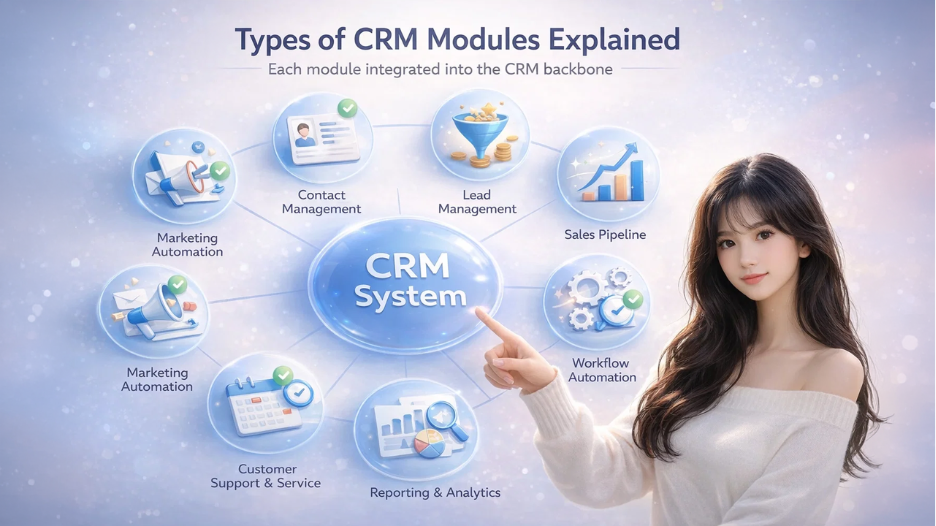
1. CRM Contact Management Module
It keeps a record of every detail about customers and prospects such as their names, contact information, company name, medium of communication, and interaction history. This makes customer profile accessible to everyone on the team with accurate and up-to-date information eliminating any guesswork.
Key features include:
- Contact details (name, email, phone, company)
- Interaction history (calls, emails, meetings)
- Account relationships
- Notes and attachments
Business benefits:
- Creates a single source of truth for customer data
- Prevents duplicate or outdated records
- Enables personalized communication
2. Lead Management Module
The Lead Management module allows businesses to capture potential customers from various sources such as websites, referrals, events, marketing campaigns, and even manual imports. It organizes, tracks and qualifies leads through early sales process. This ensures that nothing or no one slips through cracks.
Key features include:
- Lead capture from forms, emails, ads, and imports
- Lead scoring and qualification
- Assignment rules
- Lead conversion to contacts or deals
Business benefits:
- Improves lead response time
- Helps sales teams focus on high-quality prospects
- Aligns marketing and sales efforts
3. CRM Sales Pipeline Management Module
Sales Pipeline Management lets you track movement of deals as they progress through defined sales stages from initial contact to deal closure. This way you can recognize the value of each deal, expected close dates, and the likelihood of conversions. This visibility helps teams shift their energy where it counts.
Key features include:
- Opportunity tracking
- Sales stages and probabilities
- Deal value forecasting
- Task and follow-up reminders
Business benefits:
- Provides real-time visibility into revenue pipelines
- Improves forecasting accuracy
- Helps sales managers track performance
4. Marketing Automation Module

Key features include:
- Email marketing and drip campaigns
- Campaign segmentation
- Lead nurturing workflows
- Campaign performance analytics
Business benefits:
- Automates repetitive marketing tasks
- Improves lead nurturing and conversion rates
- Helps measure ROI on marketing activities
5. Customer Support and Service Module
This module organizes customer inquiries and support requests. It logs every case, tracks how quickly teams address and respond to them. It plays an essential role in making sure that tickets reach appropriate support teams, and customers receive answers as soon as possible, thereby improving customer satisfaction.
Key features include:
- Ticket management
- Case routing and prioritization
- SLA tracking
- Knowledge base integration
Business benefits:
- Improves response and resolution times
- Enhances customer satisfaction
- Enables consistent service delivery
6. Activity and Task Management Module
Activity and Task Management keeps day-to-day actions in order such as calls, meetings, emails, and follow-ups. Each activity gets logged to the right customer records, so anyone can pick up the thread and see what’s happened so far to decide on the next steps.
Key features include:
- Tasks, calls, meetings, and reminders
- Calendar integration
- Activity timelines
Business benefits:
- Keeps teams organized
- Ensures follow-ups are not missed
- Improves accountability
7. Reporting and Analytics Module
Reporting and Analytics convert raw, unfiltered CRM data into meaningful and actionable insights so that teams can use them to make informed decisions that drive positive outputs. This module presents insights in the form of dashboards, reports, and performance metrics. Organizations can monitor sales performance, effectiveness of marketing strategies, and customer service outcomes to spot trends and fix problems before they get worse.
Key features include:
- Custom dashboards
- Sales and marketing reports
- Performance metrics
- Trend analysis
Business benefits:
- Supports data-driven decision-making
- Identifies bottlenecks and opportunities
- Tracks CRM metrics across departments
8. Workflow Automation Module
The Workflow Automation module eliminates repetitive work by automating business operations. It automatically triggers actions based on predefined rules and conditions. These actions may include task creation, email notifications, or approval requests.
Key features include:
- Automated task creation
- Email alerts and notifications
- Approval workflows
- Conditional logic
Business benefits:
- Reduces manual effort
- Improves process consistency
- Minimizes human error
Key Benefits of CRM Modules
CRM modules shape how well a CRM system actually helps business operations run; not just how many features it offers. The real value comes from how CRM modules are configured, used, and aligned within everyday workflows. When you define and use modules the right way, a CRM stops being a passive database and transforms into an active business tool that drives growth.
They Improve Operational Efficiency
Each CRM module handles a specific function such as tracking leads, managing sales, or handling customer support. Keeping these responsibilities separate cuts down on manual effort, minimizes repetitive data entry, and streamline processes. Automation within these modules lets your teams invest their energy into more high-value activities instead of administrative tasks.