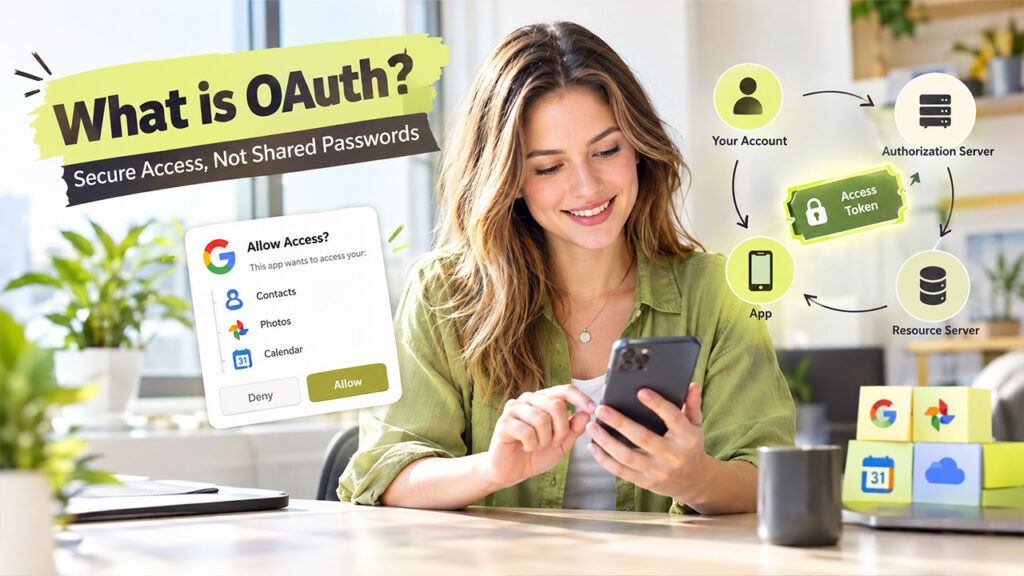






Picture yourself visiting an office building with a front desk. Since you're a visitor, not an employee, the receptionist hands you a badge. It opens one floor, and it only works until evening. Nobody gives you the master key because they don't need to. OAuth works in a similar way. Every day, apps ask for permission to access your accounts, whether it's your contacts, photos, or calendar. Years ago, the only way to allow that was to reveal your password, which comes with risks. So, what is OAuth, and how does it let an app in without giving away your keys? Let's walk through it step by step.
What Is OAuth?
OAuth is short for Open Authorization. It's a standard way to let one app use your information in another app without ever peeking into your password. The app doesn't need your password; instead, it receives an access token. This token acts as a small digital pass. It shows which parts of your account the app can use, like your photos, but not your emails. You're the one who controls this as it's you who must approve the request first. You've probably seen OAuth already. It's behind every "Sign in with Google?" Or "Allow access to your account?" message. It also works for mobile apps, smart TVs, and other connected devices.
How OAuth Works: A Step-by-Step Overview
There are four players involved in every OAuth request:
- You (The Resource Owner): You own the account and decide what to share.
- The App (The Client): This is the app asking for access.
- The Authorization Server: It checks your approval and hands out tokens.
- The Resource Server: It stores your data and gives it out when a valid token shows up.
There's one more term that you should know about: the scope. It defines the list of things the app is allowed to touch. Here's how the pieces move, one step at a time:
- The App Requests Access: It tells the authorization server who it is and what it wants to use. Passwords are not involved at this point.
- The Authorization Server Displays Permissions: This screen belongs to your account provider, not the app. It lists all the things that the app is asking for.
- The User Approves or Denies Access: If you agree, you've approved only what's on that list. Anything outside the scope stays locked.
- The Authorization Server Issues an Access Token: The app gets an access token, and your password stays private the whole time.
- The App Sends the Token to the Resource Server: It hands the token to the resource server, which is where your data lives.
- The Resource Server Grants Authorized Access: The server checks the token and releases only what you allowed. When the token expires, the access ends.
OAuth Authorization Flow Explained
Let's understand this with an example. Suppose Maya wants to print her holiday reports, which she stored in her online photo account. She's using a photo-printing app.
- Maya opens the printing app and taps "Connect my photos."
- The app sends her to her photo account's own sign-in page, not a page made by the app.
- A message appears: "Allow this app to view your photos?"
- Maya taps Allow.
- Her photo account gives the app a token that works for viewing photos only.
- The app uses the token to pull in her pictures. It can't read her emails, and it can't delete anything.
Now, notice what has never happened. Maya never typed her password into the printing app. If by chance that app gets hacked tomorrow, her password wouldn't be compromised or become a part of the damage.
OAuth Grant Types and Their Uses
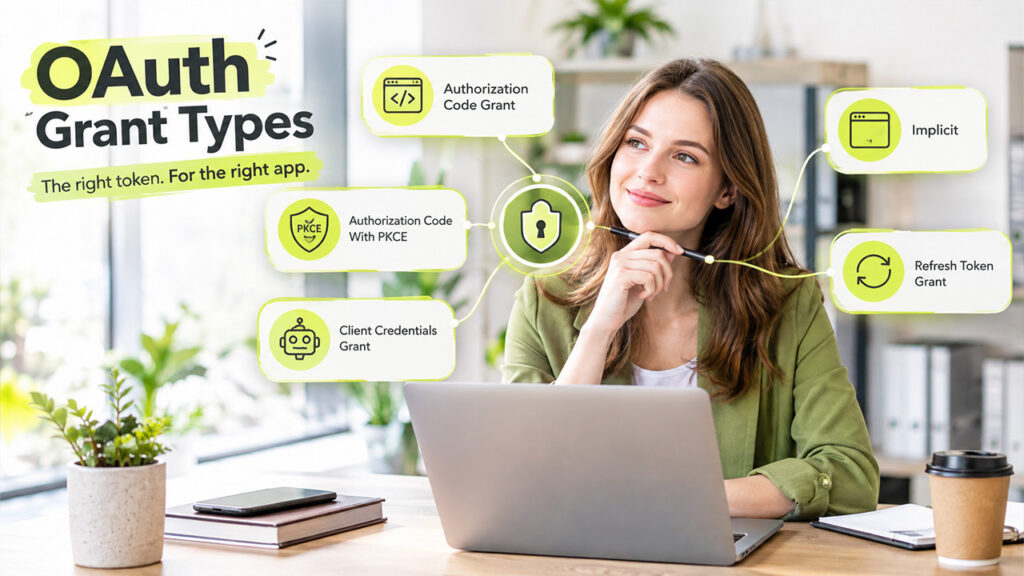
A grant type refers to the method an app uses to get its token. Different apps need different methods. Here are the main ones:
- Authorization Code Grant: This method is common for web and mobile apps. The app first gets a one-time code, then exchanges it for an access token.
- Authorization Code With PKCE: This adds a safety layer to the authorization code method. It proves that the app asking for the token is the same one that started the request, so attackers can't sneak in.
- Client Credentials Grant: This is for machines talking to machines. In this, there is no involvement of any person. A weather app pulling a forecast from a data service is a good example.
- Implicit: This is an older, simpler method for browser-based apps, where the token comes back in the web address. Because it's less secure, newer apps usually pick safer options.
- Refresh Token Grant: When an access token expires, this gets a new one. You don't have to approve the app all over again.
OAuth 1.0 vs. OAuth 2.0: Key Differences
So, what is OAuth 2.0? It's the second version of the standard. It was released in 2012, replacing OAuth, which came out in 2007. It's the one that the industry uses today. The two versions aren't compatible with each other, so they can't simply be swapped. Here's a quick side-by-side look:
| OAuth 1.0 | OAuth 2.0 | |
| Released | 2007 | 2012 |
| Built for | Websites only | Websites, mobile apps, APIs, and devices |
| Ease of use | Seen as complicated and hard to grow | Simpler and more flexible |
| Token expiry | No | Yes |
| Status today | Deprecated | Current standard |
It also works with APIs, the connections that let apps share data. Still wondering, what is API? A plain, simple answer is just a click away.
OAuth vs. Authentication: Understanding the Difference
Let's talk about the mix-up that trips up many people. OAuth is not for authentication. It does not prove who you are. Rather, it decides what an app is allowed to do and to what extent. There's a difference between authentication and authorization. Proving your identity is called authentication, and giving permission is called authorization. OAuth is responsible for the second one.
Strong passwords, tokens, and multi-factor checks protect that first step, and Authentication Security with Auth0 shows how they work together.
So how does "Sign in with Google" work? It usually uses OpenID Connect, which sits on top of OAuth 2.0 and adds the "who are you" part. One layer confirms your identity, and OAuth handles the permission. Together, they make those one-tap sign-in buttons possible.
Conclusion
OAuth is a solution to a simple problem. You no longer have to share your passwords with apps and give them full access to your system. It lets apps work together without passing passwords around. It uses limited, temporary tokens that only work once you give approval. Today, the version that is in use is OAuth 2.0. Unlike OAuth 1.0, it covers websites, phones, APIs, and smart devices. If you want to build apps, pick the most appropriate grant type that fits your case perfectly. Additionally, keep the scope small. However, if you're just an app user, pause to read the permissions screen before you tap Allow. In this digital landscape, as more of our lives connect through apps, this quiet standard will keep managing things in the background.
Frequently Asked Questions
OAuth lets one app access limited data in another account, like photos or contacts, without sharing your password. You approve the request, and the app gets a temporary token.
No. OAuth handles authorization, which means deciding what an app is allowed to do. Authentication, which proves who you are, needs another layer such as OpenID Connect.
OAuth 2.0 is the current version of the standard, released in 2012. It replaced OAuth 1.0 and works with websites, mobile apps, APIs, and smart devices.
Yes, it's designed to be safer than sharing passwords, because apps only get limited, temporary tokens. Still, only approve apps you trust and check what permissions they ask for.
OAuth gives apps permission to access your data. OpenID Connect sits on top of OAuth 2.0 and adds identity checks, so apps can confirm who you are.