





YouTube caters to billions of users around the world. As of early 2026, close to 2.7 to 2.9 billion people actively use YouTube every month. People scroll through YouTube to research and learn about different topics. But what if you want to enjoy listening to a video instead of watching it. You might want to listen to a 2-hour podcast while walking on a treadmill; you can listen to your meditation hum while taking a stroll in the garden or listen to your lecture while commuting. This is where YouTube to MP3 converter can become useful. In this blog, let us delve deep into how to convert YouTube to mp3 legally.
Let us consider what different options are out there for you to consider. We will also explore how you can use some of the best YouTube to mp3 converter platforms. By the end of this blog, you will have all the details to make YouTube to Mp3 conversion fast and easy.
So, without any further ado, let us begin learning-
Converting YouTube videos to MP3 legally is a simple task if you have access to the right tools. Irrespective of whether you prefer desktop solutions such as Any Video Converter, 4K Video Downloader, ClickGrab, or MediaHuman, or a more browser-based solution such as SaveMP3, every option mentioned in this blog provides you a reliable way to fetch audio from YouTube content. Desktop tools often provide better format flexibility and features, while web-based converters are simpler for quick and one-off conversions without installation. Always make sure you have the necessary permission to download the content and are working with the copyright boundaries. Select the tool that supports your device and workflow to YouTube audio from your favorite videos anywhere and anytime.
What Is YouTube for Mp3 Converters?
Learning how to convert YouTube to MP3 legally is actually very simple. There is no technological magic happening behind the scenes. These are the platforms that demultiplex a YouTube video and separate the audio and video parts. Naturally, when taking away the visuals and everything else, only the audio part remains. It will decrease the size of the file naturally. This is quite similar to what a simple mp3 converter to YouTube or YouTube to MP3 tool does.
A plethora of these tools exist that can help you convert a YouTube video to an mp3 file. A few of these tools are a free YouTube to mp3 converters, and some can even be costly. Also, there are dedicated tools for your iPhone that can simplify YouTube to mp3 conversions. Many people use these tools while downloading YouTube video content legally or while using YouTube video downloaders. It can require some practice to become more comfortable with how these converters work.
However, they are extremely user-friendly and need a minimum technical know-how to manage. This applies to nearly all platforms irrespective of whether you are utilizing a standard mp3 YouTube converter or a sophisticated YouTube mp3 converter created for quick and simple downloads.
Read More: Easy Peasy AI
YouTube to MP3 Converters for Desktop
Utilizing a desktop computer is possibly the simplest way to ensure a YouTube to mp3 conversion. You will have a lot of tools available that can give you the computing power to perform this conversion. You will then have a lot of space to save your file. Even if you want to listen to the converted MP3 file on your mobile, you can still perform the conversion on your desktop with the help of a reliable YouTube video downloader or an MP3 converter.
In this section, let us see numerous desktop YouTube to mp3 converters that you can use to accomplish this task quickly. However, we would like to offer you a caveat that a lot of these platforms can become unavailable from time to time with little to no warning. So, you need to make sure which of these tools are available to find the ones that are viable.
With around six of these options to choose from, you will see that at least one or two of them can align with your needs. In the succeeding sections, we will find out the details of every tool, enabling you to understand what you are offering and how they work.
How to Convert Youtube to MP3 Legally for Free with Any Video Converter?
Any video converter is an effective piece of software that comes in three main pricing tiers, i.e., Ultimate, Free, and Pro. While you can upgrade later on depending on your needs, beginning with the free version that can help you complete the job fast is recommended.
- Step 1: Visit the website of Any Video Converter and select the button “Download” to complete the download process. You will have to choose the relevant version of the software for your operating system as both Windows and Mac are available.
- Step 2: You can open and install the software. Once it is installed, you will see its main screen.
- Step 3: Select the option “Download Video.” Choose “Add URL” and provide the YouTube URL of the video that you want to convert. You will then be presented with a list of options with varying resolution, format, and file size.
- Step 4: Choose “Start Download.” The software will then begin to download the video file from YouTube and save it on your computer.
- Step 5: You can then go to “Convert Video” screen. Choose the option “Add Files” and select the file that you have just downloaded from YouTube. Select Profile, then select MP3 as your desired output. You can then select “Convert Now” and wait until the process is finished.
- Step 6: When it is all said and done, you can have an MP3 file that you can listen to anytime without having to go through visuals.
How to Convert YouTube to Mp3 Legally with OutRight Store’s Free Online Converter
For a platform that goes straight to the point and ensures all the specific services you require, you can turn to free Convert YouTube to MP3. This is a web-based YouTube MP3 converter, and the conversion process is extremely simple. It can work smoothly as long as you have a smooth internet connection. You do not even have to register; the tool is free-to-use and the tool quickly works as long as you have a stable network connection.
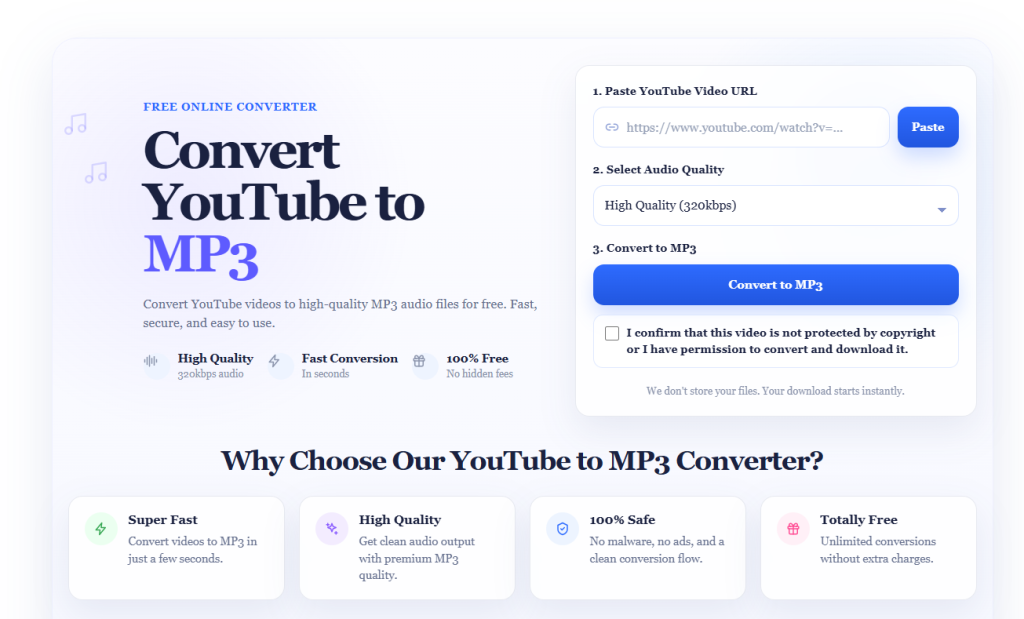
- Step One: Go to the OutRight Store YouTube to MP3 converter. Copy the URL of the YouTube video you want to convert and paste it into the input field at the top, then click the "Paste" button.
- Step Two: Use the dropdown below to select your preferred audio quality. It defaults to High Quality (320kbps), which works well for most use cases. You can adjust this if needed.
- Step Three: Check the box confirming the video is not copyright-protected or that you have permission to download it. Then click "Convert to MP3", your download will start instantly, with no sign-up and no hidden fees.
How to Convert YouTube to Mp3 Legally with Save MP3?
For a platform that goes straight to the point and ensures all the specific services you require, you can turn to Save MP3. This is a web-based YouTube MP3 converter, and the conversion process is extremely simple. It can work smoothly as long as you have a smooth internet connection. You do not even have to register; the tool is free-to-use and the tool quickly works as long as you have a stable network connection.
- Step One: To get started, you can proceed to visit the SaveMP3 website. Once you arrive at the page, you can see a large field at the start of the page. Copy the YouTube video URL simply and paste it in the designated box. Select the option “Go.”
- Step Two: You will then go to a screen where you can see the preferred output format for the file. You can find different formats available.
- Step 3: When the conversion is done, you can just download the file, get a QR code, or save your file to Dropbox. It is very simple.
How to Convert YouTube to Mp3 Legally with 4K Video Downloader?
It works similarly to the first option on our list. This is a different platform that can do a lot more than converting YouTube to MP3 for free. Of course, it can do that well, but it can also download the complete video in 4K, along with numerous other features.
The free pricing option can serve you effectively as you are beginning but upgrading to Personal and Pro licenses that are modestly priced are available if required.
- Step One: The first step is simple enough. Just go to the 4K download website. Then, visit the Download page, choose the option “YouTube to MP3 tool,” and select the blue button to ensure downloading of software.
- Step Two: Proceed to complete installation of software on your machine. You will then see a screen where you can copy and paste the link.
- Step Three: Select the option “Paste Link” and add the link of your preferred YouTube video. With the entered formation, the software will begin to automatically download the file in MP3 format. In just a few moments, the process will be finished.
YouTube to MP3 Converter Mac
This is possibly one of the earliest tools that help users move YouTube videos into an MP3 audio format. With a vast history of smooth conversions, you can have little trouble using the tool for the desired purpose.
It is required to download the software to utilize the tool, and it is available for Android, PC, and Mac devices. Apart from MP3, the software can also convert a wide variety of software formats. Thus, it is a useful tool for you if you want to download YouTube videos frequently or worry about converting YouTube videos to MP3 videos legally.
- One: Proceed to visit the website and select a black and large button to download the software.
- Two: Go ahead and install the software by following the prompts, and you will see a screen where you can paste your YouTube video URLs.
- Three: Select the “Green” colored paste button and you can add the YouTube URL that you can paste further. Click on the “Download” button and allow the software to do the rest of the task.
Convert YouTube to MP3 with ClickGrab
If simplicity is your main goal, then you can take a closer look at ClickGrab. Go to the website from where you can download the tool; you will notice everything is designed to be simple.
You can download YouTube MP3 files from a wide variety of sources, which are available for Windows, Mac, and even Linux. The tool is quite simple to use and free. However, if you want, you can offer donations and contribute to the platform.
- Step One: One the ClickGrab website’s front page, you will see a download button. You can select it if it is the right version for your requirements. Or you can select the “Show All Download Options” to find the relevant version.
- Step Two: Explore the installation process and launch the software. You will then see a screen where you will have a space to paste your YouTube video URL.
- Step Three: When you see the clip that you wish to download, you can choose it, and the process will kickstart.
Free YouTube to MP3 Conversion with Media Human
This is the last option on our list which you can use to do the free conversion. Just like ClipGrab, you can easily source the videos from not just YouTube, but also from other tools. There is also tag editor in the software that makes it simple for you to classify and organize the content that you are collecting. MediaHuman collects no charge from users using the tool.
- Step One: On the website, you can get a download link to download the relevant version of the software.
- Step Two: Next, you can install as well as launch the software. If the tool is successfully installed, you can see a drop zone where you can share your files.
- Step Three: Select the paste link and choose the down arrow to start the download. It requires a short download process, and once it is done, you can freely use your new MP3 file.
Conclusion
Converting YouTube to MP3 legally is a simple process when you utilize the right platform. Irrespective of whether you choose desktop software such as 4K Video Downloader, Any Video Converter, or MediaHuman, or a web-based solution such as SaveMP3, every solution provides a reliable way to get audio-only content from your favorite YouTube videos. Make sure that you have the permission to download the content always and respect copyright boundaries. Select the platform that aligns with your workflow and device, and you can enjoy your most-preferred YouTube audio anywhere and at any time. If you are currently working with other audio formats, you can check out our guide on how to convert WAV to MP3.
The blog explains different methos on how to convert YouTube to MP3 legally? For more tutorial guides, explore OutRight Store.