





If your sales team is closing deals in HubSpot while your conversations are happening in Slack, you're already losing time. It is not dramatic, or neither a single missed notification breaks a deal. But the constant back-and-forth, the tab switching, the “hey, did you see that lead?” messages quietly chip away at focus and speed.
That's exactly the problem the HubSpot Slack integration is built to solve. HubSpot and Slack are used widely in B2B sales and marketing. Connecting them will actually transform the way your team works. This guide will walk you through everything you need to know about integrating HubSpot with Slack; from integration steps to common troubleshooting tips to ensure a successful connection between the two.
What is HubSpot Slack Integration?
HubSpot Slack integration refers to the native connection between HubSpot’s CRM and Slack’s messaging environment. Through this integration, your team can receive real-team CRM updates directly inside Slack. There is no need to log into HubSpot every few minutes to check what’s changed.
HubSpot is where your data lives while Slack is where your team talks and discusses things. This integration aims to bridge that gap. All data from HubSpot such as deal updates, contact activity, task reminders and form submissions flow into Slack, so your team can immediately act on the without having to switch platforms. HubSpot offers this as a built-in integration, which means it's stable, well-supported, and doesn't require any complex technical setup to get running. Teams that have already looked into HubSpot integrations know that Slack is consistently one of the most impactful connections you can make with your CRM.
Key Features of HubSpot Slack Integration
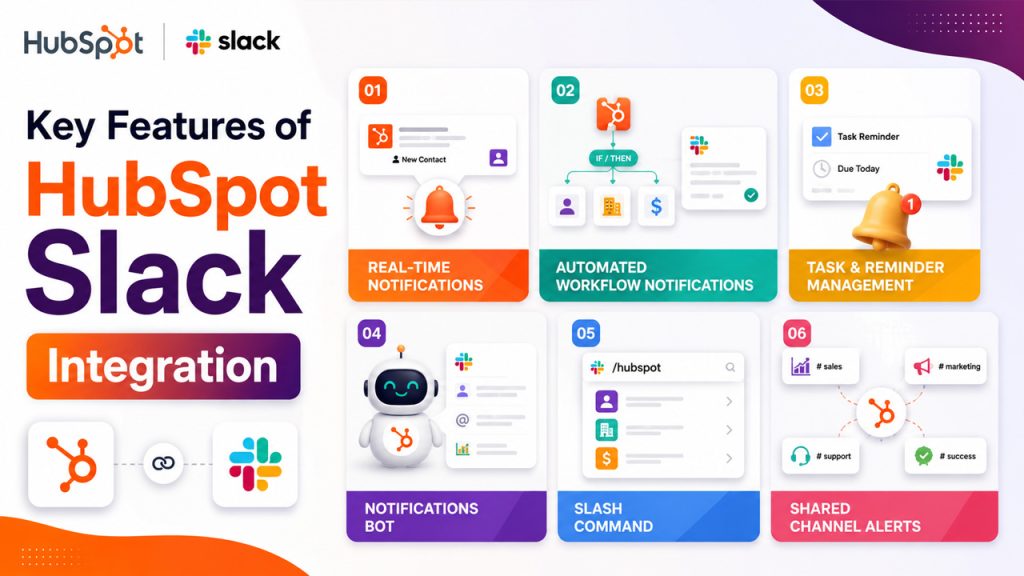
The integration does way more than just alert your team when something happens. Let's see what it actually brings to the table:
Real-Time HubSpot Notifications in Slack: Get instant Slack alerts when a contact fills out a form, a deal moves to a new stage, or a task is due. Your team stays informed without having to constantly check CRM.
Automated Workflow Notifications: HubSpot’s workflow builder lets you trigger Slack messages automatically based on specific CRM actions. When a new high-value lead comes in, your sales rep gets notified in seconds.
HubSpot Task and Reminder Management: Create and receive HubSpot task reminders through Slack, so nothing slips through the cracks during a busy day.
HubSpot Notifications Bot: A dedicated bot inside Slack that delivers personalized updates such as assigned tasks, mentions, and deal activity directly to each team member's Slack DMs.
HubSpot Slash Command: Type /hubspot in any Slack channel to search for contacts, companies, or deals right from Slack. It eliminates the need to open a new tab.
Shared Channel Alerts: Route specific notifications to team channels, so your sales channel sees deal updates, your support channel sees ticket activity, and nobody gets buried in irrelevant alerts.
Together, these features make integration more useful and functional. If you’re already exploring HubSpot features for your team, this is one of the strongest ones that you should pay attention to.
Why Businesses Use HubSpot Slack Integration

Your team doesn’t have to live inside HubSpot all day, but they live inside Slack. This is the simplest reason to integrate HubSpot with Slack. But it is deeper than you think. Let's see why:
Bring CRM Activity into Slack
Sales reps check Slack constantly, marketing teams coordinate launches there, and customer success managers handle escalations through it. When CRM activity only shows up in HubSpot, things get missed. It’s not because people aren't working, but because they're working somewhere else. The integration brings information to where attention already is.
Connect Lead Activity to Team Conversations
A hot lead that fills out a demo request form needs a follow-up in minutes, not hours. When that form submission triggers an instant Slack notification, your sales rep sees it immediately and can act while the lead is still warm. Speed is a competitive advantage, and this integration directly supports it.
Improve CRM Visibility Across Teams
When deal progress, task completions, and contact activity are already surfacing in Slack, your team spends less time chasing status updates. That means fewer unnecessary check-in meetings and more time actually moving things forward.
Better Alignment Across Teams
Sales, marketing, and support often work from different slices of the same picture. Routing CRM notifications into shared Slack channels gives everyone the same real-time context, so no one's acting on outdated information or saying, "I didn't know about that."
Smarter Workflow Automation
HubSpot's workflow engine becomes more powerful when it's connected to Slack. You can build condition-based alerts, escalation notifications, and stage-triggered messages that keep the right people informed at exactly the right moment without anyone having to manually check anything.
Reduced Cognitive Load for Your Team
Switching between tools constantly isn't just inconvenient; it's mentally exhausting. Every time someone has to leave Slack, open HubSpot, find the relevant record, and come back, that's friction. The integration removes that friction, which adds up to real focus and energy saved across the day.
How to Integrate HubSpot with Slack: Step-by-Step Guide
Setting up this integration is pretty straightforward. You don’t need a developer or a lengthy IT request. Here's how to do it:
- Log into your HubSpot account and navigate to App Marketplace.
- Search for "Slack" in the marketplace search bar and select the official Slack integration.
- Click "Install app" and you'll be prompted to connect your Slack workspace. Make sure you're logged into the right Slack workspace before proceeding.
- Authorize the connection by granting HubSpot the necessary permissions in Slack. This allows the integration to post messages and receive commands.
- Choose your notification preferences. Decide which HubSpot events should trigger Slack notifications and whether they go to individual DMs or specific channels.
- Map your channels, assign relevant Slack channels to the right HubSpot notification types. For example, deal updates might go to your #sales channel, while form submissions go to #marketing.
- Test the integration by triggering a sample event in HubSpot (like updating a deal stage) and confirming the notification shows up correctly in Slack.
- Set up workflow-triggered notifications inside HubSpot's workflow tool if you want more advanced, condition-based Slack alerts.
Key Benefits of HubSpot Slack Integration
Once the integration starts running, the impact shows up in concrete ways:
Faster Lead Response: The moment a lead engages with your product, your team gets notified, and follow-up happens sooner. This integration supports speed as it is an important aspect of sales.
Better Team Collaboration: Shared channel notifications allow the whole team to see the same deal and contact activity. It prevents information silos or “I didn’t know about that” moments.
Less Tool Switching: Your team doesn’t have to bounce between HubSpot and Slack to stay updated. They get CRM context inside the tool that they’re already using. This saves time and shifts attention to where it’s required. Before committing fully, many teams also review HubSpot pricing to understand which plan unlocks the deeper workflow and notification features.
Improved Workflow Automation: Connecting HubSpot’s workflow engine to Slack opens doors to powerful automations such as escalation notifications, conditional alerts, and stage-based triggers. This works especially well if your team is already using tools like HubSpot Salesforce integration or HubSpot Mailchimp integration to extend your CRM’s reach.
Better Task Management: When HubSpot task reminders appear in Slack, it becomes harder to forget follow-ups. It might seem like a small thing, but it has a surprisingly large effect on consistency. small thing, but it has a surprisingly large effect on consistency.
Common HubSpot Slack Integration Issues and Troubleshooting Tips
Even well-built integrations have times when they stop working properly. Here are the most common issues that you can encounter during HubSpot Slack integration and how to fix them:
| Issue | Likely Cause | Fix |
| Notifications not appearing in Slack | Incorrect channel mapping or permissions | Re-check channel assignments in HubSpot settings and confirm bot permissions in Slack |
| Slash commands not working | Integration not fully authorized | Reinstall the Slack app from HubSpot's App Marketplace |
| Wrong team members receiving alerts | Notification settings misconfigured | Review individual user notification preferences inside HubSpot |
| Duplicate notifications | Overlapping workflows and default settings both active | Audit your active workflows and disable redundant triggers |
| Integration disconnecting after Slack changes | Workspace or admin permission changes in Slack | Reconnect the integration and reauthorize under the updated Slack admin settings |
Many of the above-mentioned issues are not technical failures. They are configuration issues that can be resolved with a quick review of your notification settings and channel mappings.
HubSpot Slack Integration Best Practices
Configure Slack Notifications Strategically: Not all alerts are important; sometimes they are noise. Set up only the notifications that need action and route them to the right people.
Create Dedicated Channels for HubSpot Updates: A #crm-updates or #deals-in-progress channel keeps CRM noise separate from general team conversation.
Optimize HubSpot Workflow Notifications: Don't just automate because it sounds cool. Identify CRM events that are of highest priority such as demo request, a deal reaching proposal stage, or a churning customer and build Slack alerts around those.
Connect HubSpot Slack Integration with Other Tools: If you're using PandaDoc HubSpot integration for proposals, you can layer Slack notifications on top to alert your team the moment a document is signed.
Audit Slack Notifications Regularly: With your growing team and changing processes, your notification setup should evolve too. You must schedule a quarterly review to make sure that alerts are still relevant and routing correctly.
Improve Adoption of HubSpot Slack Commands: The ability to search HubSpot contacts and deals from inside Slack is underused. You must give your team a short internal demo to make it easier for them to adopt this integration.
Conclusion
The HubSpot Slack integration doesn't change what your team does, rather it changes how smoothly they do it. CRM data gets surfaced in real time, follow-ups happen faster, and teams stay aligned without having to work for it. It's a connection that removes friction rather than adding complexity, which is exactly what a good integration should do.
If you're evaluating your broader tool stack, it's also worth looking at HubSpot alternatives to make sure you're getting the right fit for your team's size and needs. But if HubSpot is already your CRM of choice, connecting it to Slack is one of the more impactful moves you can make, and it takes less than an hour to set up.
Frequently Asked Questions About HubSpot Slack Integration
Yes, the native HubSpot Slack integration is available at no additional cost for HubSpot users.
Yes, you can route different notification types to different Slack channels based on your team's structure.
You'll need admin access in both HubSpot and Slack to install and configure the integration. You'll need admin access in both HubSpot and Slack to install and configure the integration.
Currently, slash commands allow you to search HubSpot records from Slack, but full record editing is done within HubSpot.
Basic Slack notifications are available on free HubSpot plans, but advanced workflow-triggered alerts require a paid plan.